Change Voicemail Greetings
Both the global and personalized voicemail greeting are changeable. This topic describes how to change voicemail greetings for extension voicemail and group voicemail.
Change global voicemail greetings for all voicemails
- Prerequisites
- Upload a custom greeting or record a custom greeting.
- Procedure
-
- Log in to PBX web portal, go to .
- In the Global Voicemail Greeting
drop-down list, select an audio prompt to be played before
callers leave messages for each extension voicemail and group
voicemail.Note:
- The available prompts are synchronized from .
- If the desired prompt is not
available in the list, click Add beside the
drop-down list to create a new prompt using one of
the following methods.
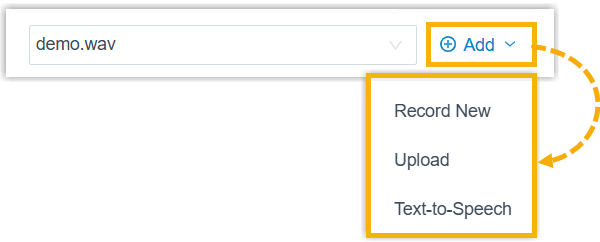
- Record a prompt by an extension.
- Upload a prompt. The upload prompt file should meet the audio file requirements.
- Generate a prompt using text-to-speech (TTS).
The newly added prompt will be displayed in the drop-down list and be synchronized to .
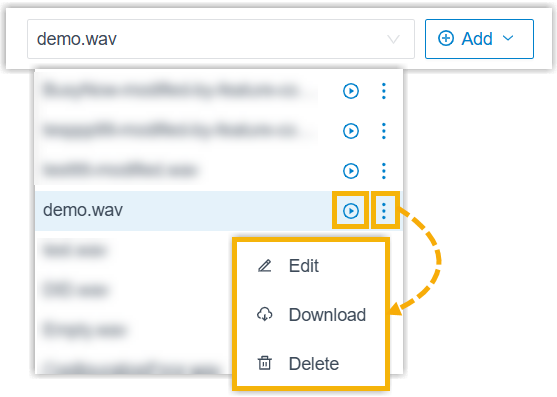
- In the drop-down list, you
can play, edit, download or delete the desired
custom prompt.
All changes will be synchronized to .
- Click Save and Apply.
- Result
- The global voicemail greeting will be applied to all the extension voicemails and group voicemails that do not have a custom greeting.
Change voicemail greetings for a specific extension
- Prerequisites
- Record or upload voicemail greeting for the specific extension.
- Procedure
-
- Log in to PBX web portal, go to , edit the desired extension.
- Click Voicemail tab.
- In the Voicemail Greeting section, select
a greeting to be played before a caller records message for the
extension.Tip: In the drop-down list, you can click
 beside the desired greeting to
play. If the desired greeting is not available in the list,
your can directly select Record New
to add a new greeting and apply.
beside the desired greeting to
play. If the desired greeting is not available in the list,
your can directly select Record New
to add a new greeting and apply.- Default Greeting: Select a greeting from Default Greeting drop-down list. The greeting is played for the presence with Presence Greetings set to None.
- Presence Greetings
(Available,
Away, Do Not
Disturb, Lunch
Break, Business
Trip, and Off
Work): Select a greeting from the
corresponding presence drop-down list.
The presence greeting is played based on extension presence.
- Click Save and Apply.
Change voicemail greetings for a group voicemail
- Prerequisites
- Record or upload voicemail greeting for the group voicemail.
- Procedure
-
- Log in to PBX web portal, go to , edit the desired group voicemail.
- In the Group Voicemail Greeting section,
select a greeting.Tip: In the drop-down list, you can click beside the desired greeting to
play. If the desired greeting is not available in the list,
your can directly select Record New
to add a new greeting and apply.
- Click Save and Apply.