WebSocket Audio Streaming Overview
WebSocket Audio Streaming feature supports transmitting real-time audio streams from active calls to third-party platforms via WebSocket for further analysis or processing.
Requirements
- Firmware: 83.20.0.74 or later
- Subscription: Ultimate Plan
Highlights
- Efficient and Stable Transmission
- Supports full-duplex, low-latency communication for millisecond-level audio transmission.
- Reliable & Secure Connectivity
- Supports encrypted transmission via WebSocket Secure (WSS) protocol and authentication credentials to ensure audio data security.
- Flexible Application Expansion
- Enables flexible integration with third-party platforms, allowing users to perform speech-to-text transcription, call compliance monitoring, multilingual translation, and other language processing tasks.
Workflow
The workflow for establishing a WebSocket connection with the third-party platform and streaming call audio is shown below.
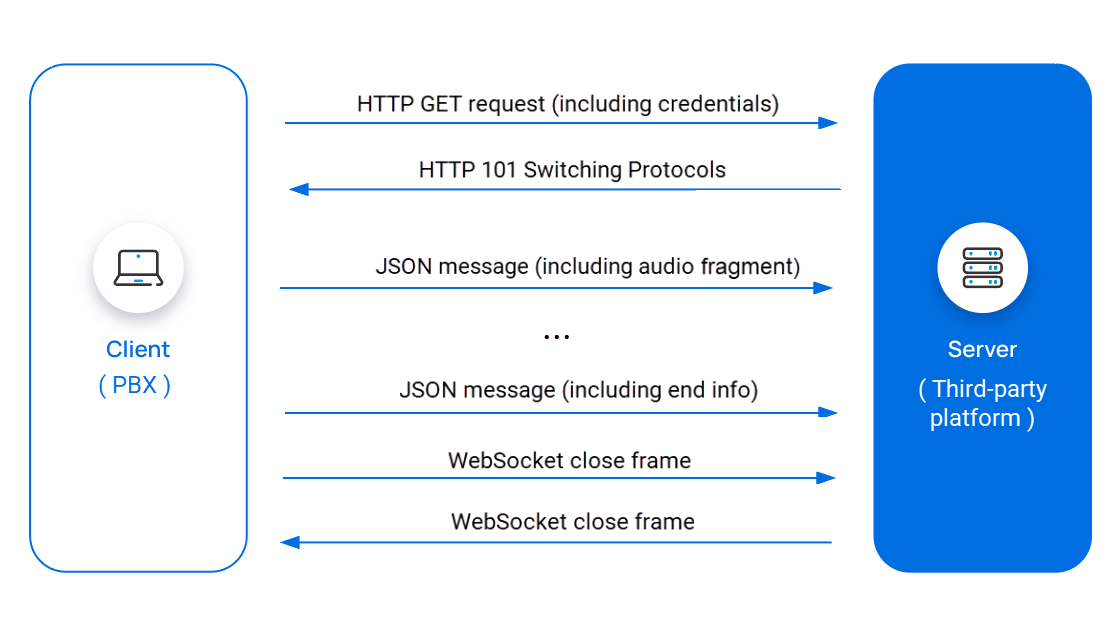
- The PBX sends an HTTP GET request to the third-party platform to initiate a
WebSocket connection, including the credentials in the request header.Note: For more information about configuring credentials on the PBX, see Enable WebSocket Audio Streaming.
- The third-party platform verifies the credentials. If valid, it responds
with an HTTP
101 Switching Protocolsstatus, completing the WebSocket handshake and establishing the connection. - During a call, the PBX streams the call audio to the third-party platform
via JSON messages.Note: For more information about the JSON message, see Audio Stream Fields.
- When the call ends, the PBX sends end info to the third-party platform via
JSON messages.Note: For more information about the JSON message, see Audio Stream Fields.
- The PBX sends a Close frame to initiates the WebSocket closure.
- The third-party platform responds with a Close frame, closing the WebSocket connection.