Onsite Proxy Overview
Yeastar Onsite Proxy is a command-line proxy software designed to create an easy and secure connection between Yeastar P-Series Software Edition and remote IP Phones, overcoming common firewall and networking issues.
Scenario
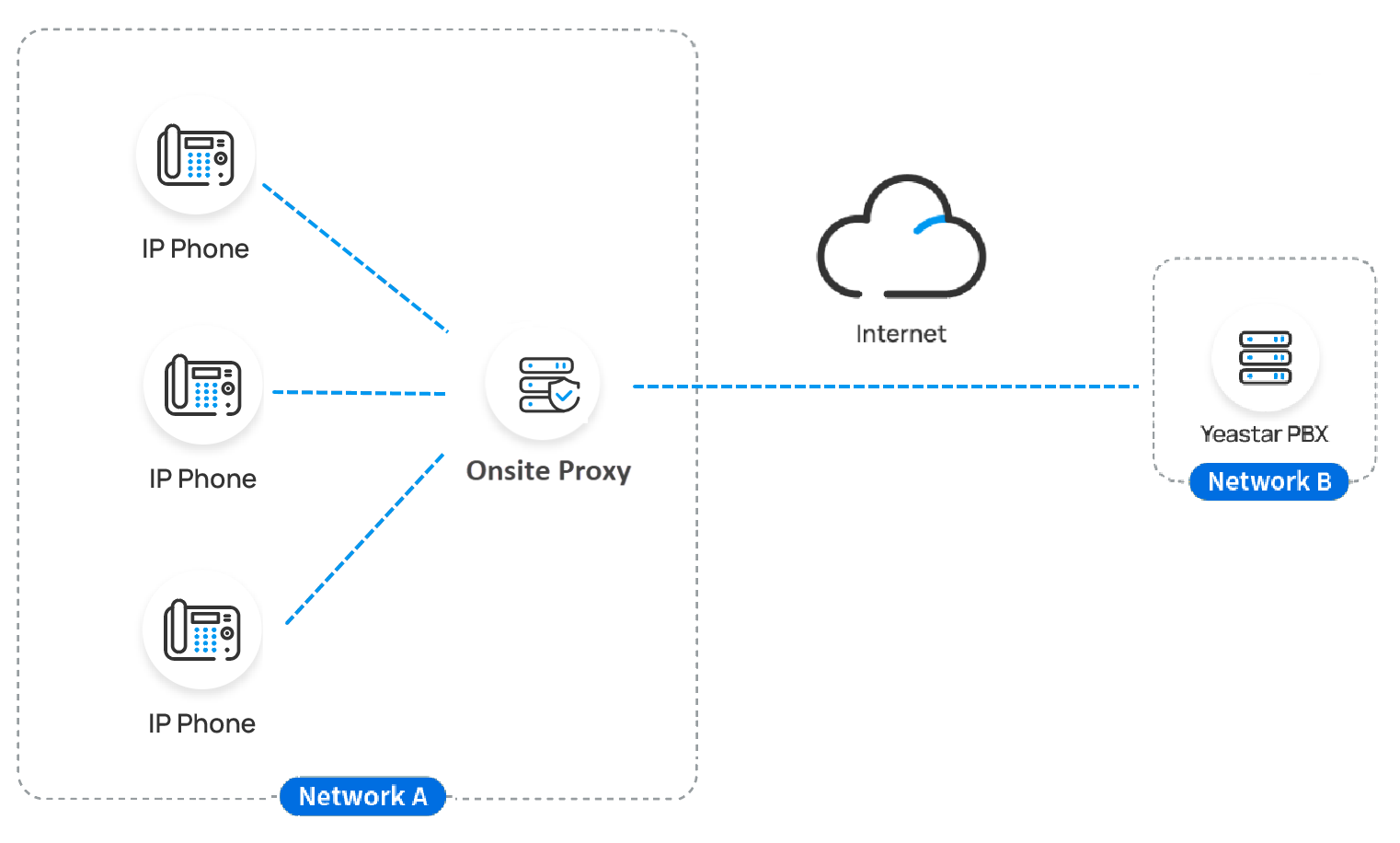
When multiple IP phones are deployed at a branch office on a different network from Yeastar P-Series Software Edition at a company headquarter, you can deploy Onsite Proxy in the same subnet as the IP phones and connect only the proxy to the PBX.
After connection, you can provision the IP phones via the proxy. Then the Onsite Proxy will forward SIP signaling, RTP packets, etc. between the phones and the PBX, making them work as if they are on the same subnet.
This strategy eliminates the need to configure redundant port forwarding or firewall rules for the phones' located network on the PBX side, and reduces data forwarding latency and the risk of packet loss caused by traditional remote access solution.
Requirements
- PBX server
-
Item Requirement PBX firmware 83.22.0.138 or later. Public access configuration Make sure that the PBX is reachable via a public IP address, external host, or Yeastar domain, with the following ports properly forwarded to the PBX: Note: It is recommended to use the Yeastar domain with its built-in signed certificate, which supports direct PBX certificate verification for most IP phones to be provisioned via Onsite Proxy.- External Web Server Port
- External Tunnel Port
Protocol Make sure that HTTPS protocol is enabled on the PBX (Path: ). - Onsite Proxy host
-
Item Requirement Network The host must reside in the same subnet as the remote IP phones, and there is network connectivity between the subnet and the PBX server. Operating system The host is deployed with required operating system. Hardware The host meeting the minimum specifications. Port forwarding UDP port 5060on the host is available.IP address The host have been assigned a static IP address.
Key features
- Auto-discovery of IP phones
- Onsite Proxy automatically discovers available IP phones on the same subnet via PnP (Plug and Play), and reports their information (including MAC, IP address, vendor, and model) to the PBX.
- Zero-touch auto provisioning
-
When you assign extensions to IP phones PnP-discovered by the Onsite Proxy, the proxy automatically pushes the SIP NOTIFY from the PBX to the corresponding phones, triggering the phones to automatically download configuration file and complete extension registration, enabling zero-touch deployment.
- Proxy SIP signaling
-
Onsite Proxy forwards SIP registration requests from phones to the PBX and maintains a stable registration. After registration, Onsite Proxy relays all SIP signaling (such as
REGISTER,INVITE,BYE) between the phones and the PBX over a single UDP port5060of Onsite Proxy host. - Audio RTP Passthrough
- Onsite Proxy supports Audio RTP Passthrough. When enabled, if IP phones are registered via the same Onsite Proxy, the RTP audio streams between them are transmitted directly (peer-to-peer), bypassing both the PBX and the proxy. This reduces latency, saves bandwidth, and greatly improves call quality.
Objectives
The objectives of this guide and the reference topics for achieving them are as follows.
- Connect Onsite Proxy to Yeastar P-Series Software Edition
-
- Add an Onsite Proxy instance on the PBX to obtain the connection information for Onsite Proxy configuration. For more information, see Add an Onsite Proxy Instance on Yeastar PBX.
- Install and set up Onsite Proxy in the same subnet as the remote IP phones, and connect it to the PBX using the connection information obtained in the previous step. For more information, see Install Onsite Proxy.
- Auto provision remote IP phones
- After connecting Onsite Proxy to the PBX, you can
provision remote IP phones via the proxy, making them work as if they are in
the same local network as the PBX, either via PnP method or DHCP method.
- For IP phones that support PnP provisioning, you can auto provision them via PnP method.
- For IP phones that do not support PnP provisioning, you can auto provision them via DHCP method through a DHCP server.