Configure Outbound Call Minute Restrictions for a P-Series Cloud PBX
This topic describes how to configure outbound call minute restrictions for a P-Series Cloud PBX.
Requirements
- Your service provider has granted your account permission to configure outbound call minute restrictions for P-Series Cloud PBXs.
- The firmware version of the P-Series Cloud PBX is 84.24.0.122 or later.
- The P-Series Cloud PBX is activated and running.
Procedure
- Log in to Yeastar Central Management, go to .
- Select a desired PBX, click
 , then select Change Call
Restriction from the drop-down list.
, then select Change Call
Restriction from the drop-down list.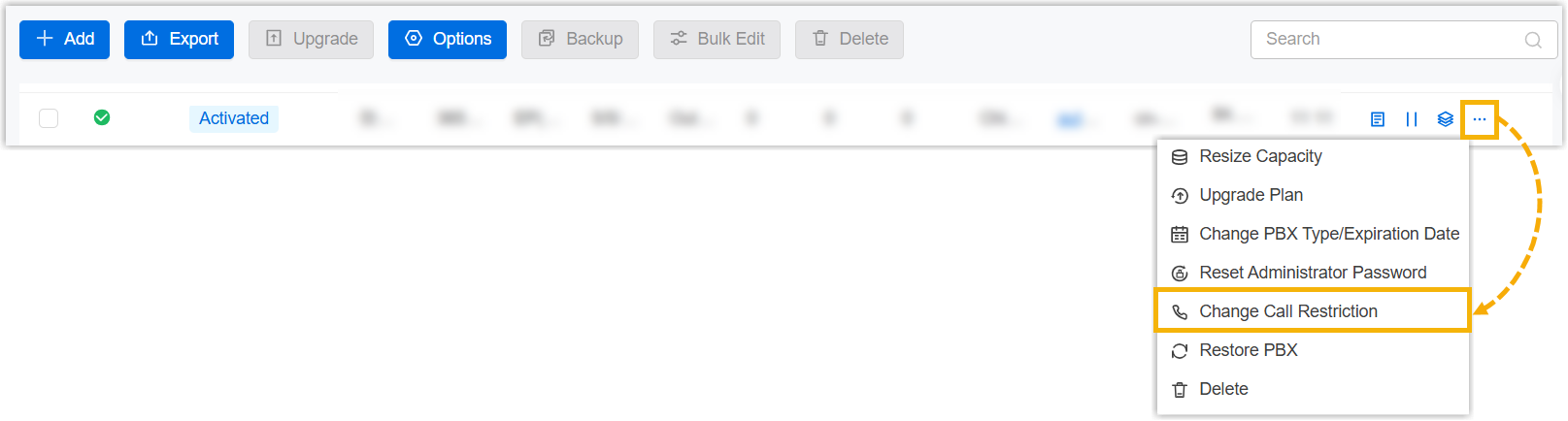
- In the pop-window, configure the following settings, then click
Save.
Setting Description Call Restriction Type Select which call type to restrict. Only Outbound call is supported. Call Minutes Restriction Specify the maximum number of outbound call minutes available on the PBX each month. Note: If you change this value, the system will reset the used outbound call minutes for the current month to 0 and start counting again.Time Cycle Select the time cycle for calculating outbound call minutes. Only This Month is supported. The system calculates outbound call minutes for the current month and resets the used minutes to 0 at the beginning of the next month.
Call Minutes Exceed Action Select the action the PBX takes when the outbound call minutes exceed the Call Minutes Restriction within the time cycle. Note:- This setting is editable only when Call Minutes Restriction does not be set to Unlimited.
- This setting does not affect ongoing outbound calls.
- Restrict: The PBX cannot initiate outbound calls.
- Allow: The PBX can initiate outbound calls.
Call Minute Alert Threshold Select desired thresholds. When the outbound call minutes used by the PBX reach the specified thresholds within the time cycle, an event notification called Call Minutes Alert will be triggered.
Result
The outbound call minutes for the PBX are restricted according to the configured settings.
- When the outbound call minutes used during the current time cycle reach any configured threshold, the event Call Minutes Alert is triggered.
- When the outbound call minutes used during the current time cycle exceed the defined Call Minutes Restriction, the PBX is either restricted from or allowed to initiate outbound calls according to Call Minutes Exceed Action.