Upload an Image File for Auto Provisioning
This topic describes how to upload an image file to the system for auto provisioning, which can be used as a screensaver, wallpaper, or bootlogo for IP phones.
Requirements
- PBX Server
- The firmware of Yeastar P-Series Software Edition is 83.21.0.66 or later.
- Image File
-
- Format:
.jpg,.jpeg,.bmp,.png, and.dob - File size: 5 MB (Max.)
- Specifications: The image must meet the specific resolution and format requirements for your phone model. Refer to the Image Specification Reference or confirm the exact specifications with your phone vendor.
- Format:
Procedure
- Log in to PBX web portal, go to .
- Click Add.
- In the pop-up window, complete the following settings.
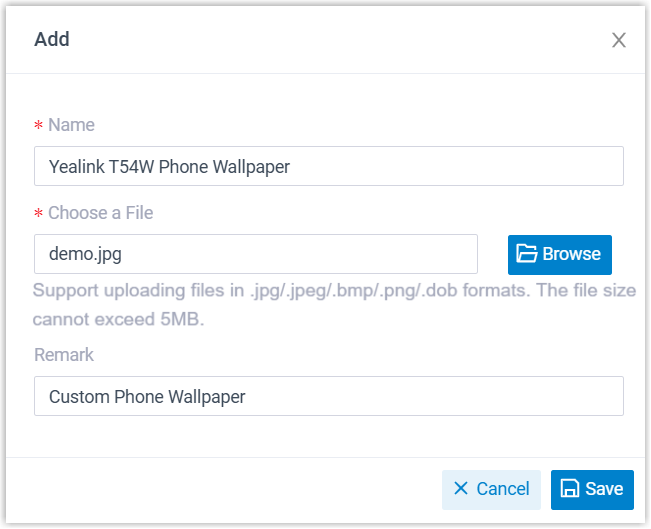
- Name: Enter a name to help you identify the image file.
- Choose a File: Click Browse to select the desired image file.
- Remark: Optional. Enter a remark for future reference.
- Click Save.
Result
The image file is successfully uploaded and displayed in the list.
What to do next
Image Specification Reference
Refer to the tables below for the image specifications of wallpapers, boot logos, and screensavers on Yealink, Snom, and Fanvil IP phones.
- Yealink phones
-
Note: Ensure at least 2 MB of free space is available on the Yealink phone before setting an image.
- Snom phones
-
Phone Model Resolution Format D385 / D785 / D812 480 * 272 px PNG D713 / D735 / D765 320 * 240 px PNG D717 426 * 240 px PNG D862 / D865 1280 * 720 px PNG - Fanvil phones
-
Phone Model Resolution Boot Logo Wallpaper ScreenSaver A32 1280 * 800 px - Static Logo (U-Boot):
- Format: BMP (24-bit, vertically flipped)
- Size: 654 * 258 px
- Max Resolution: ≤ 1024 * 600 px
- Animated Logo:
- Format: PNG (Black background)
- Max Resolution: ≤ 1024 * 600 px
/ / A32i / A320 / A320i 1280 * 800 px - Static Logo (U-Boot):
- Format: BMP (24-bit, vertically flipped and rotated 90° clockwise)
- Size: 654 * 258 px
- Max Resolution: ≤ 1024 * 600 px
- Animated Logo:
- Format: PNG (Black background)
- Max Resolution: ≤ 1024 * 600 px
/ / H6W 320 * 480 px JPG (24-bit, converted from 24-bit BMP) BMP (24-bit) PNG (32-bit) H5 480 * 320 px JPG (16-bit, converted from 16-bit BMP) BMP (16-bit) / H5W 480 * 320 px JPG (16-bit, converted from 16-bit BMP) BMP (16-bit) / i504W 1024 * 600 px JPG (24-bit, converted from 24-bit BMP) BMP (24-bit) PNG (32-bit) i506W 1280 * 800 px JPG (24-bit, converted from 24-bit BMP and pre-rotated 90° clockwise) BMP (24-bit) PNG (32-bit) i67 600 * 1024 px JPG (24-bit, converted from 24-bit BMP) BMP (24-bit) PNG (32-bit) i68 800 * 1280 px JPG (24-bit, converted from 24-bit BMP) BMP (24-bit) PNG (32-bit) V62 192 * 64 px BMP (1-bit) / / V61G / V61W 320 * 240 px JPG (24-bit, pre-rotated 90° clockwise from a 320*240 source) BMP (24-bit) PNG (32-bit) V62G / V62W / V62 Pro 320 * 240 px BMP (24-bit, pre-rotated 90° clockwise from a 320*240 source) BMP (24-bit) PNG (32-bit) V63 320 * 240 px JPG (24-bit, pre-rotated 90° clockwise from a 320*240 source) BMP (24-bit) PNG (32-bit) V64 480 * 320 px JPG (24-bit, pre-rotated 90° clockwise from a 320*240 source) BMP (24-bit) PNG (32-bit) V65 480 * 272 px JPG (24-bit) BMP (24-bit) PNG (32-bit) V66 / V66 Pro 1024 * 600 px / BMP (24-bit) / V67 1024 * 600 px - Static Logo (U-Boot):
- Format: BMP (24-bit, vertically flipped)
- Size: 654 * 258 px
- Max Resolution: ≤ 1024 * 600 px
- Animated Logo:
- Format: PNG (Black background)
- Max Resolution: ≤ 1024 * 600 px
PNG or JPG PNG (210 * 56 px or 1024 * 600 px) X1SP 128 * 48 px BMP (1-bit) / / X301 / X301G / X301W 128*48 px / 132*64 (for V2) BMP (1-bit) / / X3SP / X3S 132*64 px BMP (1-bit) / / X3SG Pro / X3SW / X303 / X303W / X305 320 * 240 px JPG (24-bit, pre-rotated 90° clockwise from a 320*240 source) BMP (16-bit R5G6B5) PNG (32-bit) X3U 320 * 240 px JPG (24-bit) BMP (16-bit R5G6B5) / X3U Pro / X4U / X4U-V2 320 * 240 px JPG (24-bit, pre-rotated 90° clockwise from a 320*240 source) BMP (24-bit) PNG (32-bit) X5U-V2 480 * 320 px JPG (24-bit, pre-rotated 90° clockwise from a 480*320 source) BMP (24-bit) PNG (32-bit) X6U-V2 / X210-V2 480 * 272 px JPG (24-bit) BMP (24-bit) / X7 800*480 px / BMP (24-bit) / X7-V2 1024*600 px / BMP (24-bit) / X7A 1024*600 px - Static Logo (U-Boot):
- Format: BMP (24-bit, vertically flipped)
- Size: 654 * 258 px
- Max Resolution: ≤ 1024 * 600 px
- Animated Logo:
- Format: PNG (Black background)
- Max Resolution: ≤ 1024 * 600 px
PNG or JPG PNG (210 * 56 px or 1024 * 600 px) - Static Logo (U-Boot):