Set Distinctive Ringtones for External Calls
You can set distinctive ringtones on different inbound routes. When an extension user hears the ringtone of an external incoming call, the user may notice the intention of the call. This topic describes how to set distinctive ringtones for external calls on users' IP phones.
Procedure
Set alert info for external calls on the PBX
- Log in to PBX web portal, go to , edit a desired inbound route.
- In the General section, enter an alert info in the
Inbound Alert Info field.
The alert info is used to trigger IP phones to play a specific ringtone when receiving external calls from the inbound route.
In this example, set alert info to international to identify international calls.

- Click Save and Apply.
Set a specific ringtone for a phone
- Prerequisites
- Each user who wants distinctive ringtone has bound a phone with their
extensions.For more information, see the following topics:
- Procedure
-
- Set distinctive ringtones for a user.
- Log in to PBX web portal, go to , edit the user's extension.
- Click the Phone tab.
- In the Distinctive Ringtone section, click Add.
- In the Alert Info field,
select the alert info that is pre-defined for
external calls.
In this example, select international.
- In the Ringtone field,
select a specific ringtone for international
calls.
In this example, select Ring2.wav.
Note: The available ringtones vary by phone models.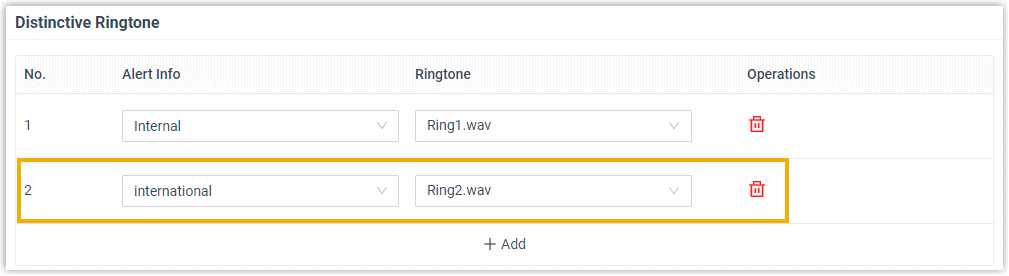
- Click Save.
- Reprovision the phone to take effect.
- Go to .
- Click
 beside the phone assigned
to user's extension.
beside the phone assigned
to user's extension.
- Set distinctive ringtones for a user.
Result
The user's phone plays ringtone Ring2.wav when receiving external calls from the specific inbound route.