Disable Configuration File Encryption for Yealink IP Phones
This topic describes how to globally disable configuration file encryption to Yealink IP phones on the PBX, improving auto provisioning compatibility.
Scenario
During auto provisioning, the Yeastar P-Series PBX System generates encrypted configuration files for Yealink IP phones by default. Yealink IP phones must identify and decrypt these files to apply the configurations.
If your IP phones do not support decryption, you can globally disable configuration file encryption to Yealink IP phones on the PBX. Once disabled, the PBX generates unencrypted configuration files, allowing the IP phones to apply the configurations without decryption. This improves auto provisioning compatibility, resulting in more stable Hot Desking and easier configuration troubleshooting.
Requirements
The PBX firmware version is 37.23.0.24 or later.
Procedure
- Log in to PBX web portal, go to .
- At the top of the phone list, click Options.

- In the pop-up window, unselect the checkbox of Enable Yealink Phone
Configuration File Encryption.
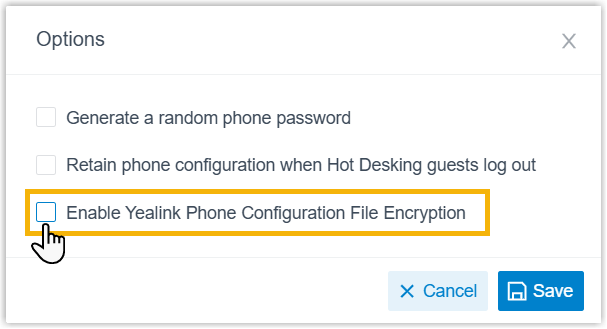
- Click Save.
Result
During auto provisioning, the PBX generates unencrypted configuration files for all Yealink IP phones, allowing them to download and apply the settings without decryption.