Advanced Trunk Settings
The advanced trunk settings require professional knowledge of SIP protocol. Incorrect configurations may cause calling issues. It is wise to leave the default settings provided on the SIP trunk page. However, for a few fields, you need to change them to suit your situation. This topic describes the further settings on a SIP trunk for reference.
Advanced settings
The following settings are included on the Advanced page of the trunk.
- Codec Settings
-
To maximize the quality of calls while optimizing the bandwidth used for calls, you can configure your preferred codec list to match the settings that your ITSP supports.
Codec Type Supported Codecs Audio codec u-law, a-law, G.729A, G.722, G.726, iLBC, Opus, GSM, SPEEX, ADPCM Video codec H.264, H.263, H.263P, MPEG4, VP8 - VoIP Settings
-
Setting Description DTMF Mode Set the default mode for sending DTMF tones. - RFC4733 (RFC2833): DTMF will be carried in the RTP stream in different RTP packets than the audio signal.
- Info: DTMF will be carried in the SIP Info messages.
- Inband: DTMF will be carried in the audio signal.
- Auto: The system automatically detects whether the device supports RFC4733 (RFC2833). If it does, DTMF tones are sent using RFC4733; if not, Inband mode is used instead.
Authentication Error SIP Code Specify the SIP error code returned by the ITSP to indicate an authentication error. Note:- This option is only available for register trunk.
- You can enter up to 10 error codes; Use
;to separate multiple error codes.
Authentication Registration Attempts Set the number of registration attempts for the PBX after receiving the authentication error SIP code from the ITSP. Note:- This option is only available for register trunk.
- The registration attempts defined here include the initial attempt without authentication information.
Global Registration Retry Interval (s) Set the global interval time (in seconds) for retrying registration after receiving any SIP error code (non-200 status code) from ITSP. Note: This option is only available for register trunk.Qualify Enable this option to send SIP OPTION packet to SIP device to check if the device is up. Enable SRTP Enable or disable SRTP (encrypted RTP) for the trunk. T.38 Support Enable or disable T.38 fax for this trunk. Note: Enabling T.38 will add the performance cost. If the system has a large number of concurrent calls, it's recommended to disable this option.Inband Progress Whether to enable Inband Progress. This setting applies to the extensions which make calls through this trunk. - Check this option: PBX will send a 183 Session Progress to the extension when told to indicate ringing and will immediately start sending ringing as audio.
- Uncheck this option: PBX will send a 180 Ringing to the extension when told to indicate ringing and will NOT send it as audio.
Ignore 183 Message without SDP This option determines the way PBX handles 183 messages without SDP. - Check this option: PBX will not forward 183 messages that don't contain SDP.
- Uncheck this option: PBX will process all the 183 messages without SDP to those with SDP and forward them.
Forward the 180 (SDP) Message Following the Peer's Format This option determines whether the PBX will forward a 180 message with SDP, depending on whether the 180 message received from the other party contains SDP. - Check this option: PBX will forward a
180 message if the 180 message received from the
other party includes SDP.Note: This setting does not take effect when Inband Progress is enabled.
- Uncheck this option: PBX will not forward a 180 message with SDP even if the 180 message received from the other party contains SDP.
Dedicated Trunk If your SIP trunk provider requires a dedicated internal IP address to connect the service, enable this setting and contact your service provider to handle the network settings for you. Enable SIP Authentication Cache When enabled, the PBX will cache successful SIP authentication credentials and reuse them for subsequent requests ( INVITEandBYE) within the same session or registration cycle.Note: This option is only for register trunk.Force SIP URI Scheme Set whether to forcibly use sip:URI scheme instead ofsips:in registration requests to change SIP transport from encrypted to unencrypted.Note: This option is only available for register trunk using TLS or DNS-NAPTR transport.Ignore 100 Trying Response Set whether the PBX will ignore the 100 Tryingresponse.Note: This option is only for register trunk. - Call Restriction
-
Setting Description Call Restriction Type Specify based on which type of calls to restrict the max concurrent call number of this trunk. - Outbound Call: Only outbound calls will be restricted.
- All: Both outbound calls and inbound calls will be restricted.
Maximum Concurrent Calls Specify the maximum number of concurrent calls allowed in this trunk. The default is Unlimited. Note: If you modify this setting when editing a trunk that has already been assigned to subordinate users or Cloud PBXs, the system will display a pop-up window when you click Save, asking whether to update the concurrent call limits for existing assignments. You can then adjust the limits directly in the pop-up as needed.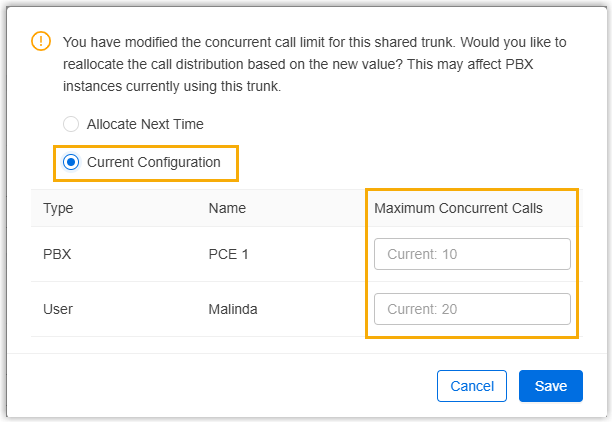
- STIR/SHAKEN
-
Yeastar Central Management allows you to configure STIR/SHAKEN for shared trunks, helping verify caller ID authenticity and prevent Caller ID spoofing.
For more information, see STIR/SHAKEN Overview.
Setting Description STIR/SHAKEN Mode Specify the STIR/SHAKEN operation mode for calls routed through the trunk. - Outbound Signing: When selected, the PBX will digitally sign all outbound calls routed through the trunk, excluding emergency and anonymous calls.
- Inbound Verification: When selected, the PBX will verify all inbound calls routed through the trunk, and reject calls based on the rejection criteria globally configured for all shared trunks in the STIR/SHAKEN module.
- Signing & Verification:When selected, the PBX will both sign outbound calls and verify inbound calls routed through the trunk.
Upstream Verification Result Handling When enabled, the PBX will solely rely on the verification result provided by the ITSP without performing its own independent verification. Verification Status Parameter in PAI Header Enter the parameter name in the P-Asserted-Identity (PAI) header where the ITSP includes the signature verification results of inbound calls. Header Field for SHAKEN Attestation Level Enter the parameter name defined by the ITSP to convey the SHAKEN attestation level of inbound calls. Enable Call Filtering When enabled, the PBX will use the verification results provided by the ITSP and reject calls based on the rejection criteria configured on the trunk. Drop Calls by Verification Status Select one or more verification statuses that will trigger call rejection.
SIP headers settings
The following settings are included on the SIP Headers page.
- Inbound Parameters
-
Setting Description Get Caller ID From Specify from which header field will the trunk retrieve Caller ID. - Follow SystemNote: If selected, the trunk will follow the global setting of Get Caller ID From on the Cloud PBX (Path: ).
- From
- Contact
- Remote-Party-ID
- P-Asserted-Identify
- P-Preferred-Identify
Get DID From Specify from which header field will the trunk retrieve DID. - Follow SystemNote: If selected, the trunk will follow the global setting of Get DID From on the Cloud PBX (Path: ).
- To
- Invite
- Diversion
- Remote-Party-IDNote: If selected, but the SIP provider doesn't support Remote Party ID, the trunk will retrieve DID from Invite header.
- P-Asserted-Identify
- P-Preferred-Identify
- P-Called-Party-ID
- Follow System
- Outbound Parameters
- For outbound calls, you can define the parameters included in the
following SIP INVITE headers:
Setting Description From User Part Define the caller ID (user part of the SIP Fromheader) to be used for outbound calls.For more information, see Options of outbound parameters.
From Display Name Part Define the caller ID name (display name part of the SIP Fromheader) to be used for outbound calls.- Default: Display the name associated with the actual outbound caller ID.
- Extension Caller ID Name: The caller ID name for the extension, composed of the extension’s last name and first name.
- Trunk Outbound Caller ID Name: The default outbound caller ID name in trunk.
- Extension's Outbound Caller ID Name in Trunk: The outbound caller ID name configured to associated with extensions in the Trunk.
- Originator Caller ID Name: The caller ID name of the original caller in the case that the call is transferred.
- Custom: Custom value.
From Host Part Important:Define the domain or IP address to be used in the- This parameter is only available for Peer Trunk.
- Set the parameter according to the requirements of your SIP trunk provider, otherwise, it may cause call issues.
Fromfield of a SIP INVITE header.- Default: Use the domain or IP address configured in the Domain field when creating the peer trunk.
- Custom: Use a custom domain or IP address. You can enter the custom value in the field next to the drop-down list.
To Host Part Important:- This parameter is only available for Peer Trunk.
- Set the parameter according to the requirements of your SIP trunk provider, otherwise, it may cause call issues.
Define the domain or IP address to be used in the
Tofield of a SIP INVITE header.- Default: Use the domain or IP address configured in the Domain field when creating the peer trunk.
- Custom: Use a custom domain or IP address. You can enter the custom value in the field next to the drop-down list.
Diversion Optional: Define other parameters of a SIP INVITE header as needed. For more information, see Options of outbound parameters.
Remote-Party-ID P-Asserted-Identity P-Preferred-Identity P-Asserted-Identity URI Format Note: This parameter is available only when P-Asserted-Identify is set to a value other than None.To assert and verify the identity of the caller, specify the format of P-Asserted-Identity:- SIP URI (sip:)
- TEL URI (tel:)
- Custom SIP Headers
- Custom SIP headers allow you to include additional information in SIP
INVITE messages to meet requirements from ITSP or destination devices,
such as identifying the source PBX, triggering specific features, or
addressing other operational needs.
Setting Description Custom SIP Header Specify the name of the custom SIP header. Note: Up to 5 custom SIP headers are supported.After binding the custom SIP header to a Cloud PBX and configured a unique value for it, it will be added to INVITE messages of outbound calls routed through the trunk.For more information about custom SIP header configuration, see Assign custom SIP headers during PBX creation and Assign custom SIP headers during PBX edition.
- Other Settings
-
Setting Description User Agent If the ITSP requires User Agent for authentication, enter the User Agent information that is provided by the ITSP. Realm Specify the username and password that the system needs to use for authentication within a specific domain when connecting to the SIP trunk. Note: If you are unsure about the information, contact your service provider for guidance.100rel Configure 100rel for this trunk. - Required: 100rel is required for this trunk.
- Supported: 100rel is supported by this trunk.
- Disabled: 100rel is disabled for this trunk.
Maxptime Select the value of the maxptime used when the PBX sends the INVITE packet. Note: If you select [Default], PBX will send a corresponding maxptime value according to the codec that is used for the outbound call.Send Privacy ID Whether to send the Privacy ID in SIP header or not. The default is unchecked. User Phone Whether to add the parameter user=phoneas a request line in the header field of the SIP INVITE packet.Note: Enable this option only when the SIP provider requires.Send X-OpenAPI-Call-ID Set whether to include a X-OpenAPI-Call-IDfield in the SIP INVITE packet to carry the Call ID for inbound calls and outbound calls routed through the trunk.Support P-Early-Media Set whether the P-Early-Media field is included in the INVITE packet. Send 183 Message with P-Early-Media Header Set whether the PBX will include the P-Early-Mediaheader with the value ofsendrecvin the 183 message for inbound calls routed through the trunk.Force Using Selected DOD in From Header Set whether the PBX will ignore the trunk's From User Part setting and forcibly use the extension's selected DOD number in the Fromheader when the extension selects a specific DOD to make an outbound call.Return 302 on External Forward Set whether the PBX will return a 302 Moved Temporarilyresponse to the caller when forwarding an inbound call to an external number, allowing the carrier to redirect the call directly.