Integrate Yeastar P-Series Software Edition with Microsoft Teams
By associating Teams users with SIP extensions of Yeastar P-Series Software Edition, the Teams App will work as a softphone that is registered to the PBX. In this way, you can keep your existing phone numbers and SIP devices, make and receive calls directly from the Teams App, and enjoy advanced PBX features including IVR, call queue, call routing, etc.
Networking scenarios
- Yeastar FQDN
-
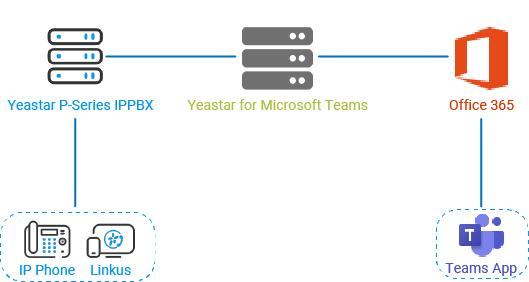
The integration between Yeastar P-Series Software Edition and Microsoft Teams via FQDN is based on the following test environment:
- The FQDN of Yeastar P-Series Software Edition is yeastardocs.ras.yeastar.com.
We provide a diagram to help you understand the integration in a better manner:
- Public IP Address / Custom Domain
-
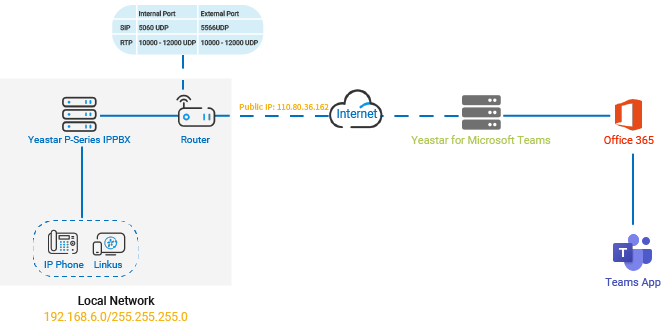
The integration between Yeastar P-Series Software Edition and Microsoft Teams via Public IP Address / Custom Domain is based on the following test environment:
- The Yeastar P-Series Software Edition is deployed in the local network 192.168.6.0/255.255.255.0.
- The Yeastar P-Series Software Edition is behind a router and is
accessible through a public IP. The integration via
Public IP Address / Custom Domain supports three
NAT types, you can select the appropriate NAT type according
to your network environment and public IP setup. For more
information, see Configure NAT.
The table below lists the example public IP addresses or domains for each NAT type:
NAT type Public IP Address / Custom Domain Public IP Address 110.80.36.162 External Host example.domain.com Yeastar Domain docs.cloudpbx.yeastar.com
We provide a diagram to help you understand the integration in a better manner:
Prerequisites
- Microsoft 365
-
- Get admin access to Microsoft 365 admin center.
- Your Microsoft service must meet the following requirements:
Microsoft 365 version Requirements Microsoft 365 Business Basic Any one of the followings is required:
- "Common Area Phone" license
- “Phone System" license
- "Microsoft 365 Business Voice" add-on
Note: Not all of them are available in all the countries, buy any one of them according to your country or region.Microsoft 365 Business Standard Microsoft 365 Business Premium Office 365 E1 Office 365 E3 Microsoft 365 E3 Office 365 E5 No additional requirements. Microsoft 365 E5
- Yeastar for Microsoft Teams App
- Contact Yeastar Sales to purchase and activate Yeastar for Microsoft Teams license.
- Yeastar P-Series Software Edition
- Get admin access to Yeastar P-Series Software Edition.