Configure Call Confirmation
Call Confirmation requires the called party to press a key to confirm before accepting a call, preventing voicemail or automated systems from answering the call. This topic describes how to configure call confirmation on Linkus Web Client.
Requirements
The firmware version of PBX Server is 37.24.0.73 or later.
Introduction
When calls to your extension are sent to an external number, either through call forwarding or simultaneous ringing, the external recipient may answer the call. However, the call could also be inadvertently answered by voicemail or other automated systems. To prevent this, you can enable call confirmation for your extension. When configured, external recipients will be prompted to press a key to confirm acceptance before the call is connected, ensuring that calls are answered by a person.
- Call Forwarding: The extension has call forwarding configured with the destination set to an external number or the extension's mobile number. For more information, see Configure call confirmation for call forwarding.
- Simultaneous Ring: The extension has simultaneous ring configured to ring its associated mobile number. For more information, see Configure call confirmation for simultaneous ringing.
Configure call confirmation for call forwarding
- Procedure
-
- Log in to Linkus Web Client.
- Go to .
- In the status bar, select a status to which the call
forwarding rule will be applied.

- In the Internal Calls and
External Calls section, complete the
following settings:
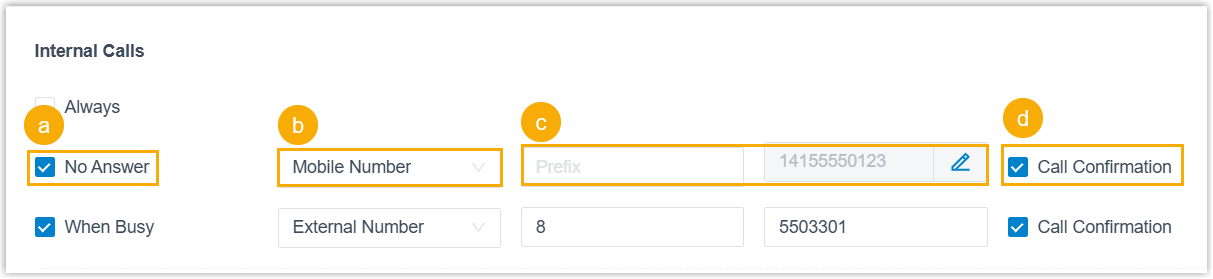
- Select a forwarding condition.
- Always: Forward all incoming calls to the designated destination.
- No Answer: Only forward unanswered calls to the designated destination.
- When Busy: Only forward the calls that come in while you are talking on the phone to the designated destination.
- Set the destination to Mobile Number or External Number.
- Configure the prefix and number.
- Select the checkbox of Call Confirmation.
- Select a forwarding condition.
- Click Save.
- Result
- Upon receiving a forwarded call, the external recipient will hear a prompt
asking them to press a key to accept or decline the call.
- Press 1 (Accept): The call will be connected successfully.
- Press # (Decline): The call will be dropped and routed to your extension's voicemail.
Configure call confirmation for simultaneous ringing
- Procedure
-
- Log in to Linkus Web Client.
- Go to .
- In the status bar, select a status to which the call
forwarding rule will be applied.
- Scroll down to the Option section, then
complete the simultaneous ringing settings.

- Select the checkbox of Ring the Mobile Number Simultaneously.
- Configure the prefix and mobile number.
- Select the checkbox of Call Confirmation.
- Click Save.
- Result
- Upon receiving a simultaneous ringing call, the external recipient will
hear a prompt asking them to press a key to accept or decline the
call.
- Press 1 (Accept): The call is connected successfully.
- Press # (Decline): The call is dropped and routed to your extension's No Answer call forwarding destination under the corresponding presence.