Yeastar P-Series Software Edition 83.23.0.83-beta1
Release date:May 25, 2026
Release version:V24.2-Beta
This topic introduces the new features and improvements included in the first beta release of firmware 83.23.0.83.
- To try out the new updates, check for firmware updates from PBX admin portal or download the firmware from Yeastar Official Website , and upgrade your phone system.
- For details on the new features and improvements in Linkus UC Clients and 'Yeastar Linkus for Google' Chrome extension, see Linkus Release Notes.
- If you found something that doesn't work as expected, you can submit feedback directly from here.
New features
- Data Connector
- Yeastar P-Series Software Edition supports exporting PBX data (e.g., CDR, call
report data) to third-party databases (e.g., PostgreSQL, MySQL,
Microsoft SQL Server) via data connector. The synchronized data can be
read by Business Intelligence (BI) tools or other applications for data
visualization and analytics.
For more information, see Data Connector Integration Overview.
- AI Receptionist
- Added support for the following capabilities for AI receptionist to
achieve more intelligent call handling:
-
Specify the Large Language Model (LLM) used by the AI receptionist based on your business needs, such as Gemini, GPT, or Claude, and customize the system prompt to define the AI receptionist's response style and behavior.
For more information, see Create an AI Receptionist and Update Settings of an AI Receptionist.
-
Set up custom rules for the AI receptionist to collect caller information (e.g., name, email, order number) from the call, and deliver the collected data to a human agent upon call transfer.
For more information, see Manage Skills for an AI Receptionist - Information Collection.
-
- AI Transcription
- Added support for custom service accounts, which allows you to use your
own third-party AI services for AI transcription and call summary
generation. The following service providers are supported:
For more information, see AI Transcription Overview.Feature Supported Provider AI transcription (speech-to-text for calls and voicemails) Amazon, Elevenlabs, OpenAI, Google LLM-powered call summary generation OpenAI GPT, Google Gemini - Omnichannel Messaging
- Added support for the SMS messaging integration with Voxtelesys, which allows business to set up SMS messaging channels for the service provider on Yeastar P-Series Software Edition, so that agents in the business can receive and reply to SMS messages from customers on their Linkus UC Clients.
Improvements and bug fixes
- System
-
- Added support for creating a custom account with root access
privilege during the automated Ubuntu ISO installation
process.Note: After installation, you can run
sudo -ifrom this custom account to switch to the root user.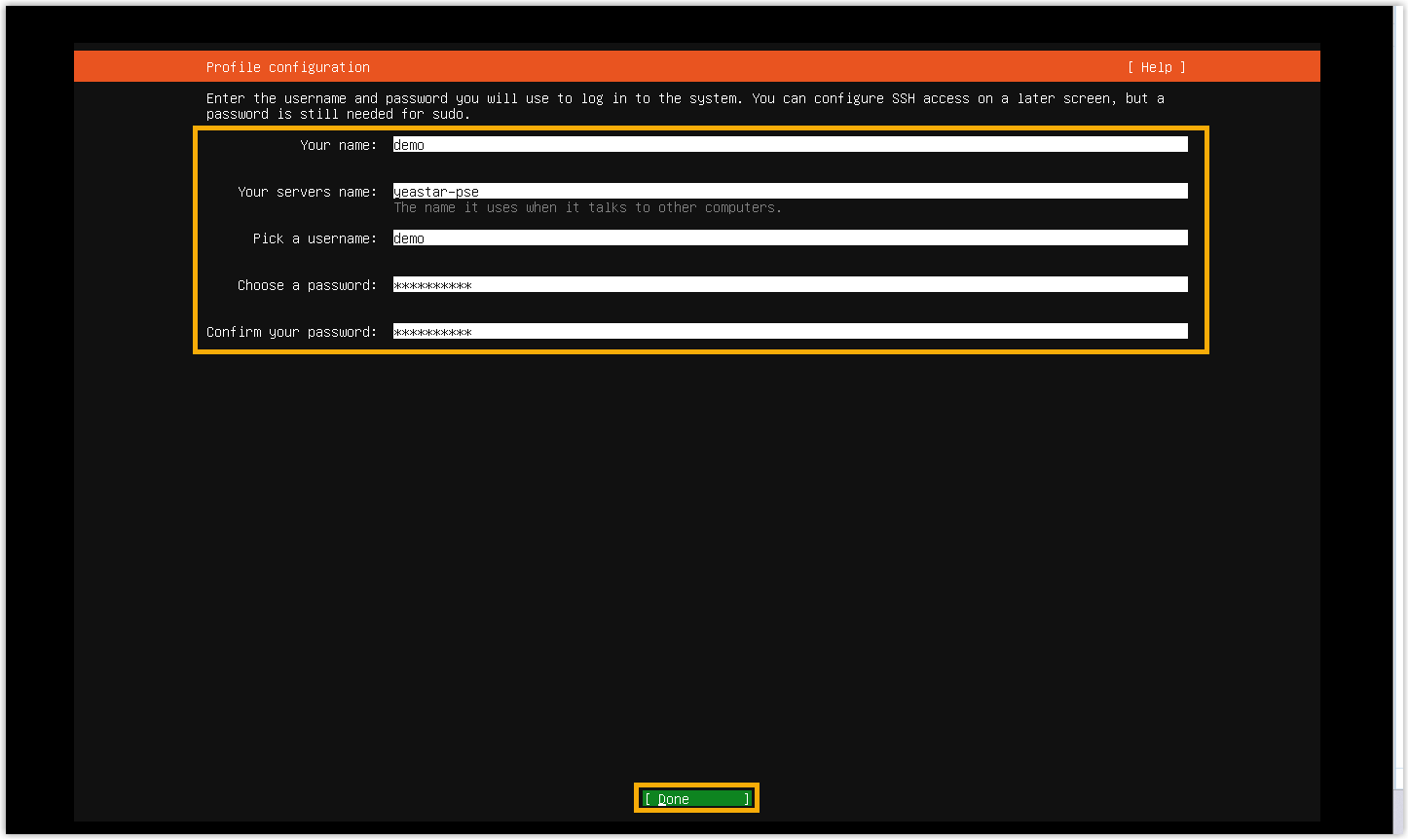
- Added the following configuration parameters for the XML
configuration file used for PBX activation and setup.
Module Element Description Extension Group Group.UserEnbCallDistributionWhether users in the Default_All_Extensions group have permission to distribute incoming calls on Operator Panel, including redirect, transfer, drag and drop operation. Group.UserEnbExtCallDistributionWhether users in the Default_All_Extensions group have permission to distribute incoming calls on Extension Page, including redirect and transfer operation. Client Permission ContactVisibilityRules.RuleDefine the contact visibility configuration. Contacts LdapSetting.EnableWhether to enable LDAP Server. Auto Provisioning PhoneOptions.EnbRandomPasswordWhether to assign randomly generated phone passwords to phones during the auto-provisioning. PBX Settings EnbCallFwdPromptWhether to play call forwarding prompt. EnbCallWaitingPromptWhether to play call waiting prompt. EnbNumberFilterWhether to automatically remove all special characters from dialed numbers before sending to the trunk. Download the XML configuration file for the latest parameters.
- Added support for creating a custom account with root access
privilege during the automated Ubuntu ISO installation
process.
- Extension
-
- Added support for configuring a function key for
an extension to monitor and pick up incoming calls to members of
a specified extension group to which the extension belongs
(except for the Default_All_Extensions
group) (Path: ).

The function key can be applied to both Linkus clients and auto-provisioned IP phones, and achieves the followings:
Note: For Linkus Mobile Client, users must upgrade their Linkus app to the following versions:- Linkus iOS Client: Version 5.26.15 or later
- Linkus Android Client: Version 5.26.10 or later
- Monitor whether there are incoming calls ringing on any member's extension in the extension group.
- Display the incoming calls to members in the extension group (up to 10 calls on Linkus clients, and up to 2 calls on IP phones), allowing users to select a call to pick up.
- Press the function key to directly pick up the first incoming call in the extension group.
- Fixed the extension registration issue: Extensions registered on IP phones frequently went offline.
- Fixed the call forwarding setting issue: When bulk editing extension presence settings, call forwarding setting enabled under Do Not Disturb was disabled after switching to another status and then back.
- Added support for configuring a function key for
an extension to monitor and pick up incoming calls to members of
a specified extension group to which the extension belongs
(except for the Default_All_Extensions
group) (Path: ).
- Extension Group
- Added support for displaying the extension group ID on the extension group editing page (Path: ), which helps you identify the extension group by its ID.
- For example, users can dial a
feature code followed by the extension group ID to pick up
the first incoming call ringing in a specified extension group.

- Client Permission
- Fixed the extension visibility issue: When an extension performed a blind transfer to another extension it was not allowed to view, the system would crash.
- Trunk
- Added a configuration item Outbound Failover SIP
Code for SIP trunk (Path: ), allowing you to specify which SIP response codes
trigger automatic failover to the next trunk within the same outbound
route. You can choose to use the system default codes or customize your
own codes.Note: The default SIP response codes include
408,500,502,503,513,555, and580.
For more information, see SIP Trunk Settings.
- Auto Provisioning
-
- Fixed the function key issue: When more than 120 function keys were configured, the excess keys did not take effect on an IP phone after auto provisioning.
- Fixed the custom template issue: The number of templates displayed in the list did not match the total count.
- Feature Code
- Optimized the Group Call Pickup feature code (Path: ): Added support for dialing the feature code followed by an extension group ID to pick up the first incoming call ringing in the group.
- Ring Group
- Added a configuration item No Extension Online
Destination (Path: ), which allows you to select a destination to route the
call when no extension in the ring group is online (i.e. all members'
extensions are unregistered or disconnected).

For more information, see Create a Ring Group.
- Inbound Queue
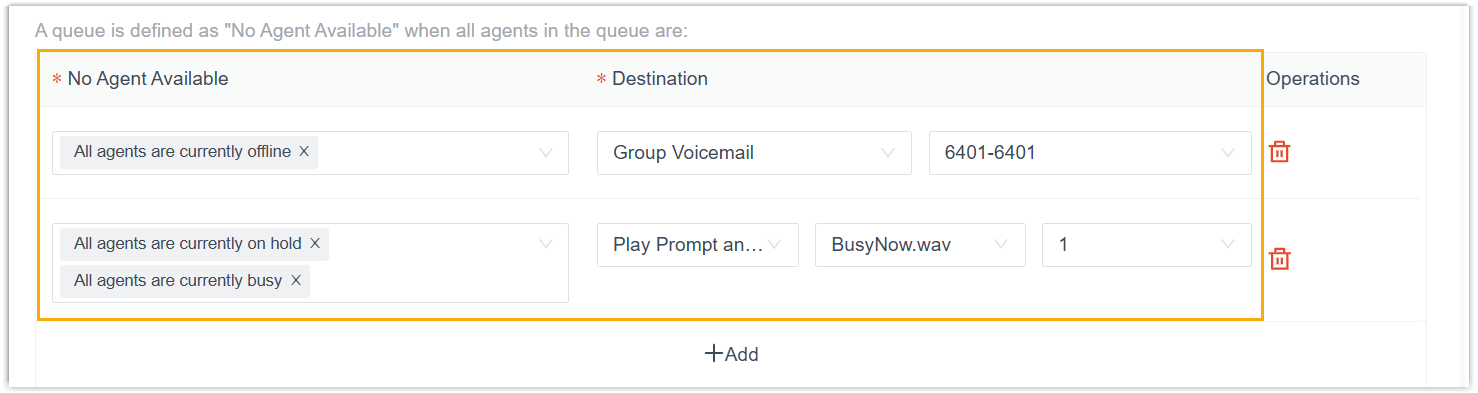
- Optimized the call routing configuration for the Leave
Empty and Disallow to Join When
Empty feature (Path: ). You can configure separate destinations for different
"No Agent Available" scenarios (e.g., all agents are offline, on hold,
and/or busy). When the queue matches the specified scenario, calls will
be routed to the corresponding destination.
 Note: The settings Maximum Callers In Queue, Leave Empty, and Disallow to Join When Empty are moved from the Preferences tab to the Basic tab.For more information, see Create a Queue.
 - Recording
-
- Optimized the IVR call recording logic (Path: ):
- Before this version: If the source channel of a call entering an IVR (e.g., trunk or queue) was selected for auto recording, the call would be recorded regardless of whether the IVR itself was selected.
- After this version: If an IVR is not selected for
auto recording, a call entering that IVR will not be
recorded, even if its source channel is selected.Note: For a call flow, if the setting of a Record component is set to Enabled and the call is routed to an IVR, the system will follow the call flow's setting and record the call even if the IVR is not selected for auto recording.
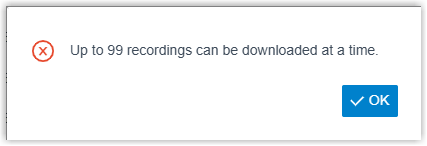
- Added a limitation of up to 99 call recording files for
each download. A prompt will appear when the selection exceeds
this
limit
(Path: ).
- Optimized the IVR call recording logic (Path: ):
- Email Template
-
- Added support for Email template language of Polish (Path: ).
- Added the
{{.ExtensionName}}and{{.ExtensionNumber}}variables to the email template of Agent Auto Pause, which can be used to obtain the name and number of the agent extension.
- CRM/Helpdesk Integration
- Optimized the CRM/Helpdesk integration.Note: The following features are available for all supported CRM/Helpdesk integration (excluding Dynamics 365 CRM), as well as the custom CRM/Helpdesk integration template.
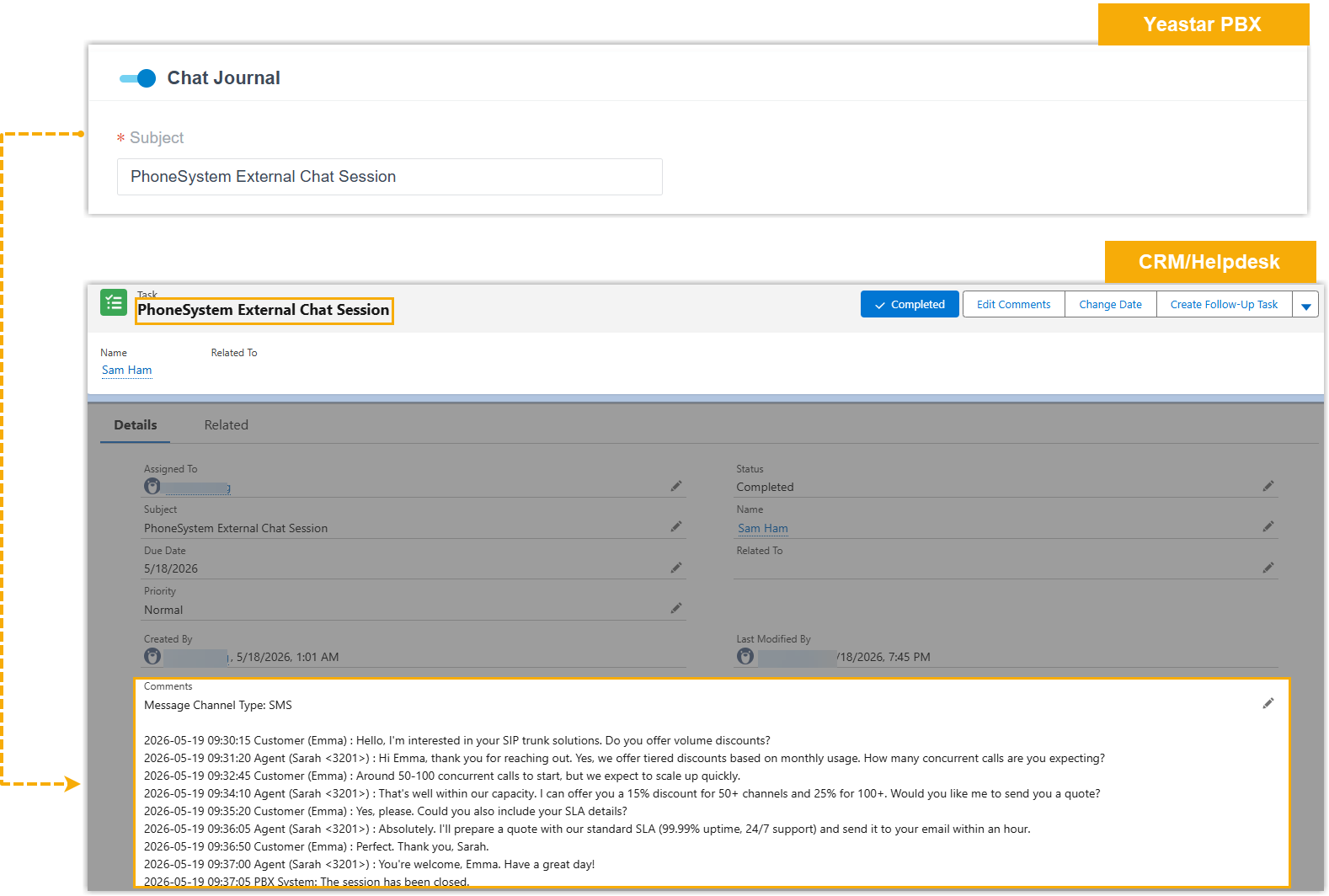
- Added support for Chat Journal. When
enabled, if the recipient's number of an external chat session
is identical to a CRM/Helpdesk contact, the chat messages
(including the message channel type and time-ordered message
records) will be synchronized to the CRM/Helpdesk system when
the chat session is closed.
- Optimized the Call Journal setting: Added
support for variables
{{.AI_Transcription}},{{.AI_Summary}}, and{{.Call_Note}}. By adding these variables, the PBX will automatically synchronize the corresponding content to the CRM/Helpdesk system when the call ends or when the content is updated.Note: For Zoho Desk integration and Zendesk integration, if the When to Create New Ticket is set to Before the Call, these contents will not be synchronized, and will not be updated after the call.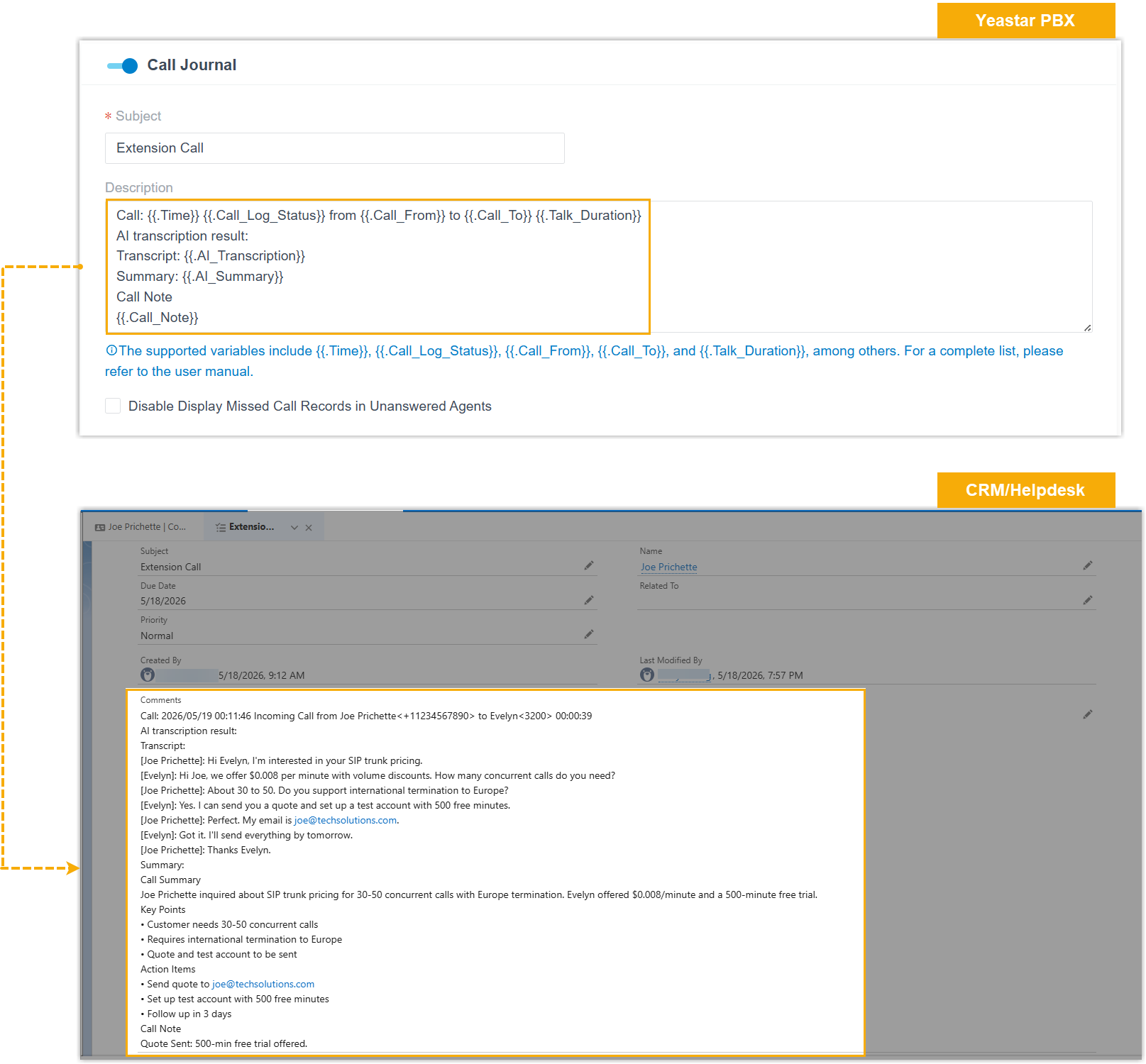
- Added support for Chat Journal. When
enabled, if the recipient's number of an external chat session
is identical to a CRM/Helpdesk contact, the chat messages
(including the message channel type and time-ordered message
records) will be synchronized to the CRM/Helpdesk system when
the chat session is closed.
- Speech to Text Integration
- The Google Cloud STT
API V1 integration is no longer maintained after this version.
Note:
- For better security, it is recommended that you switch from the legacy integration to AI transcription using Google Cloud Speech to Text API V2 (Path: ). For more information, see Configure AI Call Transcription with Google Service and Configure AI Voicemail Transcription with Google Service.
- Once you disconnect the legacy integration, the entry will no longer appear.
- API
- Optimized the API interfaces for the following features:
Feature Description Extension Group Added API interfaces for extension group, which can implement the followings: - Query extension group list
- Search specific extension groups
- Query the information of one or multiple extension groups
- Add, edit, or delete an extension group
Ring Group Added API interfaces for ring group, which can implement the followings: - Query ring group list
- Search specific ring groups
- Query the information of one or multiple ring groups
- Add, edit, or delete a ring group
Voicemail Greeting Added API interfaces for voicemail greeting settings for both group voicemail and extension voicemail, which can implement the followings: - Query the greeting list (for group voicemail, extension voicemail, or a combined list)
- Record or upload a greeting
- Play a greeting
- Download a greeting
- Delete a greeting
Voice Prompt Added API interfaces for voice prompt, which can implement the followings: - Query the list of MoH playlist
- Query the information of one or multiple MoH playlists
- Add an MoH playlist
- Upload a custom prompt
- Query the list of custom prompts
CDR Added the interfaces cdr/getaicontext,cdr/getaisummary, andcdr/aidownload, which can implement the followings:- Retrieve the AI-generated call transcript of a specific CDR, which may include multiple call legs.
- Retrieve the AI-generated call summary of a specific call leg.
- Download the JSON file containing the desired AI call transcription data.
For more information, see Developer Guide - CDR.
Extension Added parameters moh,call_forward_moh,ringback_tone_moh, andvm_greetingfor the interfacesextension/get,extension/query,extension/create, andextension/update, which can be used to query or configure the corresponding MoH or voicemail greeting for an extension.For more information, see Developer Guide - Extension.
Trunk Added parameters outbound_failover_sip_codeandsip_codesfor the interfacestrunk/get,trunk/query,trunk/create, andtrunk/update, which can be used to query or configure the SIP codes that trigger automatic failover to the next trunk in the same outbound route when received via the trunk.For more information, see Developer Guide - Trunk.
Inbound Route Added a parameter ringback_tonefor the interfacesinbound_route/get,inbound_route/query,inbound_route/create, andinbound_route/update, which can be used to query or configure the ringback tone when the destination is set toextension.For more information, see Developer Guide - Inbound Route.
Queue Added the following parameters for the interfaces queue/get,queue/query,queue/create, andqueue/update:ringback_toneandplay_full_join_prompt: Can be used to query or configure the corresponding prompt settings of a queue.leave_empty_no_agent_listandjoin_empty_no_agent_list: Can be used to query or configure "No Agent Available" scenarios and corresponding call routing destinations.Important: The legacy parametersempty_defined_for_disallow_to_join_when_emptyandempty_defined_for_leave_emptyare deprecated. Please update your API calls to useleave_empty_no_agent_listandjoin_empty_no_agent_listafter upgrading to this version.
For more information, see Developer Guide - Queue.
- CDR
- Fixed the CDR filtering issue: When querying the CDR list by extension or extension group, call records from intermediate participants (other than the first, second, and last participant) could not be retrieved.
- Call Report
- Fixed the scheduled call report issue: When previewing or downloading a scheduled Extension Call Activity call report, the time displayed in the report data (both chart and list data) did not match the selected time period.

Submit Feedback
Found something that doesn't work as expected?
Let us know - Your feedback will help make the final release even better.