Yeastar P-Series Software Edition 83.21.0.66
New features
- Active Call Panel
- Added an Active Call panel for real-time active call monitoring and management (Path: ). This panel allows you to monitor extension status and all live call activities, view the call information, and terminate unauthorized calls in real-time through this centralized panel.
- Call Follow-up Via Email
- Added support for sending call information of 1:1 calls via email either
during an active call or after a call ends, which can be used for
record-keeping and follow-up.
- Extension users can easily send the call information via email
on their Linkus Web Client / Desktop Client.
Location Illustration Call window 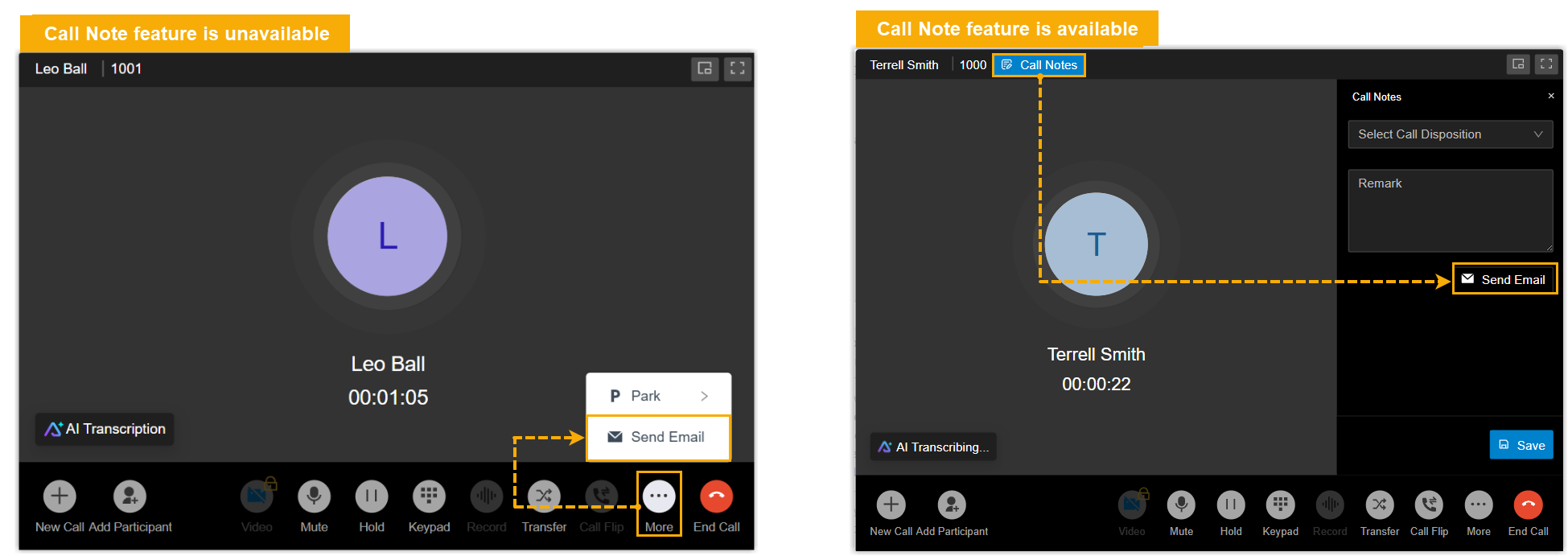
Post-call pop-up 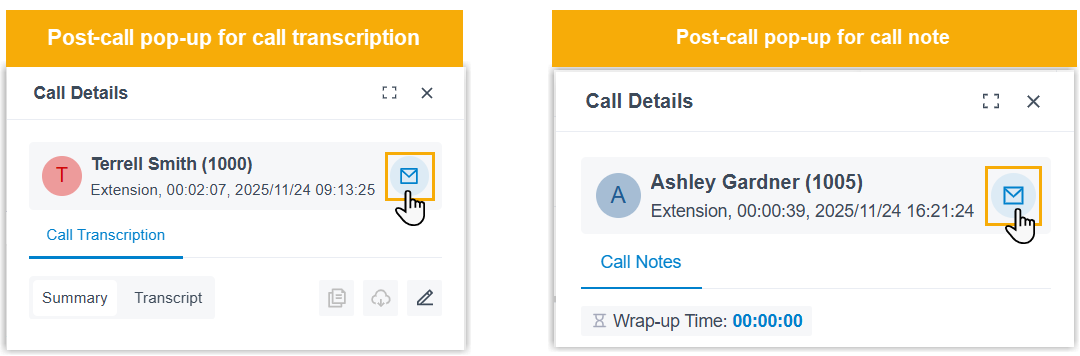
Call log 
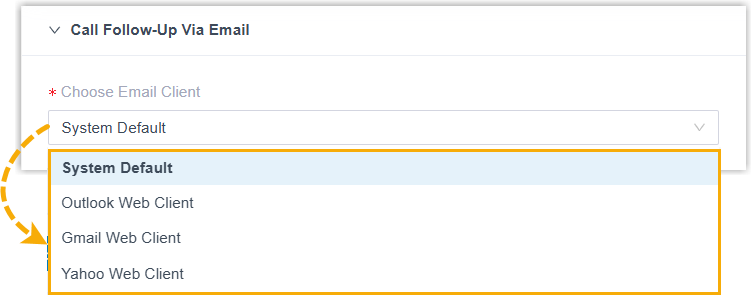
- By default, the call information email is sent using the default
email client on the extension users' computer, the users can
also select their preferred email client for email sending using
the newly added configuration item Choose Email
Client on Linkus Web Client / Desktop Client
(Path: ).
- Added an email template Call Follow-Up Template Via Email in the PBX system (Path: ). This template contains call information for a 1:1 call and is used when extension users click to send call details via email during a call or after calls.
- Extension users can easily send the call information via email
on their Linkus Web Client / Desktop Client.
Improvements and bug fixes
- Web Interface
- Added new interface language Svenska (Swedish).
- Extension
-
- Fixed the extension import issue: When adding extensions in bulk via CSV importing, the default setting of Play Ringtone on the extensions' Linkus clients was incorrect.
- Fixed the time-based presence auto switch issue:
- When an extension's presence status was switched automatically based on the time-based presence auto switch rules, the Accept Push Notifications setting did not update to the value set in the new presence.
- After bulk-configuring time-based presence auto switch rules, some extensions did not update their presence status as scheduled.
- Contact
-
- Fixed the Microsoft SQL Integration issue: When using the format
{server address}\{instance name}to connect to a specific named instance in a Microsoft SQL server, the connection failed. - Fixed the LDAP contact synchronization issue: PBX failed to synchronize all specified contacts from the LDAP server.
- Fixed the Microsoft SQL Integration issue: When using the format
- Auto Provisioning
-
- Added support for auto provisioning the following Akuvox
IP phones.
- R20A
- E16C V2.0
- S562W
- S563W
- X912K
- Added support for uploading phone images in
.dobformat (Path: ). - Optimized the parameter import compatibility: When adding phones
in bulk via CSV import, PBX automatically ignores the setting of
the
Authentication First-timeparameter for phone models that do not support this feature, ensuring successful bulk imports and thus improving deployment efficiency.
- Added support for auto provisioning the following Akuvox
IP phones.
- Call Transfer
- Optimized the caller ID display for blind transfer: When transferring a
call via blind transfer, the recipient (transferred-to user) can see the
caller ID of the transferred party instead of the transferring party's,
providing clear context about who is being connected.
For example, user A and user B are in a call, when user A transfers the call to user C via blind transfer, user C will then see the number and/or name of user B.
- Paging/Intercom
- Fixed the Scheduled Paging/Intercom issue: When the start date was set more than 7 days in the future, the system incorrectly ignored the date and initiated the paging immediately once the scheduled time was reached.
- Recording
-
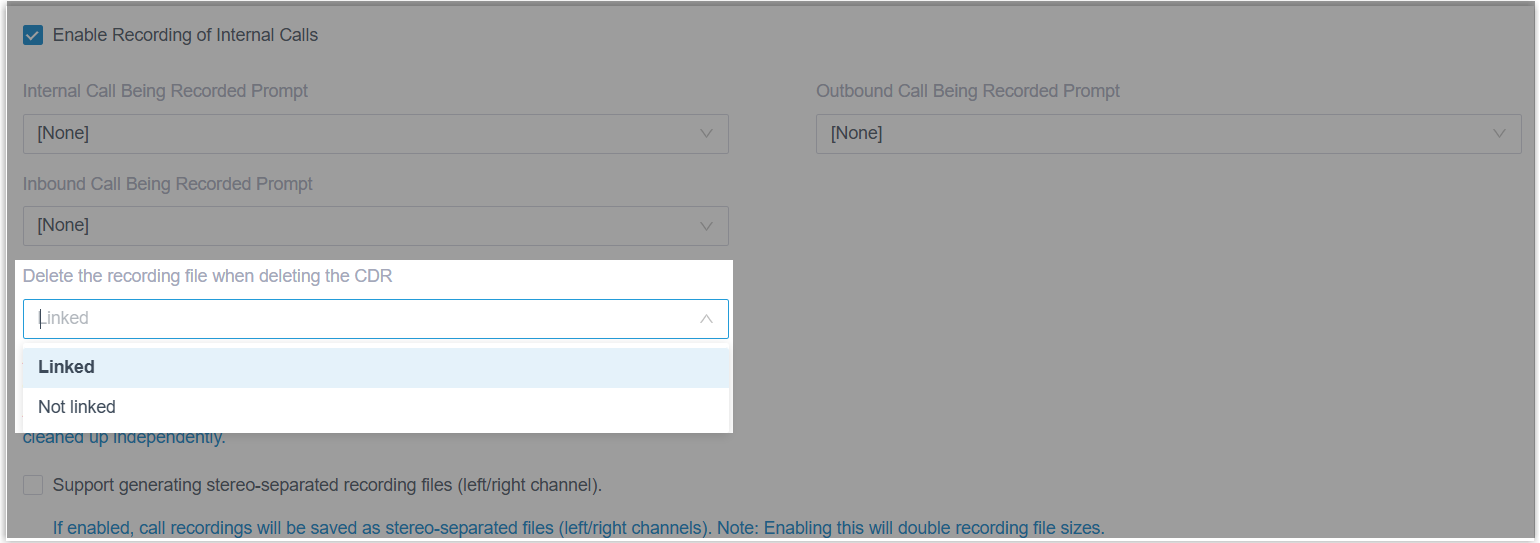
- Optimized the recording feature setting: Added a configuration
item Delete the recording file when deleting the
CDR (Path: ), which allows you to decide whether to delete or
retain the corresponding recording files when manually deleting
a CDR.Note: This feature only applies to manually deleted CDRs. For files deleted by the Auto Cleanup, CDRs and recording files are cleaned up independently based on their respective retention policies.
- Optimized the recording file management (Path: ):
- Added a filter setting File
Location, which allows you to search
specific recording files based on the storage
location.

- Added a File Location column in
the recording file list, which intuitively display the
current storage location of each file.
 Tip: You can hover over the icon to view the full storage path and click to copy.
File Location Description Archived (  )
)The recording file has been archived to an external archive server. Local (  )
)The recording file is stored on PBX-attached storage.
- Added a filter setting File
Location, which allows you to search
specific recording files based on the storage
location.
- Optimized the recording feature setting: Added a configuration
item Delete the recording file when deleting the
CDR (Path: ), which allows you to decide whether to delete or
retain the corresponding recording files when manually deleting
a CDR.
- Preferences
- Added supported for configuring the caller ID name display rules to
define which name takes priority on Linkus UC clients and extension
endpoints (Path: ).Note:
- The display rule currently applies only to the incoming call screen and the call interface.
- To apply this setting, Linkus clients must be running
the following version:
- Linkus Desktop Client: Version 1.18.5 or later
- Linkus Mobile Client: Version 5.21.3 (for iOS) / 5.21.7 (for Android) or later
Linkus Client / Endpoint Description Linkus Web / Desktop Client & extension endpoint (IP phone or softphone) You can configure whether to display the matched contact name, the original Caller ID name carried by the caller, or both. Linkus Mobile Client You can configure whether to display the matched local contact name, the name carried in the Fromheader of the SIP message provided by the PBX, or both.
- Network
-
- Added support for the MS-CHAP v2 authentication protocol for PPPoE connection. When obtaining an IP address from a PPPoE client, PBX is compatible with ISPs or network providers that require this protocol, ensuring successful connection and IP assignment.
- Fixed the audio issue: Calls had no audio when the PBX NAT type was set to the External Host.
- Email Template
- Fixed the Voicemail to Email issue: The
calleridcontactnamefield in the email notifications did not display the correct contact's name. - Auto Cleanup
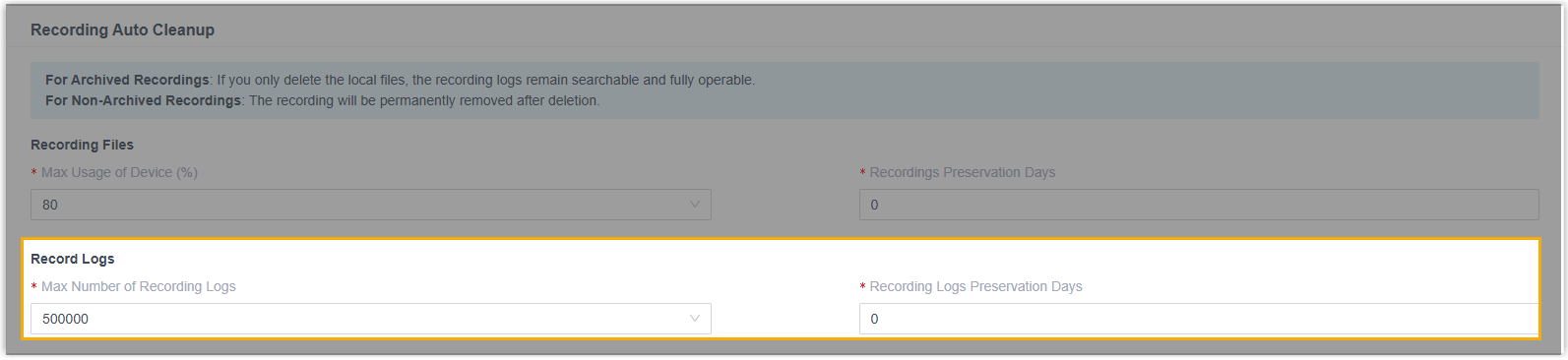
- Added configuration items Max Number of Recording Logs and Recording Logs Preservation Days for recording logs (Path: ), which allows you to set the maximum number of recording logs to store and the maximum number of days that recording logs should be retained.
- Archive
-
- Added a server type SharePoint (Path: ), which allows you to add Microsoft SharePoint as
an archive server and schedule tasks to archive PBX's call
recordings and backup files to your SharePoint container.
For more information, see Archive Files to Microsoft SharePoint.
- Optimized the archive server setting for S3.
- Renamed the server type Amazon S3 to S3, which allows you to connect to any S3-compatible object storage services.
- Added configuration items Endpoint and Region, which requires you to specify the service URL and the bucket region to ensure a successful connection.
- Added the following settings for recording archiving tasks.
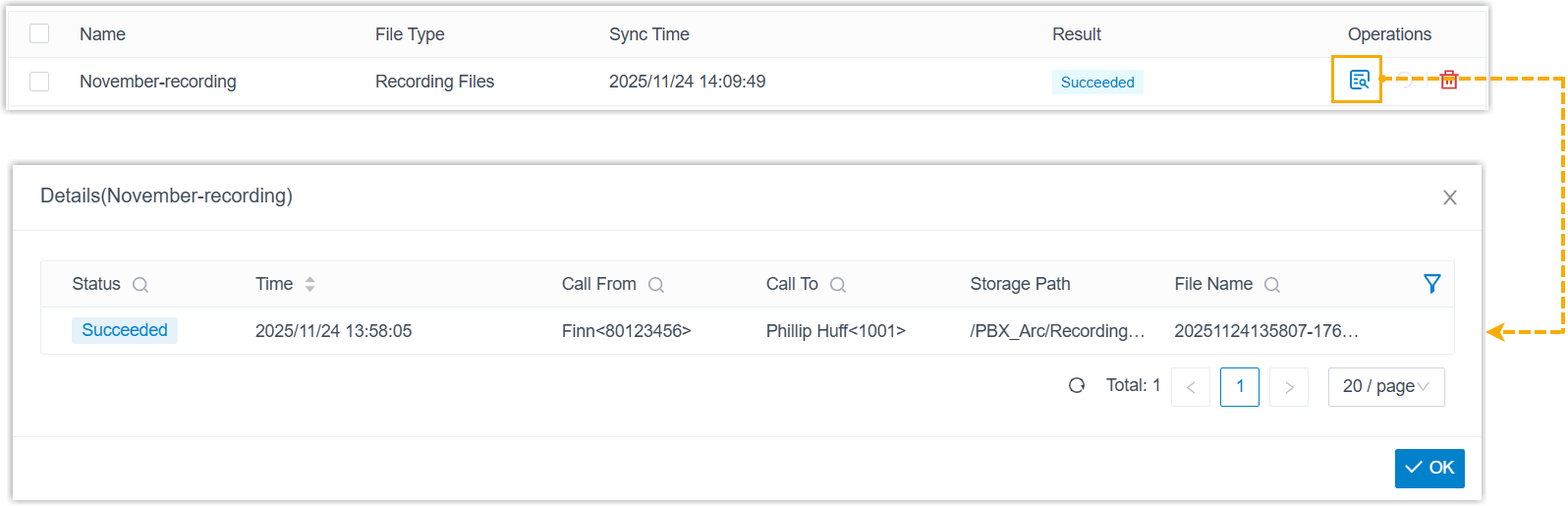
Setting Description Recording File Format This setting can be used to specify the format for the archived recording files. Note: This option appears only when the stereo-separated recording feature is enabled (Path: ).Skip archived files When enabled, the system skips recording files that have already been archived. Note: Repeated archiving will update the file's storage location, but will not delete files already archived to the archive server.Delete local files after archiving When enabled, the system removes the local recording file after a successful archive. Note: After deletion, playback and download for the archived recording files are still supported from the PBX server and Linkus clients. However, playback/download from third-party platforms or Dynamics 365 will no longer be supported. - Optimized archival logs: Added support for checking the
archiving details of an archive task.
- Fixed the FTP archiving issue: After setting a recurring task to periodically archive recording files to an FTP server, the task failed at the second execution.
- Added a server type SharePoint (Path: ), which allows you to add Microsoft SharePoint as
an archive server and schedule tasks to archive PBX's call
recordings and backup files to your SharePoint container.
- Operation Log
- Fixed the operation log issue: When filtering operation logs with the CDR module, the log entries for deleting CDR records were missing and only appeared when the module filter was set to All.
- Microsoft Entra ID (Azure AD) / Active Directory / Google Workspace / Red Hat SSO Integration
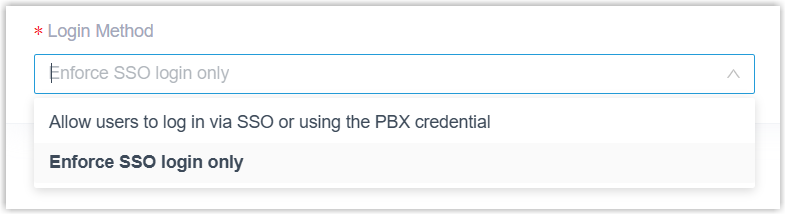
- Added a configuration item Login Method in the
Single Sign-on (SSO) settings, which allows
you to decide whether the third-party platform users can log in to
Linkus UC Clients via SSO only or both SSO and the associated extension credentials.Note:
- To apply this setting, Linkus clients must be running
the following version.
- Linkus Desktop Client: Version 1.18.5 or later
- Linkus Mobile Client: Version 5.21.3 (for iOS) / 5.21.7 (for Android) or later
- For Red Hat SSO Integration, SSO on Linkus Mobile Client is currently NOT supported. Therefore, if you set the login method to Enforce SSO login only for the integration, Red Hat SSO users will NOT be able to sign in to and use Linkus Mobile Client.
- To apply this setting, Linkus clients must be running
the following version.
- CRM/Helpdesk Integration
-
- Optimized the call journaling feature for the CRM/Helpdesk
integration: Added a configuration item Disable
Display Missed Call Records in Unanswered
Agents. If enabled, for queue and ring group calls,
the PBX will only synchronize the call logs to the CRM of the
agent who answers the call, while missed call logs for the same
call are not synchronized to the CRM of agents who did not
answer.Note: The supported platforms include Bitrix24, HubSpot, Oddo, Salesforce, Zoho, Zoho Desk.
- Optimized the following features for the CRM/Helpdesk
integration template.
Feature Description Authentication Method Added a configuration item Content Type (Path: ). When the authentication method is set to OAuth2 or Bearer Token, this configuration item can be used to set the content type of the token retrieval request.

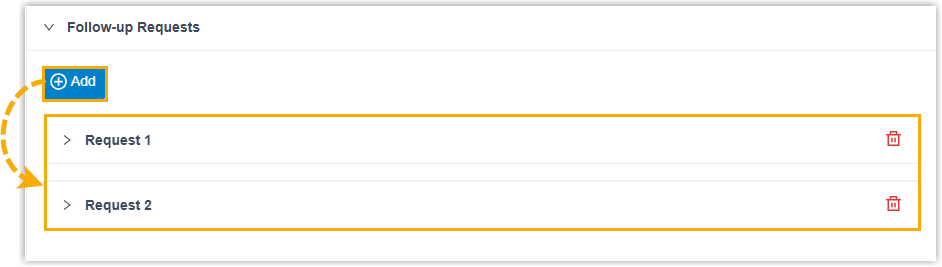
Follow-up Request Added support for adding follow-up requests (Path: ). You can configure up to 10 follow-up requests, which will be automatically triggered upon the completion of a specified operation (such as token retrieval or token refresh), and their response data can be extracted and stored in global variables for reuse elsewhere in the integration.
Call Journaling Added a configuration item Disable Display Missed Call Records in Unanswered Agents (Path: Call Journal). 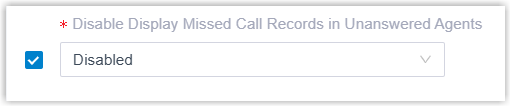
If enabled, the corresponding setting will be available to configure in the integration. This can be used to determine whether call logs for queue and ring group calls are synchronized only to the CRM/Helpdesk of the agent who answered the call, while missed call logs for the same call are not synchronized to the CRM/Helpdesk of agents who did not answer.
For more information, see Add a CRM Integration Template and Add a Helpdesk Integration Template.
- Optimized the call journaling feature for the CRM/Helpdesk
integration: Added a configuration item Disable
Display Missed Call Records in Unanswered
Agents. If enabled, for queue and ring group calls,
the PBX will only synchronize the call logs to the CRM of the
agent who answers the call, while missed call logs for the same
call are not synchronized to the CRM of agents who did not
answer.
- API
- Fixed the extension API issue: Setting parameter
enb_natto0when adding an extension via API did not take effect. - Linkus Web Client
-
-
Added support for Swedish interface language.
-
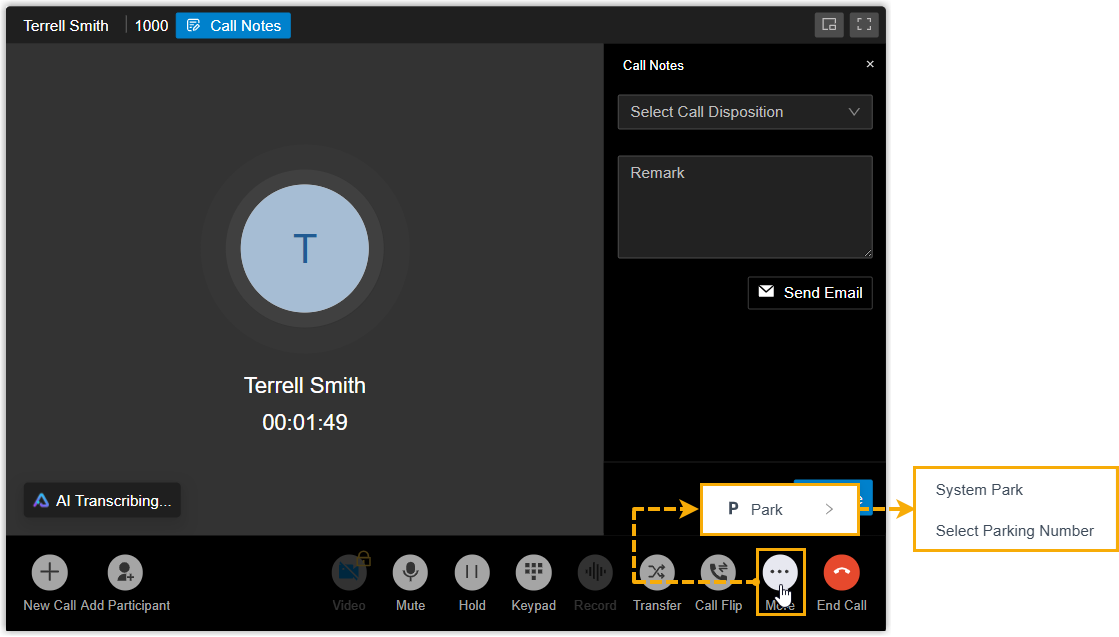
Added support for call parking via a dedicated button. By clicking the Park button on the call window, extension users can park an active call to a system-assigned or manually-selected parking number.
- Added compatibility with the following system-level
configurations:
- Caller ID name display rules: Depending on the rules configured on the PBX, Linkus Web Client may display the matched contact name, the caller ID name carried by the caller, or both.
- Login restriction: If the PBX is integrated with Microsoft Entra ID (Azure AD), Active Directory, Google Workspace, or Red Hat SSO, and the login method is configured to Enforce SSO login only, extension users must log in to Linkus using their account from the integrated third-party platform.
-