Yeastar P-Series Software Edition 83.22.0.134 V23.3-Beta
This topic outlines the release history of firmware version 83.22.0.134, from the beta stages to the final release.
- To try out the new updates, check for firmware updates from PBX admin portal or download the firmware from Yeastar Official Website , and upgrade your phone system.
- For details on the new features and improvements in Linkus UC Clients and 'Yeastar Linkus for Google' Chrome extension, see Linkus Release Notes.
- If you found something that doesn't work as expected, you can submit feedback directly from here.
Firmware 83.22.0.134-beta1
Release date:March 30, 2026
Release type:V23.3-Beta
Base version:83.22.0.17
New features
- AI Receptionist
- Yeastar P-Series Software Edition provides AI Receptionist feature,
which functions as a 24/7 virtual assistant that automatically answers
calls, greets callers, responds to inquiries based on your custom
knowledge base, and intelligently routes calls to the appropriate
destinations, reducing repetitive manual tasks while ensuring consistent
service delivery.
For more information, see AI Receptionist Overview.
-
- Added the following add-on subscription services to expand
minutes for AI Receptionist feature (Path: ).

Subscription Description AI Receptionist (One-Time Capacity) This service provides a one-time capacity of AI receptionist minutes for the PBX. You need to purchase additional minutes once the quota is used up. AI Receptionist (Monthly Quota Pack) Each pack provides 200 AI receptionist minutes per month, you can subscribe to one or multiple packs as needed. Note: The minutes reset each month and do not roll over to the next month.Note: PBX provides 60 one-time free minutes for the AI Receptionist feature. You can expand more minutes according to your needs.- To subscribe to these services, go to the Yeastar Partner Portal (dedicated for Yeastar partners) or click the Buy button beside the service in the PBX portal to submit a request (for non-partner customers).
- You can subscribe to one or multiple monthly quota packs, purchase one-time capacity, or subscribe to both services as needed. If both services are subscribed, minutes are deducted from the monthly pack first.
- Added a call report AI Receptionist Call
Activity (Path: ), which provides an overview of call
activity and statistics for AI receptionist
calls.
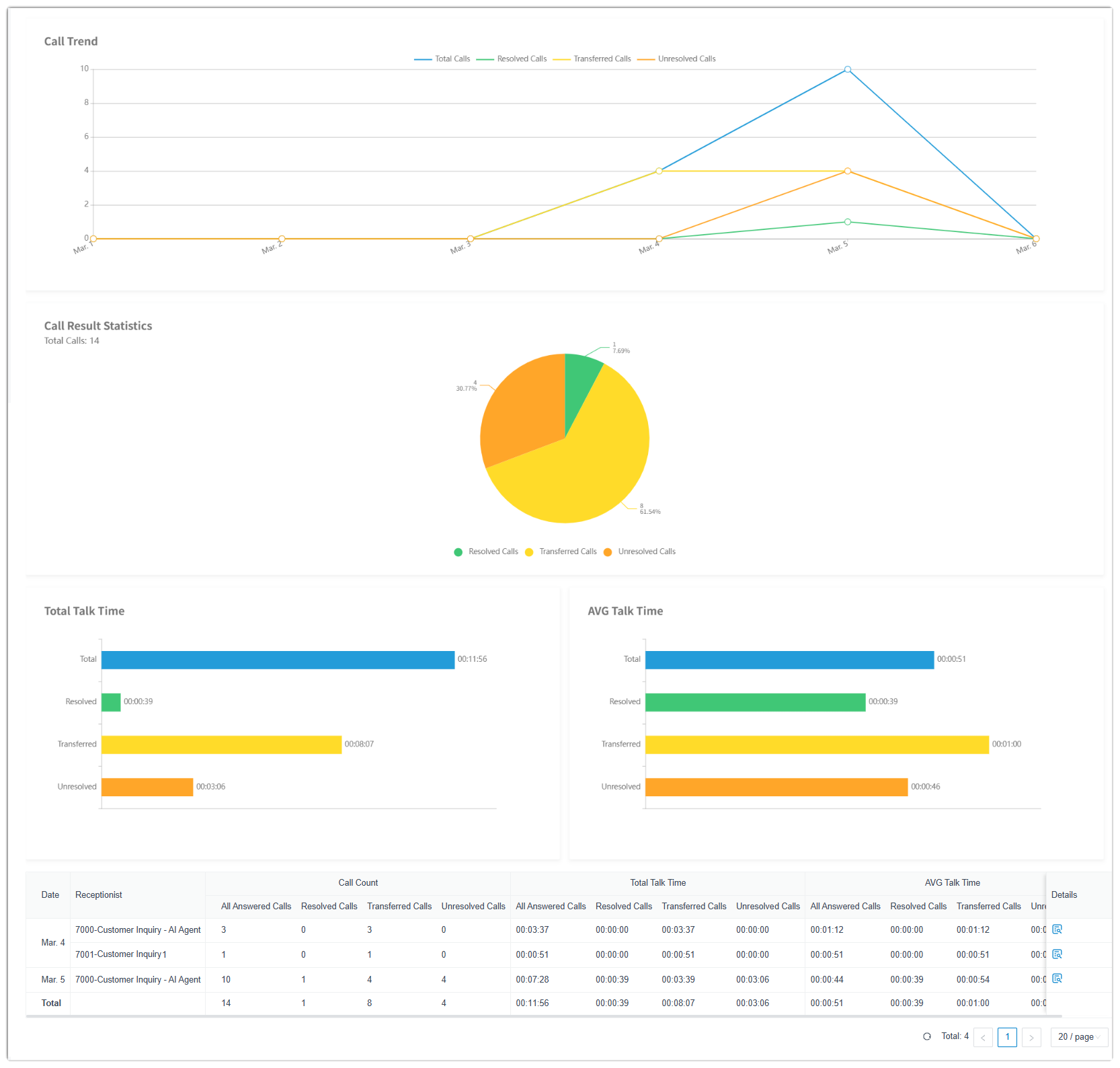
For more information, see AI Receptionist Call Activity Report.
- Added the following event notifications for the AI
receptionist feature (Path: ).
Event notification Description AI Receptionist Call Line Abnormal Triggered when the call line for AI receptionist is abnormal and can not receive calls. AI Receptionist Call Line Restored Triggered when the call line for AI receptionist has been restored and is able to receive calls properly. Your AI Receptionist Usage is Reaching the Capacity Limit Triggered when AI receptionist utilization rate (used minutes / total minutes) of either the one-time capacity or the monthly quota pack has reached the pre-configured capacity thresholds. AI Receptionist Limit Reached Triggered when the total AI receptionist minutes (including both the one-time capacity and the monthly quota pack) have been fully used. For more information, see Event Notification Overview.
- Added the following add-on subscription services to expand
minutes for AI Receptionist feature (Path: ).
- Custom Call Report
- Added support for creating Custom Reports tailored to your business needs. You can select either built-in custom reports or the default call reports as datasets, then choose metrics, dimensions, and filters to define your own report data criteria, thereby generating your custom call reports.
-
For more information, see Create a Custom Call Report.
In addition, the following related updates are introduced:- Added a My Reports page in call
reports (Path: ), where you can create and manage custom
reports, and quickly access the default reports you've added
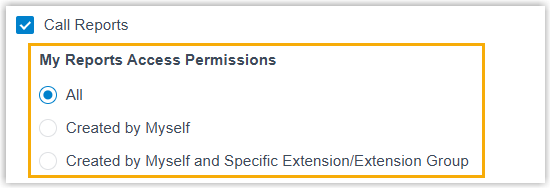
to this list.Note: You can control who can access the call reports in My Reports based on the user's assigned role (Path: ).
- Moved and categorized the PBX's built-in reports into a
Default Reports page.

- Added the following custom call
reports (Path: ).
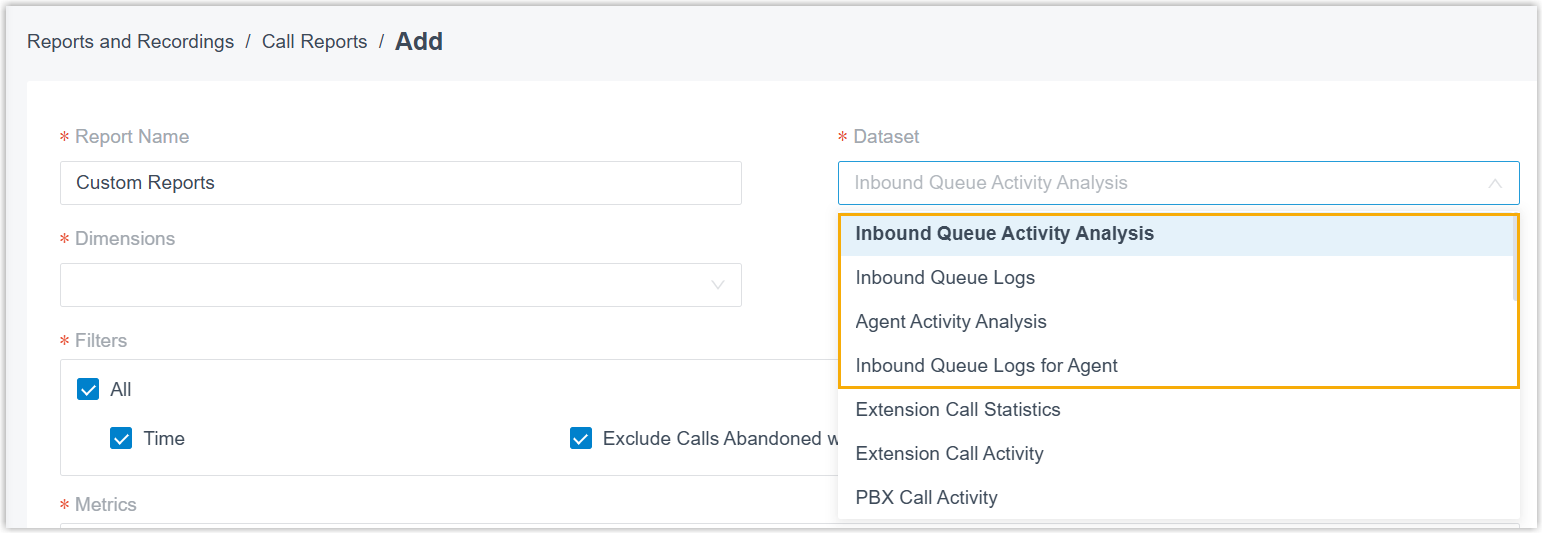
Call Report Description Inbound Queue Activity Analysis This call report provides granular insights into queue activity in queue call handing.
For more information, see Inbound Queue Activity Analysis Report.
Inbound Queue Logs This call report provides a quick overview of each inbound queue's call activity over a selected time period.
For more information, see Inbound Queue Logs Report.
Agent Activity Analysis This call report provides granular insights into agent activity in queue call handing.
For more information, see Agent Activity Analysis Report.
Inbound Queue Logs for Agent This call report provides a quick overview of each agent's call activity over a selected time period.
For more information, see Inbound Queue Logs for Agent Report.
- Optimized the following default call reports
(Path: ).
Call Report Description Extension Call Statistics / Extension Call Activity Added a report metric Abandoned, which displays the number of calls abandoned by caller before connecting to the extension, excluding calls received when the extension acts as a member of a queue or a ring group. 
Extension Call Accounting Details - Added a filter criteria PIN
Code, which can be used to filter call
report data using specified PIN codes.

- Added a report metric PIN
Code, which displays the PIN code used
when making a call via a restricted outbound
route.

DID/Outbound Caller ID Activity Added filter criteria DID and DOD, which can be used to filter call report data using specified DID and DOD numbers. 
Agent Missed Call Activity Added a report metric Queue, which displays the queue that received the call. 
Agent Performance Added support for specifying more than one queue for data filtering. 
- Added a filter criteria PIN
Code, which can be used to filter call
report data using specified PIN codes.
- Added support for the following quick actions from a call
report:
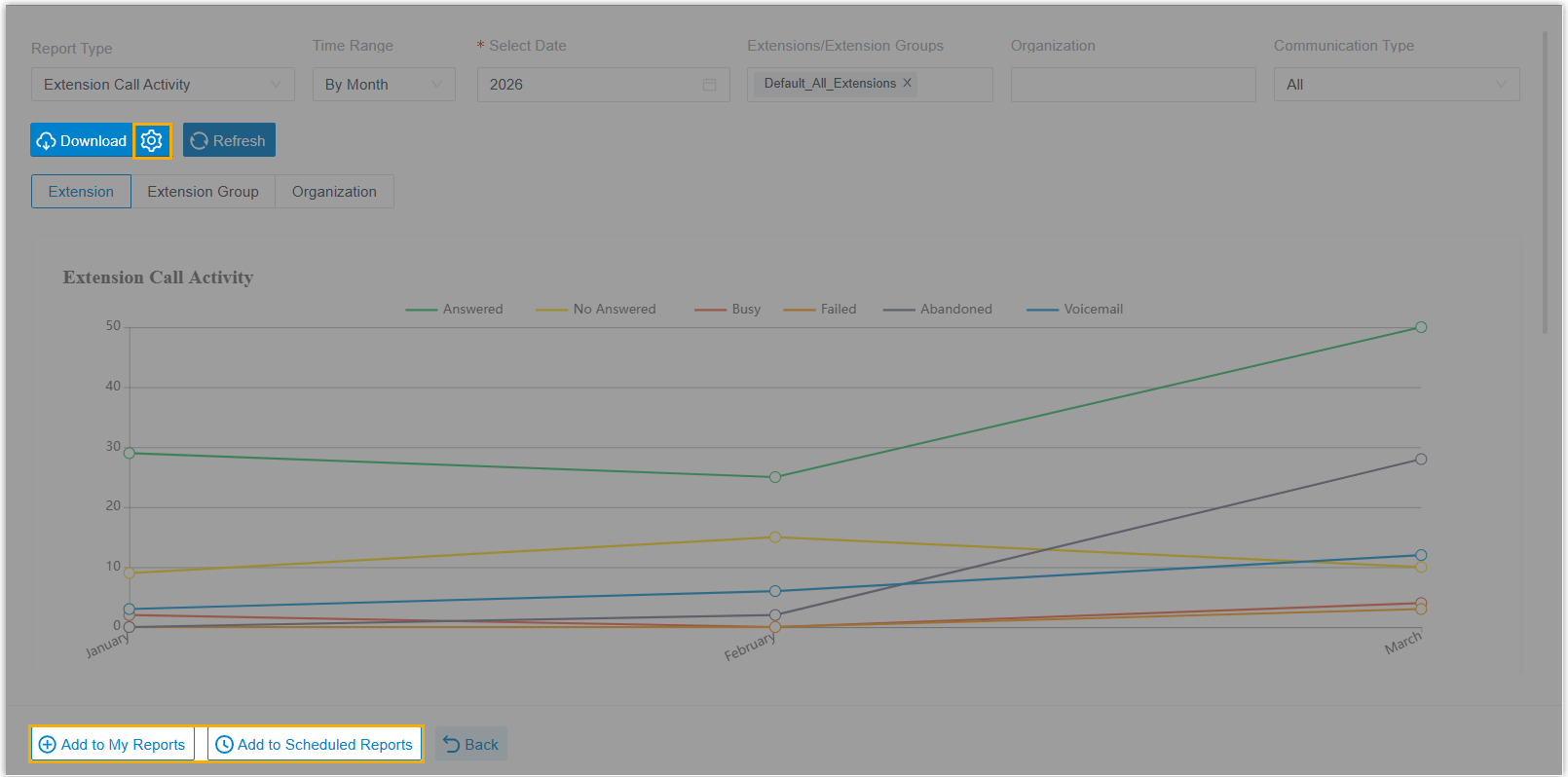
- Customize download settings: Click
 beside
Download to customize call
report download settings.
beside
Download to customize call
report download settings.
For more information, see Download Call Report from PBX Web Portal.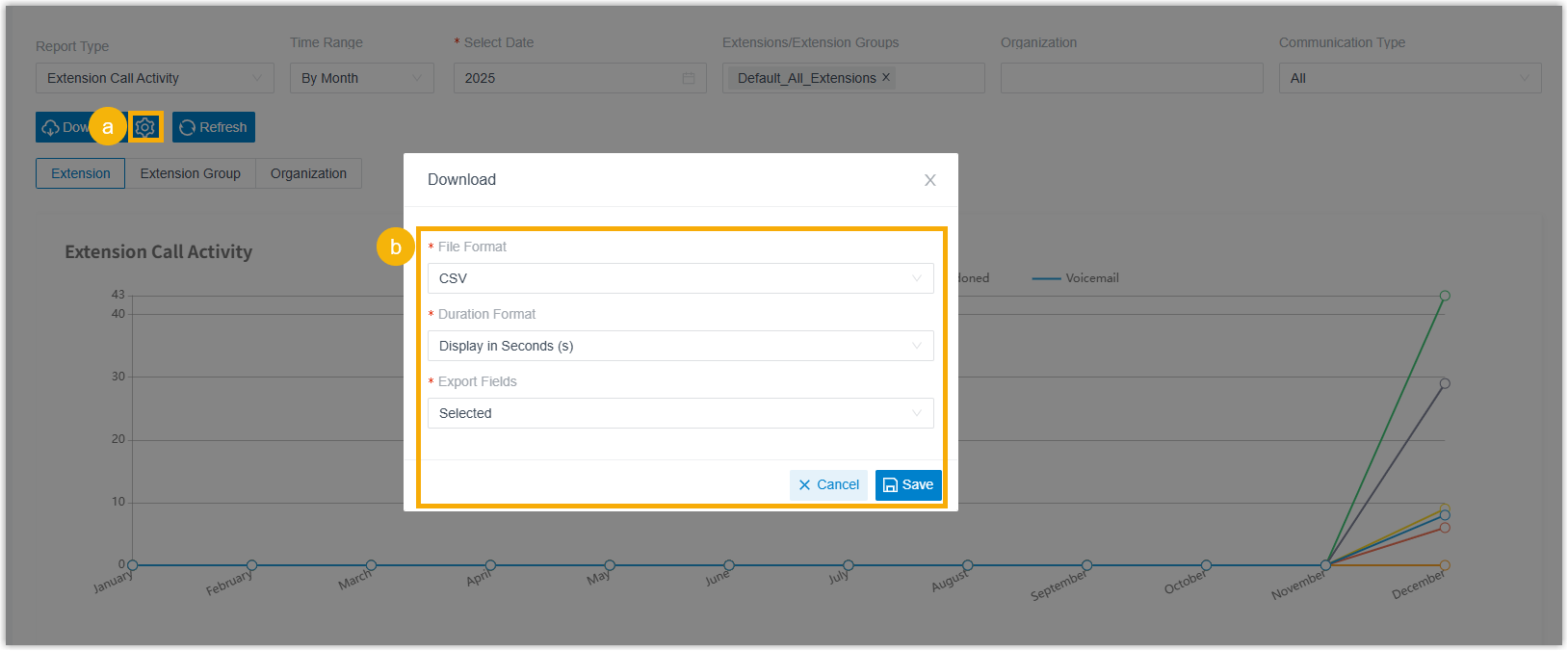
- Add to My Reports: Add a frequently used report to My Reports list for quick access.
- Add to Scheduled Reports: Quickly schedule a task to automatically send the report via email.
- Customize download settings: Click
- Added support for customizing the report data
display:
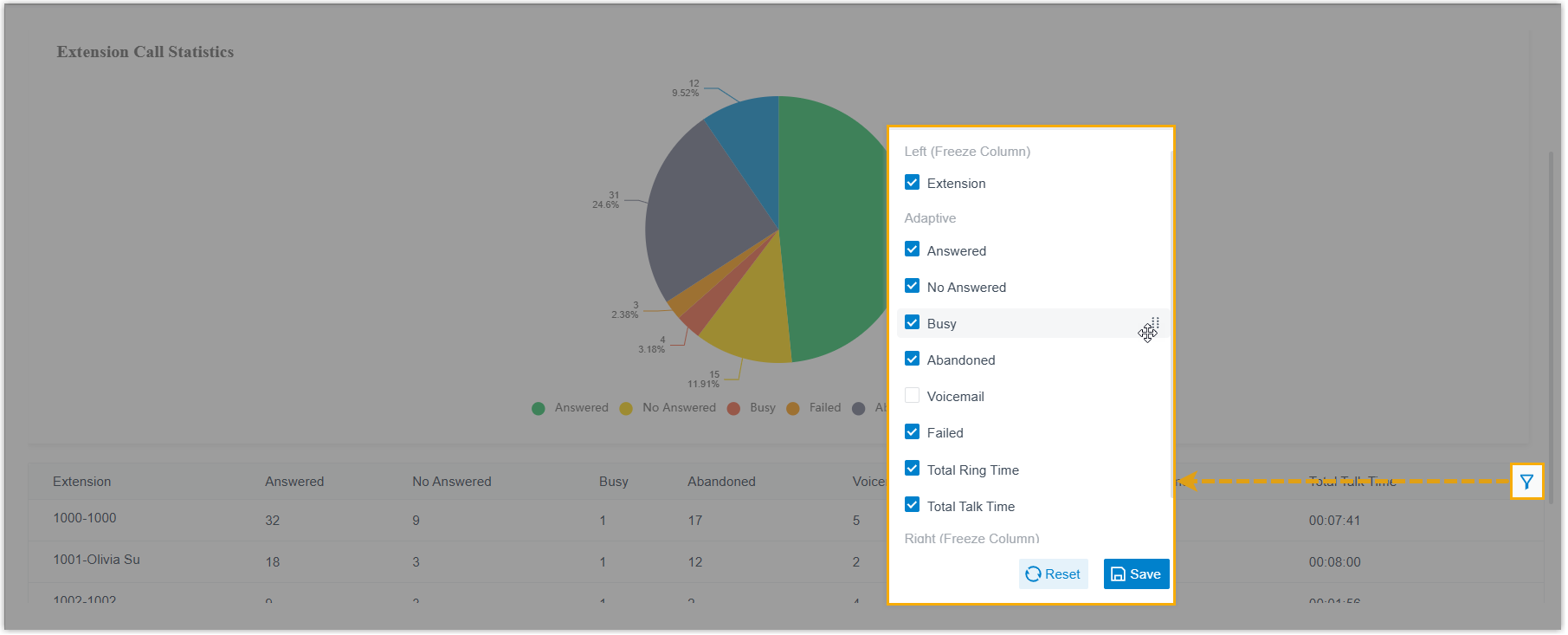
- Click
 beside the
desired field to reorder its display position in the
report data.
beside the
desired field to reorder its display position in the
report data. - Click beside the desired field,
then drag it to the Left (Freeze
Column) or Right (Freeze
Column) to fix the display position.
- Click
- Optimized the scheduled call report.
- Optimized the scheduled call report settings (Path: ):
Setting Description File Format Added support for downloading call report in HTML format. 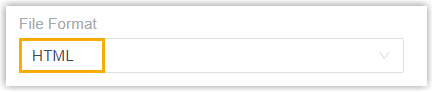
Duration Format Added support for specifying the display format for all duration-related fields. 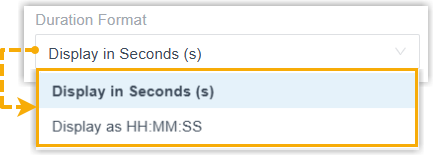
Include Details Added support for specifying whether to include call details in the downloaded report, and defining how the details will be downloaded. 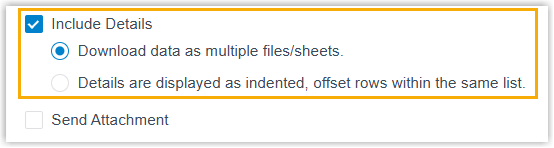 Note: This option is available only for call reports that include call details (e.g. IVR report or Queue Performance report).
For more information, see Schedule Automatic Call Report Delivery via Email.
- Added support for displaying the delivery status of
scheduled call reports in the scheduled log list
(Path: ).

- Optimized the scheduled call report settings (Path: ):
- Optimized the call report APIs:
- Added an interface
myreport/list, which can be used to query the list of custom call reports and default reports added to the My Reports list for quick access.For more information, see Developer Guide - Query My Reports List.
- Optimized the existing call report API interfaces:
- Added parameters to interfaces
call_report/list,call_report/detail, andcall_report/downloadfor querying the following call reports.Call Report Description Custom Call Reports Added a parameter my_report_id, which can be used to query the statistics of custom call reports and the default reports added to the My Reports list for quick access.AI Receptionist Call Activity Added a valid value aireceptionistcallactivityto the parametertype, and added a parameterai_receptionist_id_list, which can be used to query the AI Receptionist Call Activity report.Extension Call Accounting Details Added a parameter pin_list, which can be used to filter call report data using specified PIN codes.DID/Outbound Caller ID Activity Added parameters did_num_listanddod_num_list, which can be used to filter call report data using specified DID and DOD numbers. - Added the following parameters to interface
call_report/downloadto specify the call report download settings:Parameter Description detail_typeSpecify how details of associated calls are downloaded in the report file. formatSpecify the download file format. duration_formatSpecify the display format for all duration-related fields. - Added a response parameter
statusto interfacecall_schedule_report/list, which returns the delivery status of the scheduled call report.
For more information, see Developer Guide - Call Report.
- Added parameters to interfaces
- Added an interface
- Added a My Reports page in call
reports (Path: ), where you can create and manage custom
reports, and quickly access the default reports you've added
to this list.
- Onsite Proxy
- Yeastar P-Series Software Edition provides Onsite Proxy
feature. By deploying the Yeastar-provided Onsite Proxy software in the
same subnet as remote IP phones, it establishes a secure communication
channel between the PBX and these phones, enabling them to be
auto-provisioned and accessed over the internet as if they were in the
same local network, while eliminating complex port forwarding
configurations.
For more information, see Onsite Proxy Overview.
In addition, the following related updates are introduced:
- Added support for provisioning remote IP phones via Onsite
Proxy.
For more information, see Auto Provisioning IP Phones Remotely (PnP Method) and Auto Provisioning IP Phones Remotely (DHCP Method).
- Added an event notification Onsite Proxy
Error (Path: ), which is triggered when the connection between
the PBX and Onsite Proxy is interrupted, or the system resources
utilization for Onsite Proxy exceeds specified thresholds.
For more information, see Event Notification Overview.
- Added API interfaces for Onsite Proxy, which can implement the
followings:
- Query the list of Onsite Proxy instances.
- Search for specific Onsite Proxy instances.
- Query the information of one or multiple Onsite Proxy instances.
- Query or reset the secret key of an Onsite Proxy instance.
- Add, edit, or delete an Onsite Proxy instance.
For more information, see Developer Guide - Onsite Proxy.
- Added support for provisioning remote IP phones via Onsite
Proxy.
Improvements and bug fixes
- Extension
-
- Added support for setting the maximum number of Linkus UC
Clients that can simultaneously log in to an extension (Path: ).
 Note: To achieve simultaneous Linkus logins on multiple devices, the Linkus clients must meet the following version requirements:
- Linkus Desktop Client: Version 1.21.2 or later
- Linkus Mobile Client: Version 5.24.13 (iOS) / 5.24.7 (Android) or later
- Added support for viewing all Linkus clients logged into an
extension and managing their associated devices, such as adding
remarks for devices or remotely logging the extension out of
specific ones (Path: ).
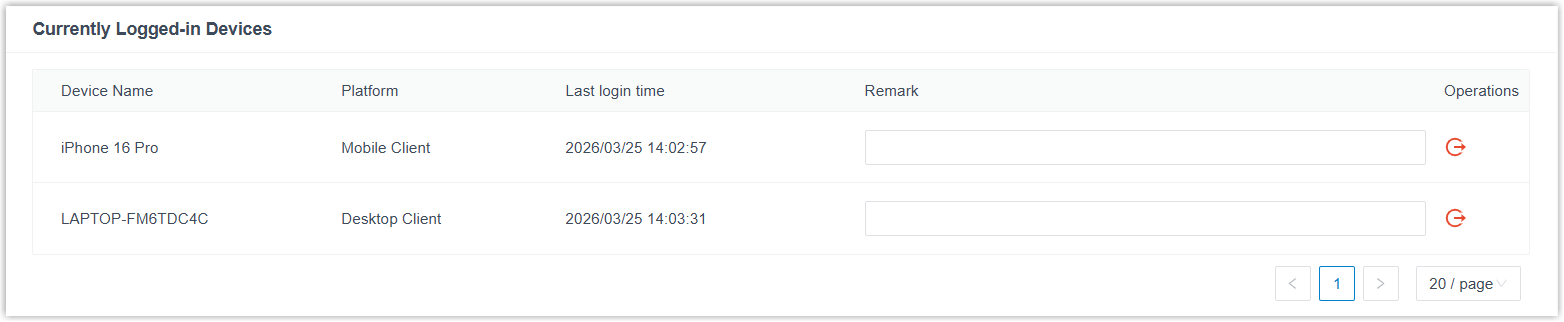
For more information, see Manage Logged-in Linkus Clients for an Extension.
Note:- This feature is only available for super administrator.
- Extension users can also view and manage all Linkus clients logged into their extensions. For more information, see Manage Logged-in Linkus Clients on Mobile Client, Manage Logged-in Linkus Clients on Desktop Client, and Manage Logged-in Linkus Clients on Web Client.
- Added support for updating extension information by importing
files (Path: ).
When importing, if an extension number already exists in the system, its settings will be automatically updated with the data from the file.
Note: This feature is only available for super administrator.
- Added support for setting the maximum number of Linkus UC
Clients that can simultaneously log in to an extension (Path: ).
- Extension Group
- Increased the maximum capacity limit to 256.
- Contacts
- Added the following fields to company contact information for more
comprehensive contact details (Path: ):
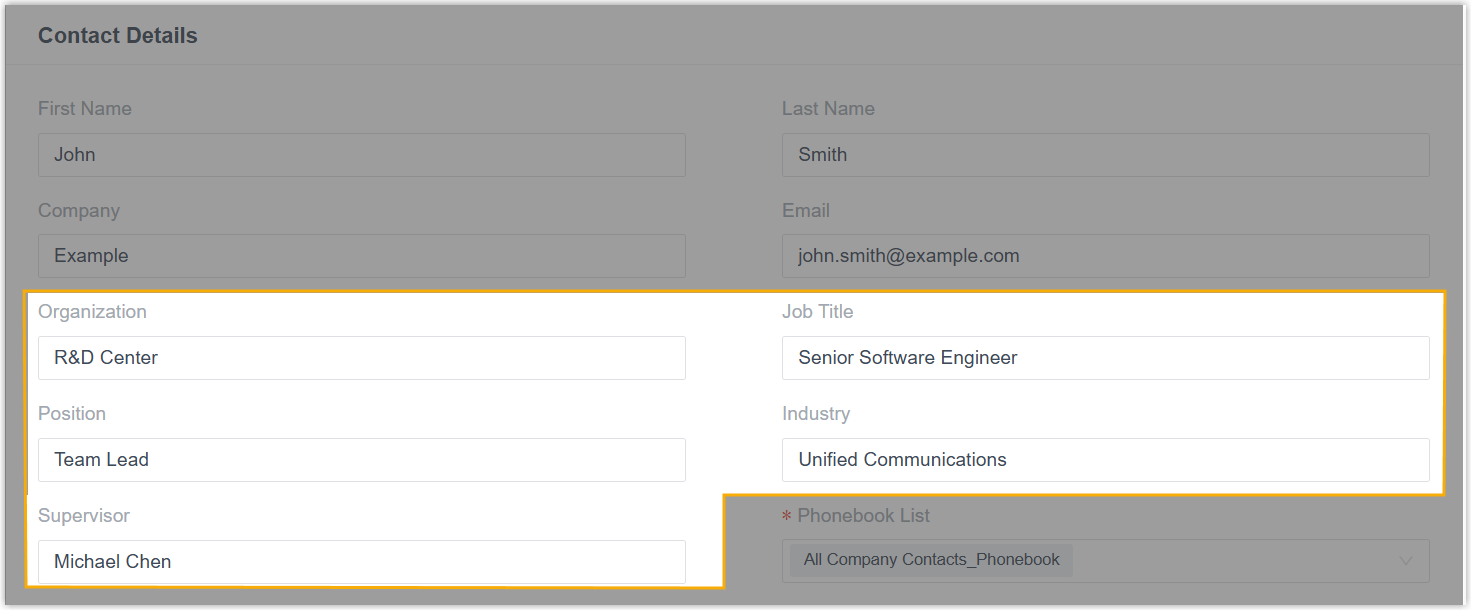
- Organization
- Job Title
- Position
- Industry
- Supervisor
- Auto Provisioning
- Fixed the following Resource Repository issues:
- When uploading an IP phone firmware, the webpage displayed a "Failed to upload" error and the operation did not complete.
- After uploading firmware for a model with a suffix (e.g.,
X5U-V2) first, the base model (e.g.,X5U) no longer appeared in the Model drop-down list when uploading firmware later.
- Time Condition
-
Increased the maximum number of custom business hours and time periods that can be added for the following features (from 10 to 20):
Feature Description Inbound Route When Time Condition is enabled and Time-based Routing Mode is set to Based on Custom Business Hours or Based on Custom Time Periods, you can add up to 20 time periods for each time setting entry. Business hours and holidays When configuring business hours in a time zone, you can add up to 20 time periods in Business Hours and Break Hours for each time setting entry. Call Flow Designer When Time-based mode of a Business Hours component is set to Based on Custom Business Hours, you can add up to 20 time periods in Business Hours and Break Hours. IVR When Time Condition is enabled for IVR Key Press Event and Time-based Mode is set to Based on Custom Business Hours or Based on Custom Time Periods, you can add up to 20 time periods for each time setting entry. - Inbound Route
- Fixed the inbound route issue: When an inbound route was set to Based on Custom Time Periods routing mode, dialing the feature code for a specific time period did not switch to the corresponding destination, while other feature codes worked normally.
- Call Flow Designer
- Fixed the HTTP Request component issue: Failed to obtain complete data from HTTP response.
- Call Features
- Increased the maximum capacity limit to 256 for the following
call features:
- Ring group
- IVR
- Inbound queue
- Speed Dial
- Added support for adding a remark to speed dial number (Path: ).
When users dial the speed dial number to call out, the remark will be displayed along with the phone number for better identification.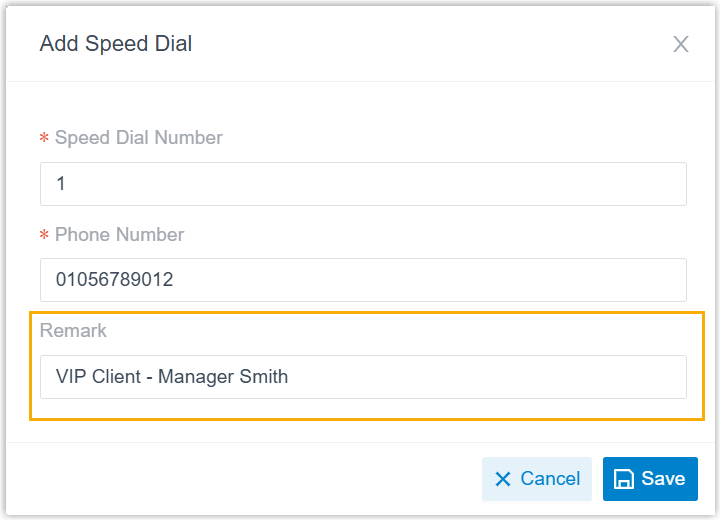
- AI
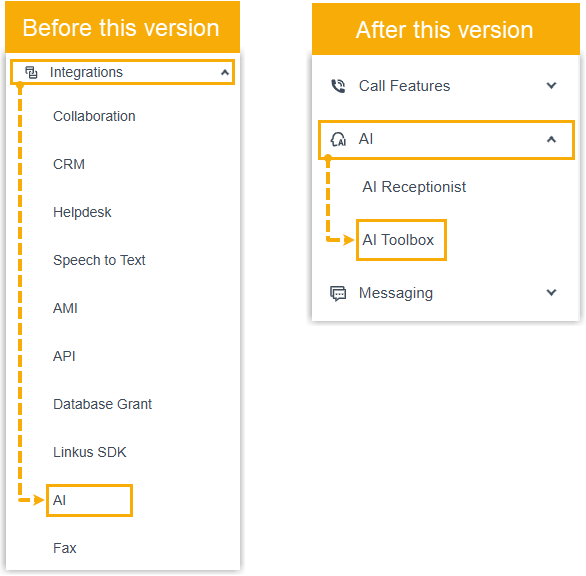
- Moved the entry of built-in AI features (Text-to-Speech, Call Transcription, and Voicemail Transcription) from to .
- AI Transcription
-
- Added the following add-on subscription services to expand
minutes for AI Transcription feature (Path: ).

Subscription Description AI Transcription (One-Time Capacity) The previously Transcription service, which provides a one-time capacity of AI transcription minutes for the PBX. You need to purchase additional minutes once the quota is used up. AI Transcription (Monthly Quota Pack) Each pack provides 500 AI transcription minutes per month, you can subscribe to one or multiple packs as needed. Note: The minutes reset each month and do not roll over to the next month.Note: PBX provides one-time free minutes for AI Transcription feature (120 minutes for Enterprise Plan or 240 minutes for Ultimate Plan). You can expand more minutes according to your needs.- To subscribe to these services, go to the Yeastar Partner Portal (dedicated for Yeastar partners) or click the Buy button beside the service in the PBX portal to submit a request (for non-partner customers).
- You can subscribe to one or multiple monthly quota packs, purchase one-time capacity, or subscribe to both services as needed. If both services are subscribed, minutes are deducted from the monthly pack first.
- Optimized the following AI transcription event notifications
(Path: ).
Event Description Your AI Transcription Usage is Reaching the Capacity Limit Added support for specifying capacity alert thresholds separately for one-time capacity and monthly quota packs. 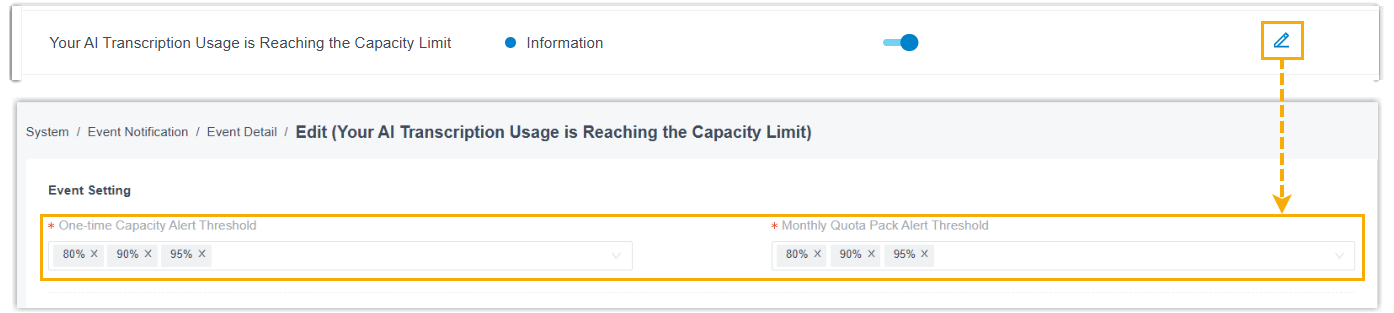
The event notification will be triggered when the AI transcription utilization rate of either the one-time capacity or the monthly quota pack has reached the pre-configured capacity thresholds.
AI Transcription Limit Reached The event notification will be triggered when the total AI transcription minutes (including both one-time capacity and monthly quota pack) have been fully used.
- Added the following add-on subscription services to expand
minutes for AI Transcription feature (Path: ).
- Email Template
- Fixed the Email Template issue: When editing the email template for
Scheduled CDR and specifying the display text
for the CDR download link, the PBX automatically prepended
http://to the URL, resulting in duplicate prefixes and making the link inaccessible. - Event Notification
- Added an event notification Concurrent Calls Overload (Path: ), which is triggered when the call concurrency has reached the PBX's limit.
- Messaging Channel
- Fixed the messaging channel issue: When setting up a Twilio SMS channel using a NAT-mapped domain, users failed to receive SMS messages through the channel.
- SIP Settings
- Added support for customizing SDP session parameters, including the
session name (
s=line) and the<username>part of the session originator (o=line), to meet specific carrier or device requirements (Path: ).
- SNMP
- Added a field EngineID, which displays a unique
identifier of the SNMP entity (PBX). This value is fixed and cannot be
modified.

- Microsoft Entra ID (Azure Active Directory) Integration
-
- Simplified the integration process. The
integration can now be initiated simply from the PBX, requiring
only a Microsoft account login for permission consent. The PBX
will automatically create the necessary application in Microsoft
Entra ID for the connection, with no manual configuration
required.Note: Existing integrations using the legacy method will continue to work without interruption.
For more information, see Integrate Yeastar P-Series Software Edition with Microsoft Entra ID.
- Optimized user synchronization settings.
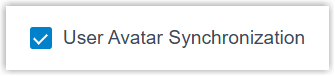
- Added a configuration item User Avatar
Synchronization. If selected, user
avatars will be synced from Microsoft to the PBX
extensions.
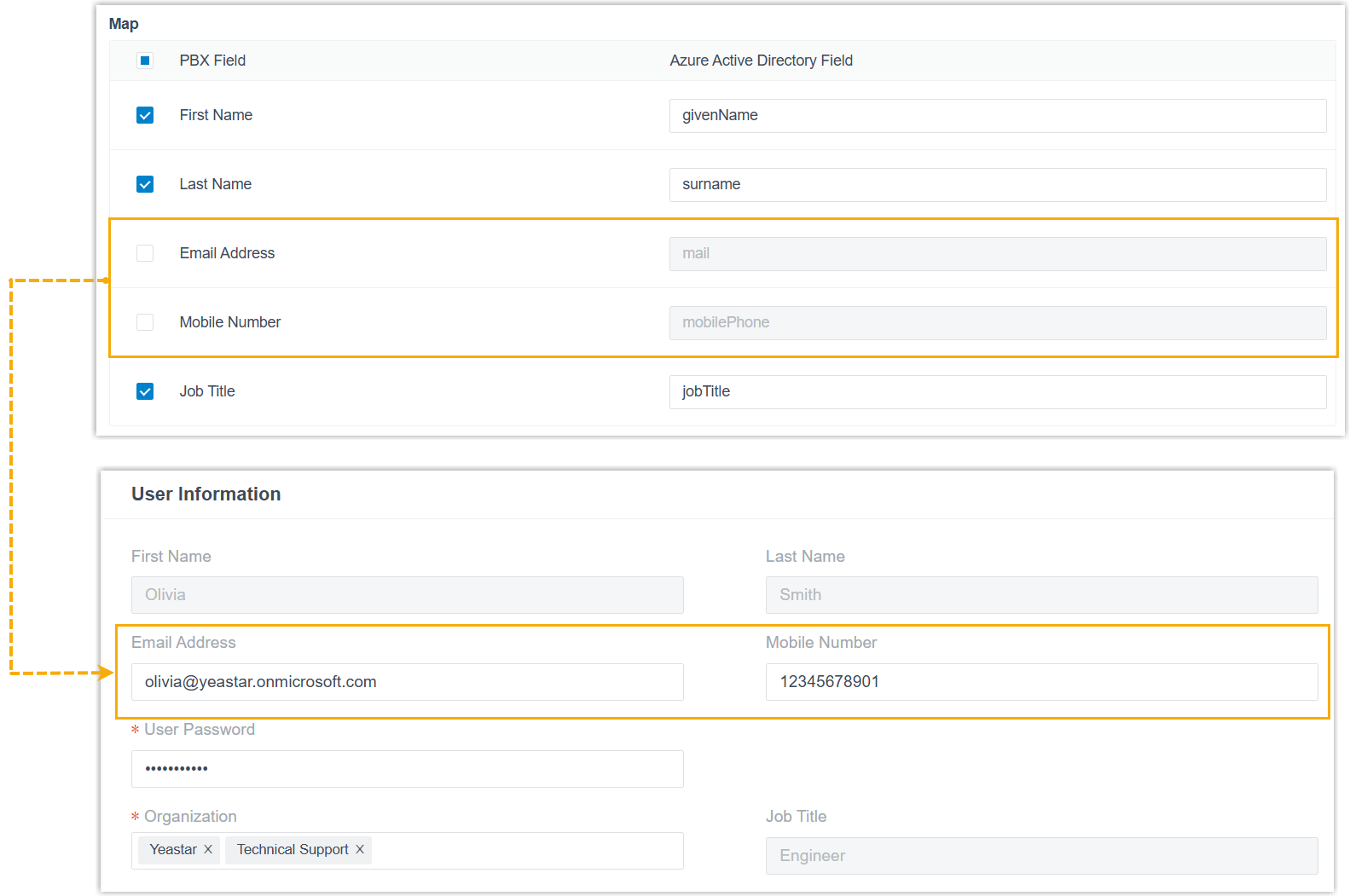
- Added support for modifying the extension information of
synced users.
If you disable the mapping of specific fields or all fields, the corresponding information will not be synchronized, and you can edit the information directly on the PBX.
- Added a configuration item User Avatar
Synchronization. If selected, user
avatars will be synced from Microsoft to the PBX
extensions.
- Optimized the contact synchronization settings: With the simplified integration method, the Outlook contact
synchronization requires only configurations on the PBX, no more
need for handling permission access additionally in
Microsoft.Note: Existing integrations using the legacy method remain unchanged and still require permission configurations in Microsoft.
For more information, see Synchronize Microsoft Outlook Contacts to Yeastar P-Series Software Edition.
- Simplified the integration process. The
integration can now be initiated simply from the PBX, requiring
only a Microsoft account login for permission consent. The PBX
will automatically create the necessary application in Microsoft
Entra ID for the connection, with no manual configuration
required.
- API
-
- Optimized the API interface for the following features:
Feature Description System - Added a value
ai_receptionistto themenuparameter for the interfacesystem/get_menuoptions, which can be used to query the existing AI receptionists in the PBX. - Added support for querying the total and used
capacity of one-time or monthly AI transcription
minutes and AI receptionist minutes using the
interface
system/capacity.For more information, see Developer Guide - Query PBX Capacity.
Extension Added a parameter max_clientsfor the interfacesextension/get,extension/query,extension/create, andextension/update, which can be used to query or specify the maximum number of Linkus Clients that can be logged in with a specific extension simultaneously.Contacts Added parameters organization,job_title,position,industry, andsupervisorfor the Contacts API interfaces (except forcompany_contact/delete), which can be used to query or specify the corresponding information of a company contact.For more information, see Developer Guide - Contacts.
Auto Provisioning - Added a parameter
onsite_proxy_uuidfor the interfacesphone/search,phone/get, andphone/batchcreate, which can be used to query or specify the UUID of an Onsite Proxy instance. - Added values
pnp_via_onsite_proxyanddhcp_via_onsite_proxyto theprovisioning_methodparameter for the interfacesphone/getandphone/batchcreate, which can be used to query or specify the proxy-related provisioning method of an auto-provisioned IP phone.
Inbound Route Added a value ai_receptionistto the destination parameters for the Inbound Route API interfaces (except for theinbound_route/delete), which can be used to query or set the routing destination to an AI receptionist.IVR Added a value ai_receptionistto the destination parameters for the interfacesivr/get,ivr/query,ivr/create, andivr/update, which can be used to query or set the routing destination to an AI receptionist.Recording Added a request parameter filefor the interfacerecording/playtoextension, which allows you to specify a recording using its file name when playing it to an extension. - Added a value
- Optimized the API events (30011) Call State
Changed: Added a
internalobject in themembersarray, which returns the information of internal calls.For more information, see Developer Guide - (30011) Call State Changed.
- Optimized the API interface for the following features: