Enable Call Quality Monitoring
Linkus Mobile Client supports call quality monitoring for extension, helping technical support diagnose and troubleshoot more efficiently when you encounter call issues. This topic describes how to enable call quality monitoring for your extension on Linkus Mobile Client.
Requirements
| Item | Requirement |
|---|---|
| PBX Server | Version 37.23.0.123 or later |
| Linkus App |
|
Prerequisites
System administrator has granted you the permission to enable call quality monitoring for your own extension.
Procedure
- Log in to Linkus Mobile Client.
- At the top-left corner of the Calls page, tap your account.
- Enable call quality monitoring.
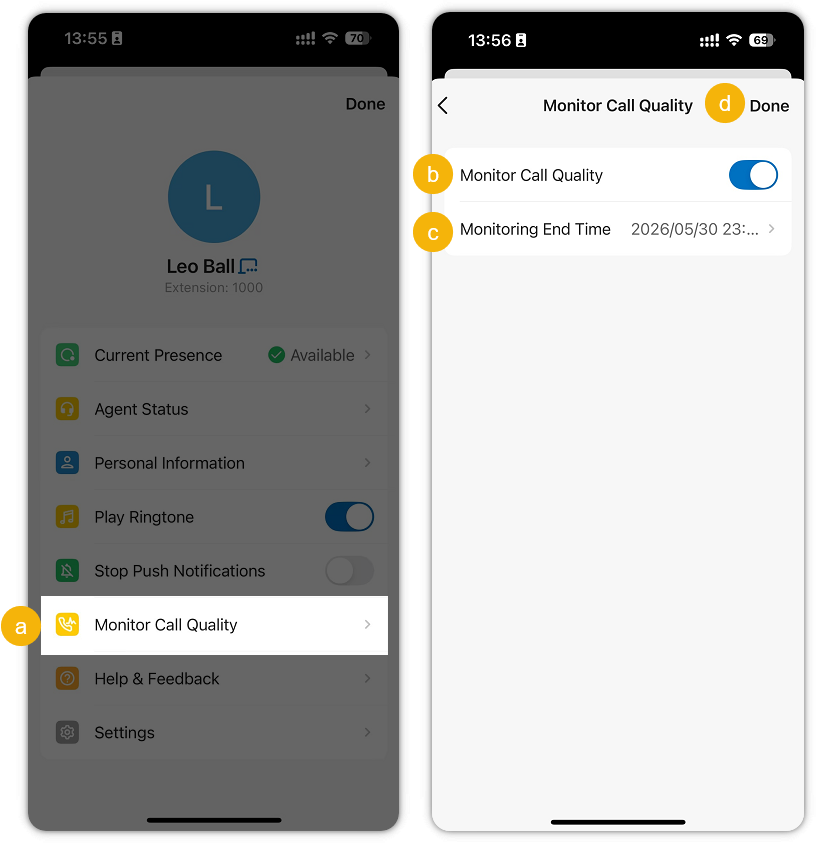
- Tap Monitor Call Quality.
- Turn on the switch of Monitor Call Quality.
- In the Monitoring End Time drop-down list, specify when call quality monitoring should end.
- At the top-right corner, tap Done.
Result
When your extension is on a call in Linkus Mobile Client, call quality data is automatically collected and a call quality report is generated. You can view the report from the corresponding call log.
For more information, see Access Call Quality Monitoring Report.