Allow Multiple Registrations for One Extension Number
Registering one extension number to multiple SIP endpoints and Linkus clients allows the employees to handle calls on any devices. This topic describes how to set the maximum concurrent registrations for an extension.
Background information
For employees who work flexibly anywhere, they can register their extensions on multiple SIP endpoints and Linkus clients, such as an IP phone in their office, a softphone on computer, or a SIP client on mobile phone. In this way, an incoming call can ring all endpoints and Linkus clients at the same time, and users can handle calls at anywhere on any devices.
Procedure
- Log in to PBX web portal, go to , edit the desired extension.
- In the Extension Information section, set the maximum
number of concurrent registrations for the extension as needed.
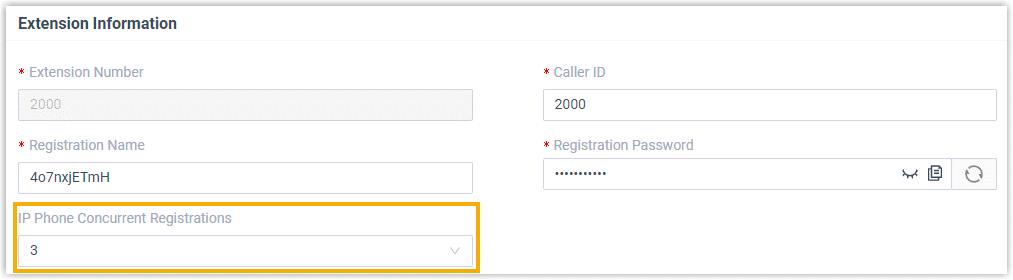
Setting Description IP Phone Concurrent Registrations In the drop-down list, select the maximum number of SIP phones that can simultaneously register with the extension. In this example, select 3.
Note: The maximum number is 5.Linkus Web Client Concurrent Registrations In the drop-down list, select the maximum number of Linkus Web Clients and Yeastar for Teams Desktop Plugins that can be simultaneously logged in to the extension. In this example, select 3.
Note: The maximum number is 3.Linkus Desktop Client Concurrent Registrations In the drop-down list, select the maximum number of Linkus Desktop Clients that can be simultaneously logged in to the extension. In this example, select 3.
Note: The maximum number is 3.Linkus Mobile Client Concurrent Registrations In the drop-down list, select the maximum number of Linkus Mobile Clients that can be simultaneously logged in to the extension. In this example, select 2.
Note: The maximum number is 3. - Click Save and Apply.
Result
The extension can be logged into up to 3 Linkus Web Clients and Yeastar for Teams Desktop Plugins in total, 3 Linkus Desktop Clients, 2 Linkus Mobile Clients, while also being registered on up to 3 SIP phones simultaneously.
When the extension receives a call, all its logged-in Linkus clients and registered SIP phones will ring (based on the configured ring strategy). The extension user can handle the calls from any of these devices.
To prevent other endpoints from receiving a new incoming call when an endpoint is busy, go to to enable All Busy Mode for Endpoints for the extension.