Function Keys Overview
Function keys provide quick access to commonly used operations and features, allowing users to perform specific operations and monitor feature status more efficiently.
What is function key?
A function key is a programmable key that can be assigned different functions. NovoOne supports the following function key types:
| Key Type | Function |
|---|---|
| N/A | No function is assigned to the key. |
| Line | Select a SIP account for making calls. Note: The key type is supported on IP
phones only.
|
| BLF |
|
| Speed Dial | Place a call to frequently dialed numbers. |
| Check Voicemail |
|
| Park & Retrieve |
|
| Intercom | Place an intercom call to a specific extension. |
| DTMF | Send DTMF digits without entering them manually each time. Note: Only numbers,
#,
and * are supported. |
| Agent Login/Logout |
|
| Agent Pause/Unpause |
|
| Call Forward | Always forward incoming calls to a specified destination. Note: The key type is supported on IP
phones only.
|
| Action URL | Send an HTTP GET request to a specified URL. Note: The key type is supported on IP
phones only.
|
How to set up function keys?
NovoOne allows both administrators and users to configure
function keys.
- Administrator can configure function keys for user in NovoOne tenant portal. This can be achieved by either
configuring function keys individually for each user, or creating a function
key template and apply it to multiple users in bulk. For more information, see the following topics:
- Users can configure function keys for their own accounts in NovoOne Web Client.
How to use function keys?
Users can use function keys on their NovoOne Web Client or
provisioned IP phones.
- On NovoOne Web Client, users can click a function key to
perform the corresponding operation.
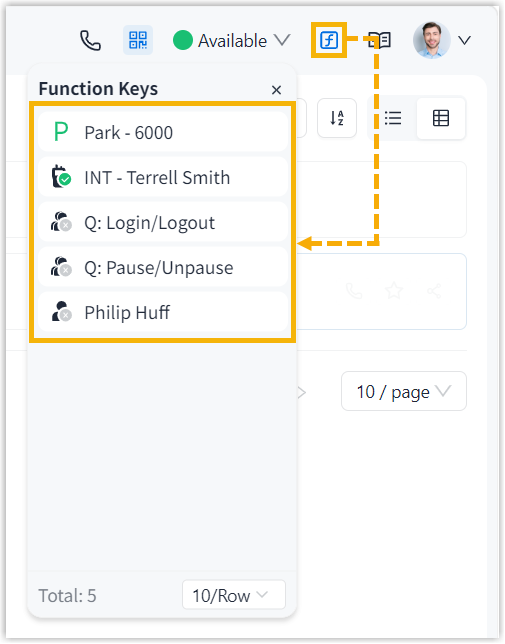
- On provisioned IP phones, users can identify feature status through the LED indicator and perform corresponding operation.