Set Destination for a DID number
After your service provider assigns DID numbers to your tenant, you can set destinations for the numbers to define where incoming calls to these numbers are routed. This topic describes how to set a destination for an available DID number.
Prerequisites
- Service provider has assigned available DID numbers to your tenant.
- You have set up the desired destination. Supported destination types and
their corresponding setup references are listed in the table below.
Destination type Setup reference User Create a User Queue Set up a Queue IVR Set up an IVR Ring Group Set up a Ring Group AI Receptionist Add and Configure an AI Receptionist
Procedure
- Log in to NovoOne Tenant portal, go to .
The available DID numbers assigned by your service provider display in the list.
- Click
 beside the desired DID number.
 - In the pop-up window, complete the following settings.
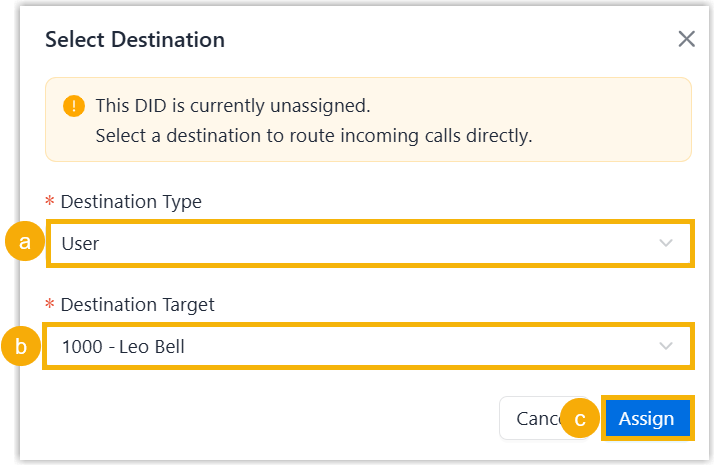
- In the Destination Type, select the desired destination type.
- In the Destination Target, select the desired destination.
- Click Assign.
Result
On the DID numbers list, the configured destination is displayed in the Destination column of the DID number, and the Call Handling column displays Direct Assignment.
When an external caller dials the DID number, the caller can reach the destination directly.

- If a match exists, Call Handling column changes
to Inbound Route, and the Destination
column displays the destination for the inbound
route.
When an external caller dials the DID number, the caller can reach the destination for the inbound route.
- If no match is found, Call Handling column changes to Unassigned, and the Destination column displays "-".