IP Phone Overview
You can auto provision IP phones on NovoOne Tenant, simplifying device deployment. This topic describes auto provisioning supported devices and methods.
Auto provisioning supported devices
NovoOne Platform supports various models for Auto Provisioning.
For more information, see Auto Provisioning - Supported Devices.
Auto provisioning methods
You can auto provision IP phones via Redirection and Provisioning Service (RPS). For more information, see Auto Provision an IP Phone.
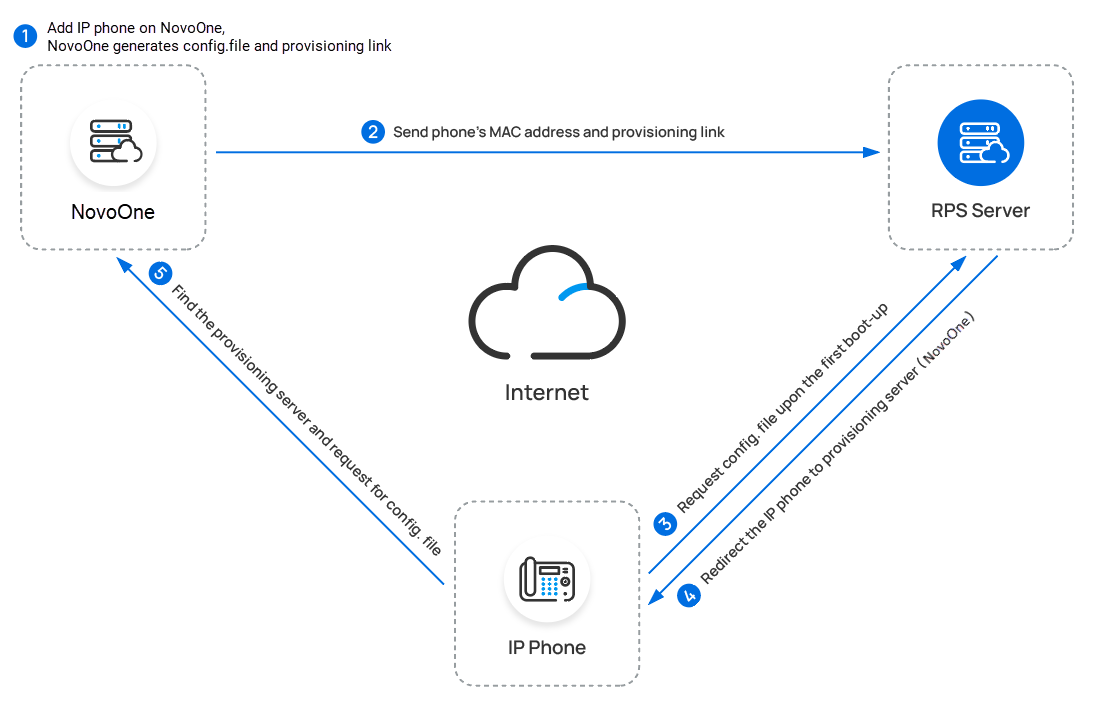
Auto provisioning options
You can configure auto provisioning option to generate random and complex passwords for admin, user, and var accounts on auto provisioned phones, eliminating the need to manually change the default password for each phone. For more information, see Automatically Generate Random Passwords for Phones.Auto provisioning settings
After the IP phone is successfully provisioned, you can perform the following
advanced operations on the phone:
- Customize general settings of a provisioned IP phone. For more information, seeModify Settings of a Provisioned IP Phone.
- Configure distinctive ringtones for a provisioned IP phone to quickly identify incoming calls. For more information, see Configure Distinctive Ringtones for a Provisioned IP Phone.
- Configure function keys for a provisioned IP phone to monitor status of specific objects or quickly perform specific operations. For more information, see Function Keys Overview.