Upgrade PBX Firmware
If a new PBX firmware file is stored on the YMP server, you can upgrade your customers' PBXs to the new version.
Note: PBX firmware cannot be downgraded.
- Go to .
- Select the desired PBXs, click Upgrade.
-
On the Upgrade page, select the Image Version and
Upgrade Mode.
Note:
- The PBX will stop working during the firmware upgrade process.
- To check what's new for the firmware version, go to , click
 beside a firmware to check
the relevant release note.
beside a firmware to check
the relevant release note.
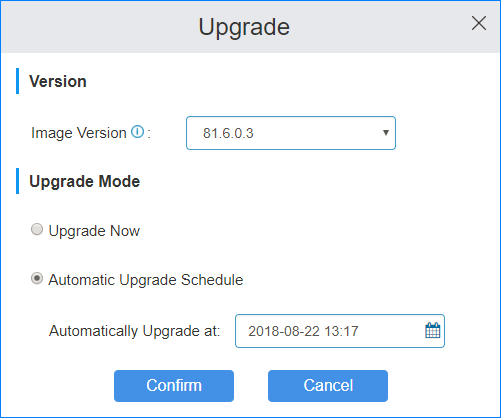
- Upgrade Now: Upgrade the PBX firmware immediately.
- Automatic Upgrade Schedule: Set a time to schedule auto upgrade.
- Click Confirm.