Export P-Series Cloud PBXs
This topic describes how to export P-Series Cloud PBXs for data analysis.
Procedure
- Log in to Yeastar Central Management, go to .
- Export P-Series Cloud PBXs as needed.
- To export all the P-Series Cloud PBXs, click
Export.
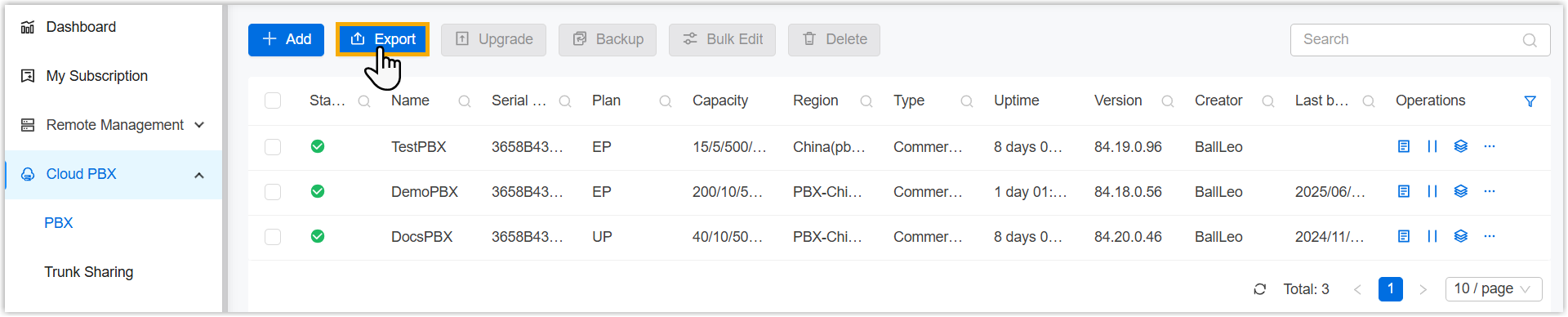
- To export specific P-Series Cloud PBXs, do as follows:
- Filter P-Series Cloud PBXs.

- Click
 beside a
desired column.
beside a
desired column. - Enter or select a desired value.
- Click Search.The matched P-Series Cloud PBXs are displayed.Tip: To clear filter, click again, then
click
Reset.
- Click
- Click Export.
- Filter P-Series Cloud PBXs.
- To export all the P-Series Cloud PBXs, click
Export.
- In the pop-up window, select the historical resource utilization over the
past 2 months you need to export.Note: Exporting historical resource utilization may significantly increase export time and system resource usage.
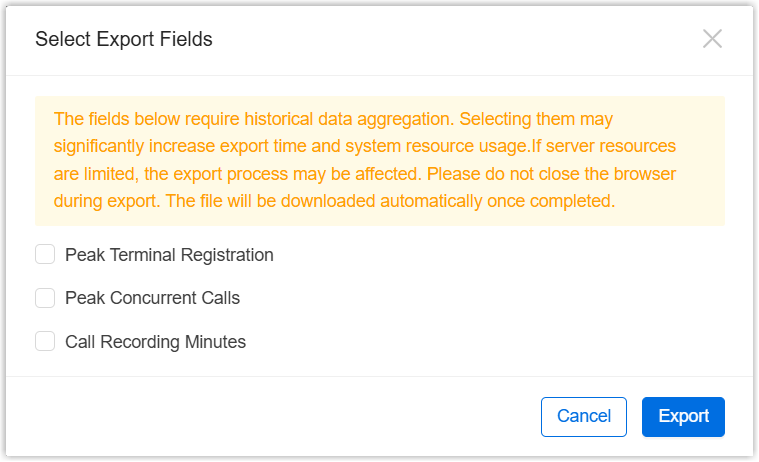
- Peak Terminal Registration: Select to export monthly peak registration number for each terminal type.
- Peak Concurrent Calls: Select to export monthly peak concurrent calls.
- Call Recording Minutes: Select to export monthly sum of used recording minutes.
- Click Export.
Result
P-Series Cloud PBXs information are exported to a .xlsx file.