Route Inbound Calls to Users Based on Specific DID Numbers
NovoOne supports routing inbound calls directly to users based on specific DID numbers. This is typically used when your company has non-consecutive DID numbers that need to be mapped individually to specific user extensions.
Procedure
- Log in to NovoOne Tenant portal, go to .
- Click Add.
- Configure the inbound route.
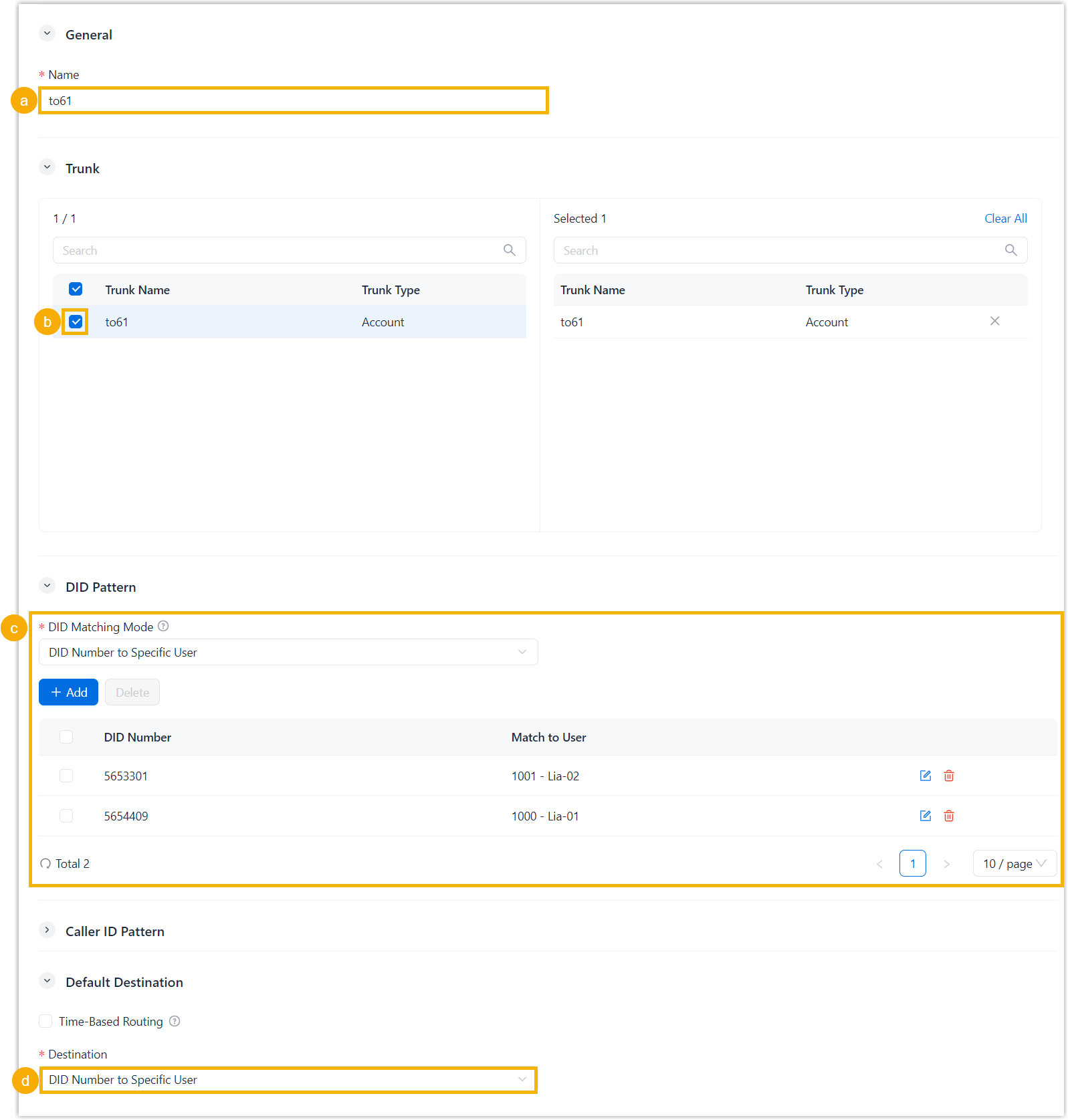
- In the Name field, enter a name to help identify the inbound route.
- In the Trunk section, select the
desired trunks to the Selected box.
Inbound calls received through the selected trunks are routed according to this inbound route.
- In the DID Pattern section, configure the DID
matching settings.
- In the DID Matching Mode drop-down list, select DID Number to Specific User.
- Click Add to specify a DID number and the corresponding user extension, then save the setting.
- In the Default Destination section, select DID Number to Specific User from the Destination drop-down list.
- Click Save.
Result
When an external caller dials a configured DID number, the call is routed to the user mapped to that DID number.