Route Inbound Calls to Users Based on DID Range
NovoOne supports routing inbound calls directly to users based on DID ranges. This is typically used when your company has a range of consecutive DID numbers that map to a corresponding range of user extensions.
Procedure
- Log in to NovoOne Tenant portal, go to .
- Click Add.
- Configure the inbound route.
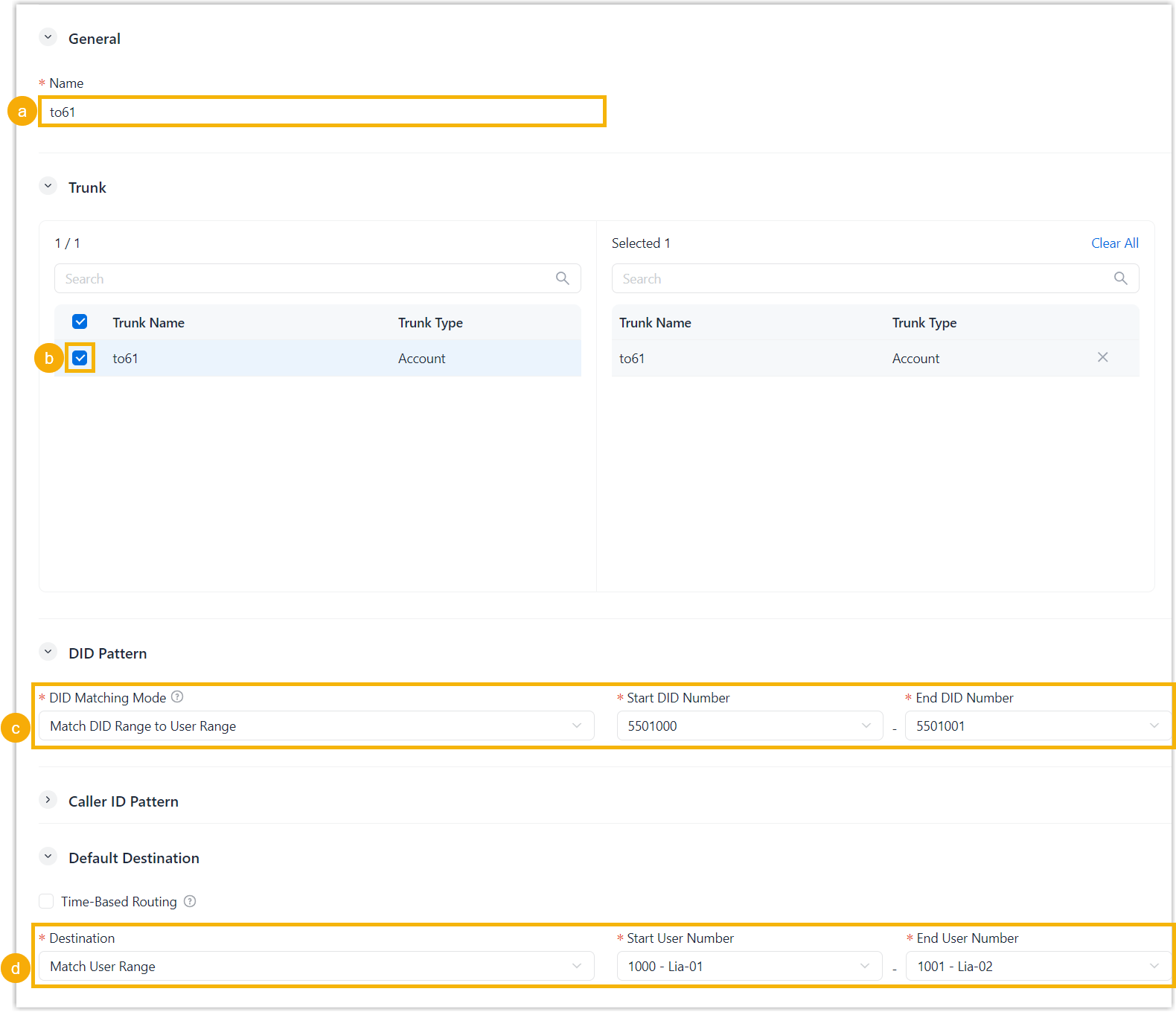
- In the Name field, enter a name to help identify the inbound route.
- In the Trunk section, select the
desired trunks to the Selected box.
Inbound calls received through the selected trunks are routed according to this inbound route.
- In the DID Pattern section, configure the DID
matching settings.
- DID Matching Mode: Select Match DID Range to User Range.
- Start DID Number & End DID Number: Specify the start and end numbers of the DID range.
- In the Default Destination section, configure
the destination settings.
- Destination: Select Match User Range.
- Start User Number & End User Number: Select the start and end numbers of the user range.
- Click Save.
Result
When an external caller dials a DID number within the configured range, the call is routed to the corresponding user within the configured user range.