Configure AI Call Transcription
The AI-powered Call Transcription feature supports transcribing a call between two parties into readable texts in real time, and automatically generating a summary after the call ends, helping you efficiently review call transcript, key points and to-do items. This topic describes how to configure AI call transcription on Linkus Web Client.
Note: The configuration will be synchronized across your Linkus UC Clients.
Requirements
- The firmware of the PBX server is 83.20.0.74 or later.
-
System administrator has enabled Call Transcription for your extension.
Procedure
- Log in to Linkus Web Client, go to .
- In the Call Transcription section, configure the
following settings according to your need.
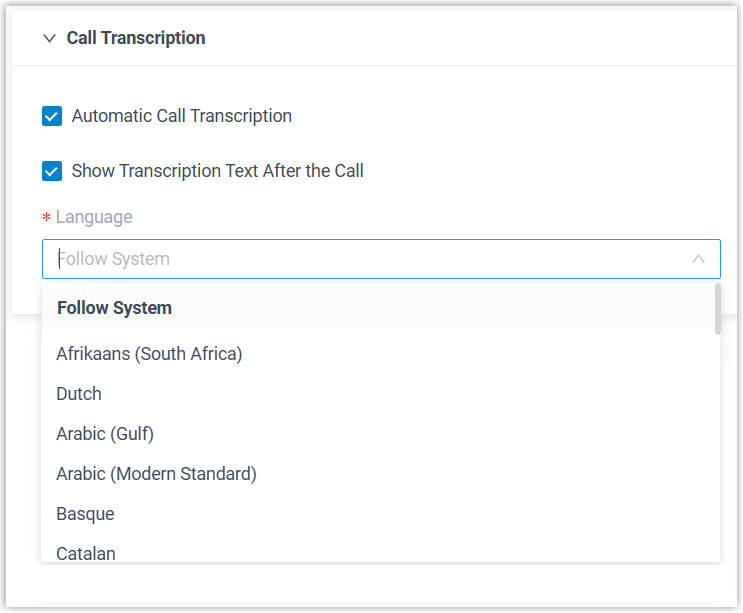
Setting Description Automatic Call Transcription Specify whether to automatically transcribe your calls in real time. Note: For calls belonging to call types for which the system administrator has configured automatic transcription, the call audio will still be automatically transcribed even if this option is disabled.Show Transcription Text After the Call Specify whether to automatically display the transcript and summary after the call ends. Note: Whether a summary can be automatically generated and displayed also depends on the system administrator's configurations on the PBX server.Language Select the desired language for call transcription. - Click Save.
Result
- Call audio can be recognized and transcribed in the configured language in real time, and can be automatically summarized after call ends.
- You can access the AI-generated transcript and summary of transcribed calls in call logs.