Dial by Name
This topic provides an overview of the Dial by Name component, and describes its configuration, usage example, as well as supported connections.
Component introduction
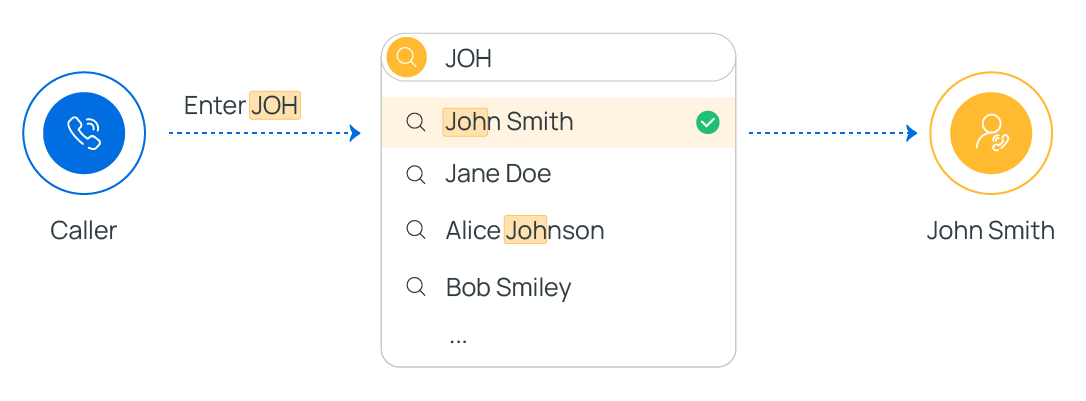
Dial by Name component is one of the end components to terminate caller's connection to the current call flow. It allows callers to reach extension user by entering the first three letters of the user's name.
Component configuration
No configuration is needed for this component.
However, to ensure that callers can successfully reach extension users, make sure the following settings are properly configured.
- Set Caller ID Name for extension.
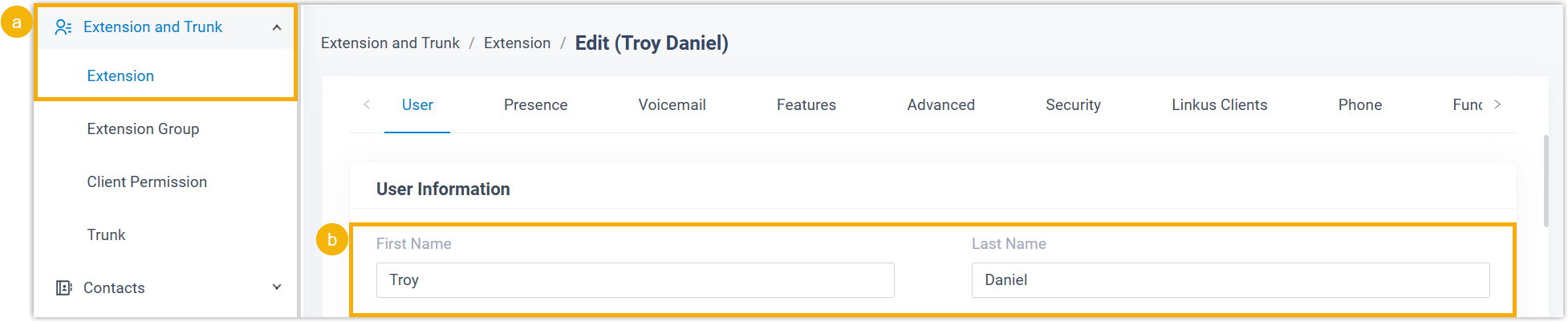
- Go to , edit desired extension(s).
- In the User Information section, enter the user's first name and last name.
- Set display format for extension's Caller ID Name.

- Go to .
- In the Name Display Format drop-down list, select
a display format.
- To allow callers to reach extension users by first name, select First Name Last Name with Space Inbetween.
- To allow callers to reach extension users by last name, select Last Name First Name with Space Inbetween or Last Name First Name without Space Inbetween.
When callers enter 3 letters, the system will search from the beginning of extensions' Caller ID Names based on the selected format.
Component usage example
When a caller reaches the Dial by Name component, the system guides the caller through the following process to search for an extension user.
- The system plays the announcement "Welcome to the directory. Please enter the first three letters of your party's first or last name, using your touchtone keypad, use the 7 key for Q, and the 9 key for Z" to prompt caller for input.
- The caller enters the first three letters of an extension user's first name.Tip: For example, to search for "Phillips Huff", the caller needs to enter 7-4-4 (corresponding to
PHI). - The system looks for the best match and plays the corresponding
announcement.
- If no match is found, the system plays the announcement "No directory entries match your search".
- If one or more matches are found, the system plays the announcement
"[Name] extension [Number] If this is the person you are looking
for, press 1 now, otherwise please press star now", then continue
based on caller's input.
- If the caller presses 1, the system will route the call to the extension user.
- If the caller presses *, the system will continue the next match and make announcement. If no more matches, the system plays the announcement "There are no more compatible entries in the directory".
Component connections
Dial by Name component comes with a built-in Call End branch. This branch can be connected on one component, which can be any of the components listed below.
| Component | Description |
|---|---|
| Internal Data Ops | Internal Data Ops component allows you
to query and update data from PBX-native database. For more
information, see the following topics: |
| Email Sender | Email Sender component allows you to
send emails, enabling real-time notifications, alerts, or
delivery of user-specific information. For more information, see Email Sender. |
| Database Access | Database Access component allows you
to interact with database during a call flow. You can execute
SQL operations to retrieve or update data as needed. For more information, see Database Access. |
| HTTP Request | HTTP Request component allows you to
send HTTP requests to external web servers, enabling data
exchange with third-party services. For more information, see HTTP Request. |
| Send SMS | Send SMS component enables the system
to automatically send SMS messages to a recipient without
creating a new session. For more information, see Send SMS. |
| Send WhatsApp Template Message | Send WhatsApp Template Message
component enables the system to automatically send WhatsApp
messages to a recipient using specified WhatsApp message
templates. For more information, see Send WhatsApp Template Message. |