Configure Voice Prompt Preferences
This topic describes how to configure voice prompt preferences for different call scenarios.
Procedure
- Log in to NovoOne Tenant portal, go to .
- In the Prompt Preferences tab, configure the prompt
preference settings, then click Save.
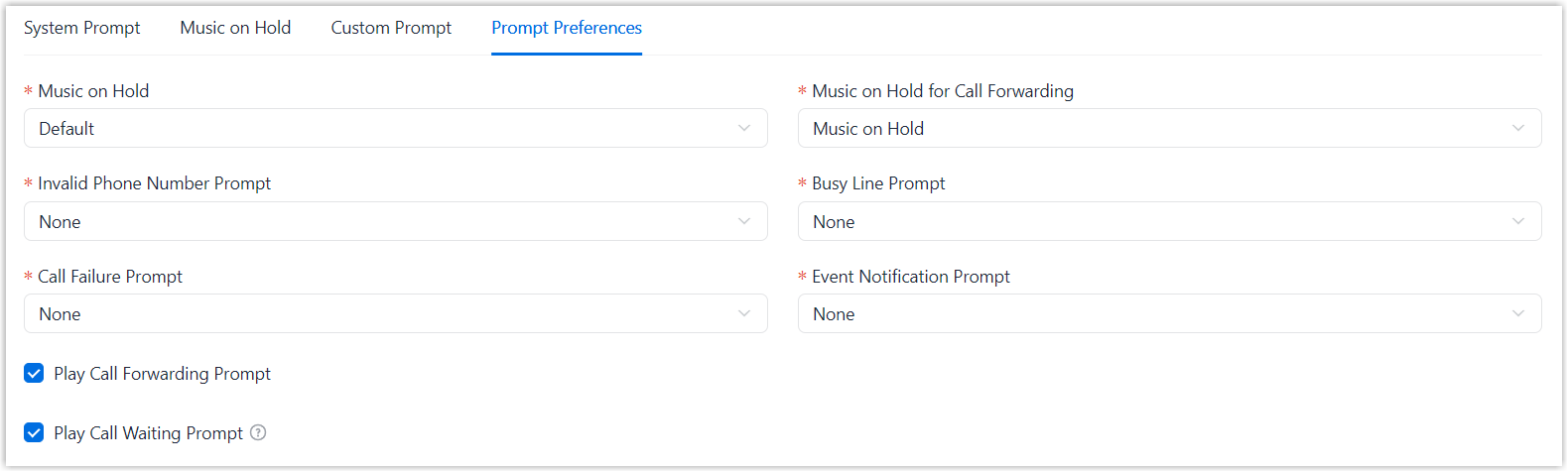
Setting Description Music on Hold Set the music played when a call is on hold. Note: Available music is synchronized from . You can select from existing music, or choose one of the following options.- Create New: Add a new Music on Hold playlist.
- Default: Play the default Music on Hold playlist (the playlist named Default in ).
Music on Hold for Call Forwarding Set the music played when the caller is put on hold during call forwarding. - Music on HoldNote: The music played is the one configured in Music on Hold.
- Ringback Tone
Invalid Phone Number Prompt Set the prompt played when the callee number is invalid and a 603 response is returned. Note: Available prompts are synchronized from . You can select from existing prompts, or click Create New to add a new custom prompt.For more information, see Add a Custom Prompt.
Busy Line Prompt Set the prompt played when the trunk is in use and a 486 response is returned. Note: Available prompts are synchronized from . You can select from existing prompts, or click Create New to add a new custom prompt.For more information, see Add a Custom Prompt.
Call Failure Prompt Set the prompt played when a call fails to be sent out. Note: Available prompts are synchronized from . You can select from existing prompts, or click Create New to add a new custom prompt.For more information, see Add a Custom Prompt.
Event Notification Prompt Set the prompt played when the system places a call to notify the callee that a specific event occurs. Note: Available prompts are synchronized from . You can select from existing prompts, or click Create New to add a new custom prompt.For more information, see Add a Custom Prompt.
Play Call Forwarding Prompt Set whether to play a system prompt to inform the user that the current call will be forwarded. If enabled, the system plays "Your call is being transferred".
Play Call Waiting Prompt Set whether to play a system prompt when the caller is waiting to be connected to a user who is on a call. If enabled, the system plays "Please hold on, the number you dialed is busy now.", then plays a ring tone or ringback tone.- For internal calls, a ring tone is played.
- For external calls, whether a ringing tone or a ringback tone is played depends on the inbound route configuration.
- Click Save.
Result
The voice prompt preferences are applied to newly established calls in corresponding call scenarios.