View Email Sent Log
NovoOne records emails sent from each Tenant portal, such as user welcome emails and missed call notification emails, helping you track email delivery.
Procedure
- Log in to NovoOne Tenant portal, go to .
- Set filter criteria to filter the desired email sent logs.
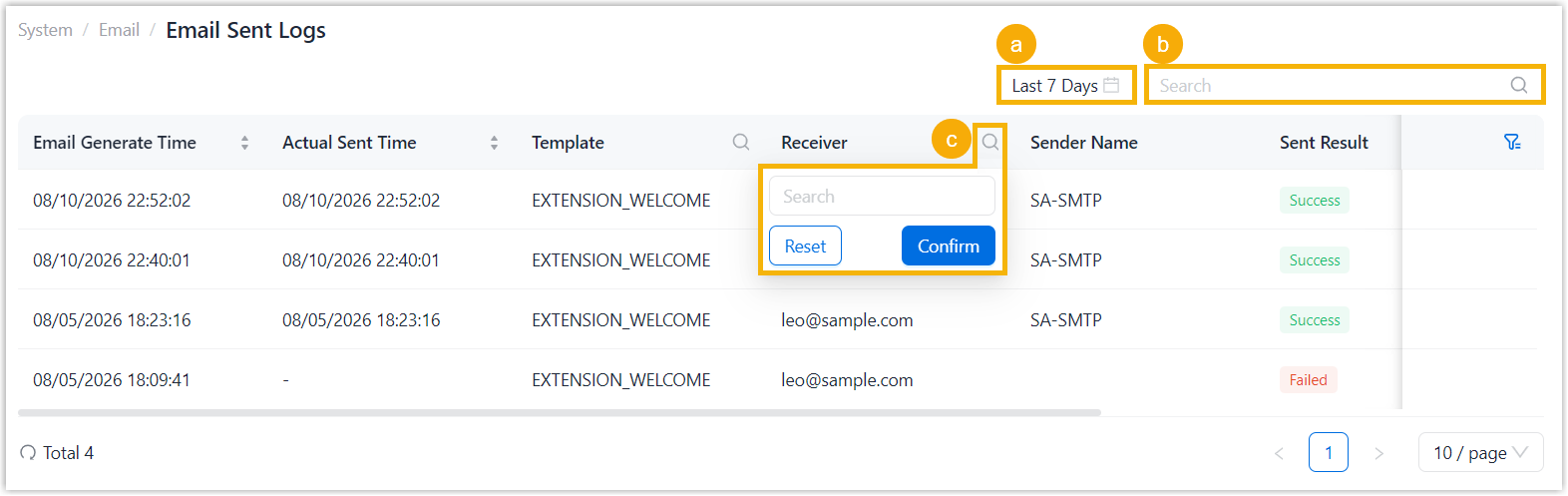
- Specify a time range.
- Search by email generation time, email template, recipient, or sent result.
- Set column filters to further narrow down the results.
Result
Email sent logs that match the filter criteria are displayed in the list. The following table describes the information available in the email sent log list.

| Item | Description |
|---|---|
| Email Generate Time | The time when the email was generated. |
| Actual Sent Time | The time when the email was actually sent. |
| Template | The email template used to send the email. |
| Receiver | The recipient's email address. |
| Sender Name | The name of the email sender. |
| Sent Result | The email sending result.
|
| Response Code | The response code returned by the SMTP server. |
| Failure Reason | The detailed error message returned when the email failed to be sent. |