Configure Call Forwarding Feature Code
This topic describes how to configure call forwarding feature codes, allowing users to manage call forwarding settings for the current presence status, including the call forwarding status and destination.
Procedure
- Log in to NovoOne Tenant portal, go to .
- In the Call Forwarding section, configure the feature
code settings.
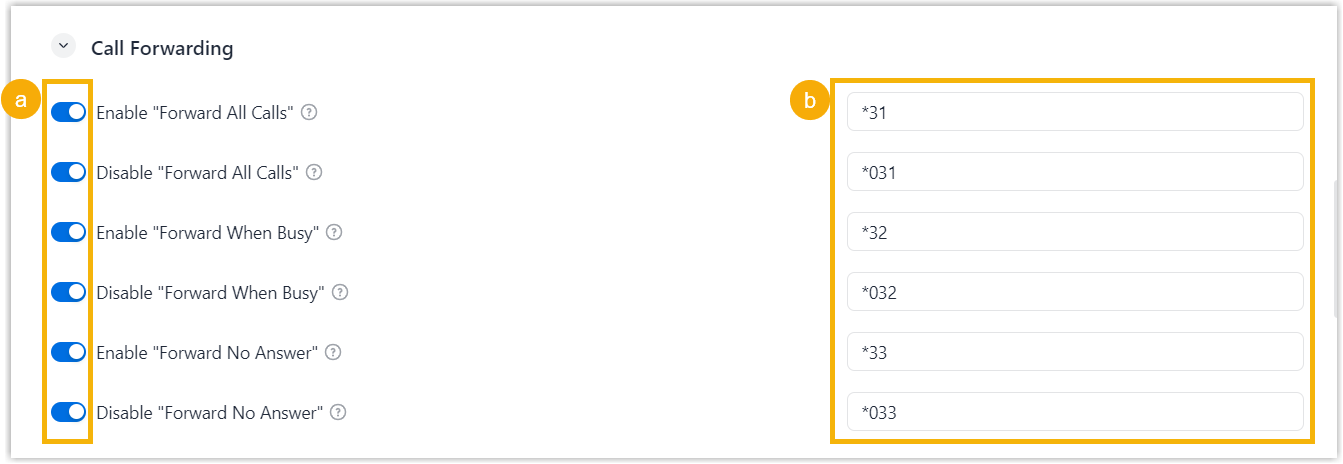
- Turn on the switch for the desired forwarding type.
- Retain the default feature code, or modify it as needed.
- Click Save.
Result
Users can manage call forwarding settings for the current presence status by dialing
a feature code.
- To change the enablement status of call forwarding, dial {call_forwarding_feature_code}.
- To change the destination of call forwarding, dial {call_forwarding_feature_code} + {target_number}.