Limit API Request Rate for Subordinate Users
Yeastar Central Management supports limiting API request rate for subordinate users (hosting users and resellers) using the token bucket algorithm. This topic describes how to configure the API request rate limits for a user.
Requirements
- The firmware of Yeastar Central Management is 87.16.0.51 or later.
- The subordinate user has enabled API feature.
Procedure
- Log in to Yeastar Central Management, go to .
All subordinate users who have enabled API are displayed in the list.
- In Operations column, click
 beside
the desired subordinate user.
beside
the desired subordinate user.
A Traffic Resource Monitoring window pops up.
- In the pop-up window, turn on the switch of Rate
Limits, and complete the following settings.
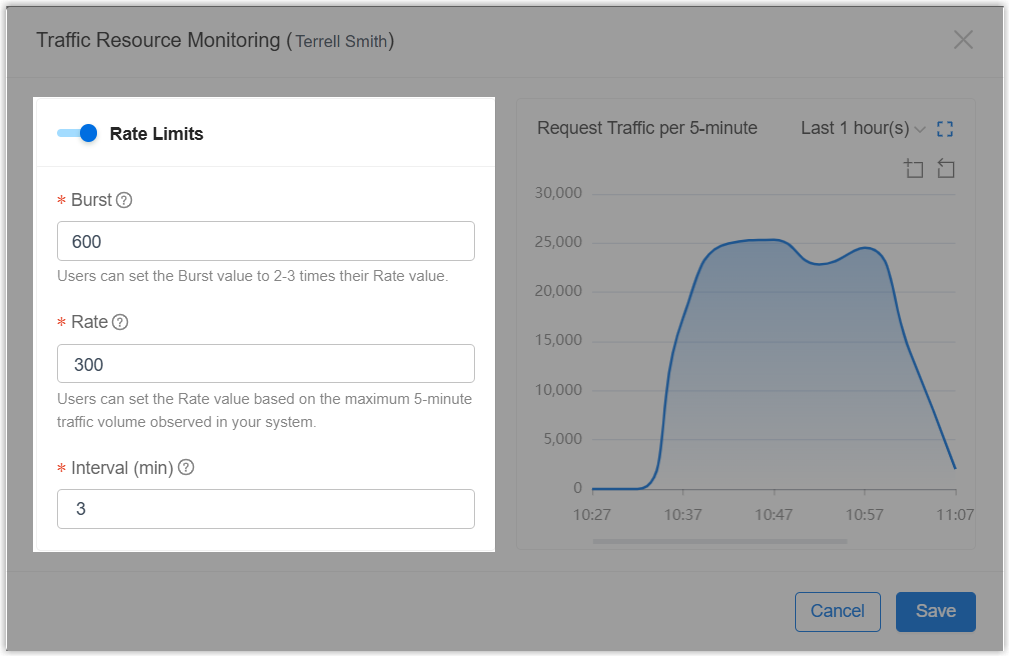
- Burst: Specify the maximum number
of tokens the bucket can store.Tip: It is recommended to set the value to 2-3 times the Rate value.
- Rate: Set the number of tokens to
add during each time interval configured in Interval.Note: The value must not exceed the value set in Burst.
- Interval (min): Specify how often the system generates and adds tokens to the token bucket.
For example, the configuration (Burst: 600, Rate: 300, Interval: 3) indicates that the token bucket can store up to 600 tokens, and the system adds 300 tokens to the bucket every 3 minutes.
- Burst: Specify the maximum number
of tokens the bucket can store.
- Click Save.
Result
- API request rate limit is enabled for the specified subordinate user based
on the Client ID. The configuration is displayed in the rate limit
list.

- The system will monitor the number of API requests for the subordinate user
and record the data every 5 minutes. If the number of API requests in a
5-minute interval approaches the specified value configured in Rate or Burst, and the following alarm notifications are enabled, the relevant
alarm will be triggered.
- Rate Threshold Alert: The API request traffic exceeds 80% of the value set in Rate. Once triggered, the alert will not be triggered again within the next 30 minutes.
- Burst Capacity Alert: The API request traffic exceeds 80% of the value set in Burst. Once triggered, the alert will not be triggered again within the next 15 minutes.
- Rate Limit Triggered: The API request traffic exceeds the value set in Burst. Once triggered, the alert will not be triggered again within the next 5 minutes.
For more information about the API request traffic monitoring, see Check API Request Traffic for Subordinate Users.