Upload a Backup File of P-Series Appliance / Software Edition
This topic describes how to upload a backup file of P-Series Appliance / Software Edition, so that you can restore PBX to the backup file.
Requirements
- Your account has subscribed to RM Premium (Self-hosted) service, or the remotely connected P-Series Appliance / Software Edition has subscribed to Remote Management Connection service.
- The firmware of Yeastar Central Management is 87.15.0.83 or later.
Limitations
The backup file to be uploaded must be in .bak format and less than
300MB.
Procedure
-
Log in to Yeastar Central Management, go to .
-
Click Upload.
-
In the pop-up window, do as follows:
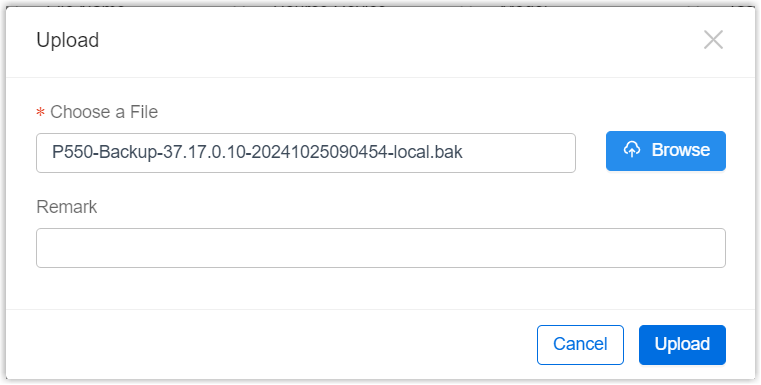
- Click Browse to choose a desired backup file.
- Optional: In the Remark field, add a note to the backup file.
- Click Upload.
A pop-up window prompts that the backup file is being uploaded, you can click Collapse to collapse the window to the bottom-right corner.
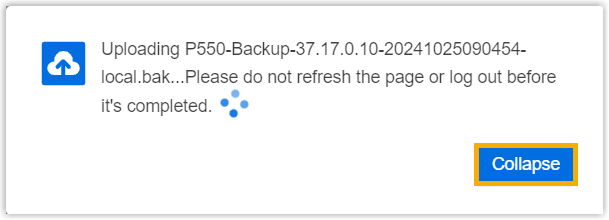
- After the backup file is uploaded, click Confirm.
Result
The backup file is uploaded.

What to do next
To restore a specific P-Series Appliance/Software Edition to the backup file, see Restore P-Series Appliance/Software Edition from Source Backup and Restore P-Series Appliance / Software Edition from Another Backup.