Set Max Number of Backup Files
This topic describes how to set maximum number of backup files that can be retained for each P-Series Cloud Edition or remotely connected P-Series Appliance/Software Edition on Yeastar Central Management, regardless of whether the backup files are generated by tasks or uploaded manually.
Requirements
The firmware of Yeastar Central Management is 87.16.0.19 or later.
Procedure
- Log in to Yeastar Central Management, go to .
- At the top-right corner of the page, click Max Number of Backup
Files.
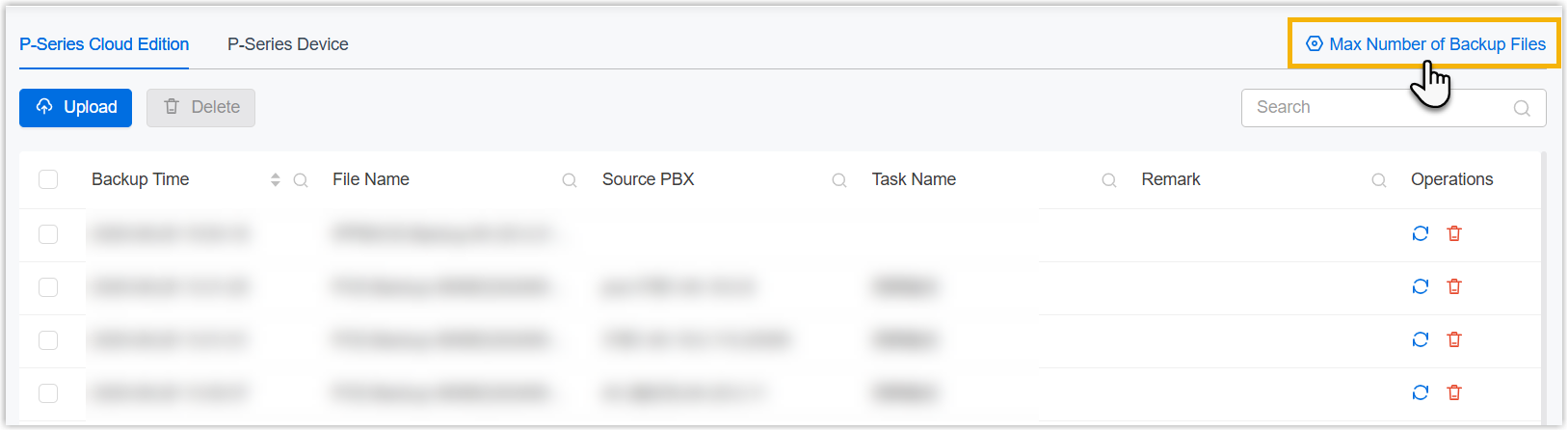
- In the pop-up window, do as follows:
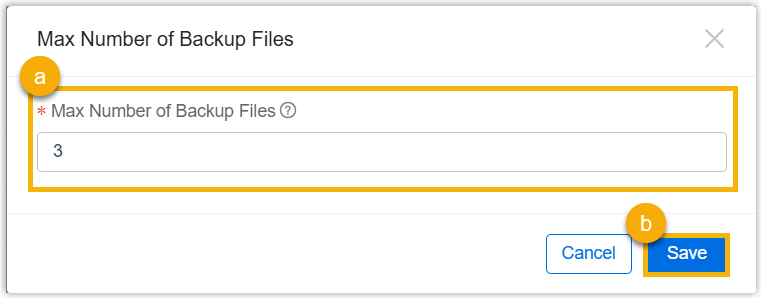
- In the Max Number of Backup Files field, specify
the maximum number of backup files.Note: The supported value range is 1 to 10.
- Click Save.
- In the Max Number of Backup Files field, specify
the maximum number of backup files.
- Click Confirm.
Result
The system will check if the number of backup files retained for each P-Series Cloud PBX or remotely connected P-Series Appliance/Software Edition on Yeastar Central Management exceeds the limit. If so, the oldest backup files will be deleted.