Set up Chat Journal to Zoho Desk
After the integration, you can set up chat journal to automatically synchronize the complete chat history between users and Zoho Desk contacts to Zoho Desk system for follow-up and analysis.
Important: Chat histories are synced only when the
recipient's number of the chat session exactly matches the contact number stored in
the Zoho Desk (e.g.,
+1123456789 on both sides).Requirements
The firmware version of Yeastar P-Series Cloud Edition is 84.23.0.83 or later.
Prerequisites
- PBX Server
-
- You have integrated Yeastar P-Series Cloud Edition with Zoho Desk
- At least one messaging channel is configured on PBX.
- Linkus UC Client
- The user (associated with a PBX extension) has created an external chat session with a Zoho Desk contact via the messaging channel on the Linkus client.
Procedure
- Log in to PBX web portal, go to .
- On the Helpdesk integration page, turn on Chat Journal.
- Configure the synchronization settings.
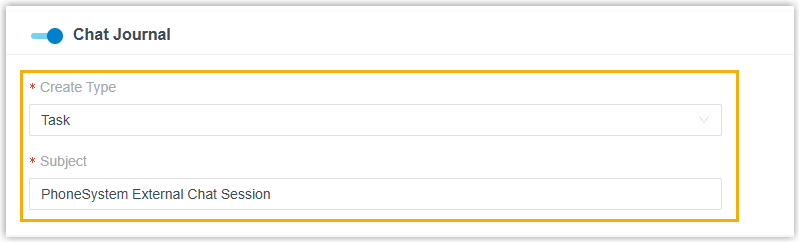
- Create Type: Select the object (Task or Call) to create in Zoho Desk for storing the synced chat messages.
- Subject: Set the subject for the synchronized
record. Supports variables. Note: The contents can be composed of variables. For the supported variables, see XML Descriptions for Integration Template - Chat Journal Scenario Variables.
- Click Save.
Result
When an external chat session with a Zoho Desk contact is closed (by either the user or the system), the PBX automatically synchronizes the entire chat history to the contact's details page.
Note: The chat messages will be synced in chronological order,
including message channel type, time, sender, and content.