Upload Avatar for Live Chat Channel
Upload a photo to the PBX, which can be used as a custom avatar of a Live Chat channel.
Request URL
POST {base_url}/{api_path}/message_channel/uploadphoto?access_token={access_token}Request parameters
| Parameter | Required | Type | Description |
|---|---|---|---|
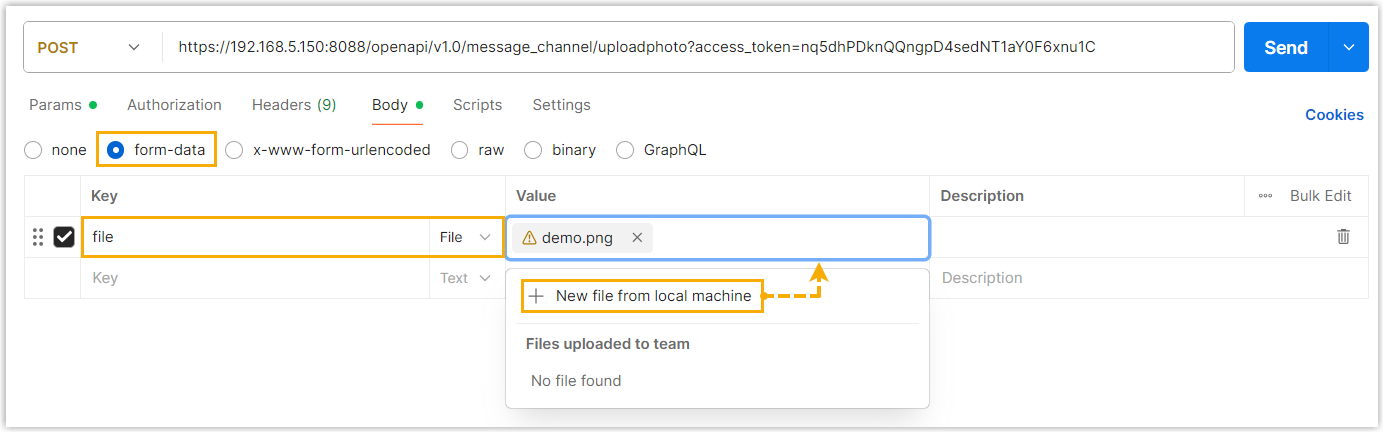
| file | Yes | File | The desired avatar file, uploaded via form-data. |
Response parameters
| Parameter | Type | Description |
|---|---|---|
| errcode | Integer | Returned error code.
Note: You can check the error code and
error message in Error Code and Error Message.
|
| errmsg | String | Returned message.
|
| file | String | The file name (ID) of the uploaded avatar. |
Examples
Request example
POST /openapi/v1.0/message_channel/uploadphoto?access_token=nq5dhPDknQQngpD4sedNT1aY0F6xnu1C HTTP/1.1
Host: 192.168.5.150:8088
Content-Type: multipart/form-data; boundary=----WebKitFormBoundary7MA4YWxkTrZu0gW

------WebKitFormBoundary7MA4YWxkTrZu0gW
Content-Disposition: form-data; name="file"; filename="/D:/project/avatar/demo.png"
Content-Type: image/png

(binary data) # actual file content here
------WebKitFormBoundary7MA4YWxkTrZu0gW--
Response example
HTTP/1.1 200 OK
{
    "errcode": 0,
    "errmsg": "SUCCESS",
    "file": "livechat-868733f7-90c0-4dcc-89ca-219d0484bd60"
}