Manage Knowledge Base Contents
You can edit or delete existing content entries in the knowledge base as needed.
Edit a content entry
You can modify the name of a content entry to better identify it.
Note: It is not supported to edit the content of an entry
directly. To update content, delete the existing content entry and add a new one with the updated
information.
- Log in to NovoOne Tenant portal, go to .
- Click the desired entry.
- In the right panel, change the name of the content entry, then click
Save.
The entry name is updated successfully.
Delete content entries
You can remove content entries that are no longer
needed.
Note: It is not supported to delete content entries that have
been assigned to AI receptionist(s). To delete such entries, unassign them from all AI receptionists
first.
- Log in to NovoOne Tenant portal, go to .
- In the knowledge base list, delete one or more content entries according to
your need.
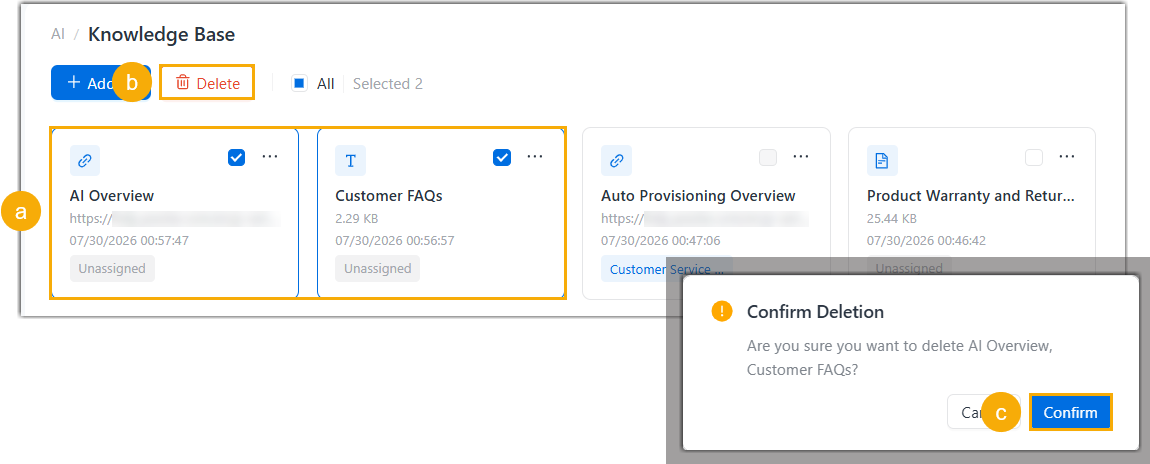
- Select the checkbox(es) of desired content entries.Note: To delete all entries, click All.
- At the top of the list, click Delete.
- In the pop-up window, click Confirm.
- Select the checkbox(es) of desired content entries.