Enforce Two-Factor Authentication (2FA) for All Users
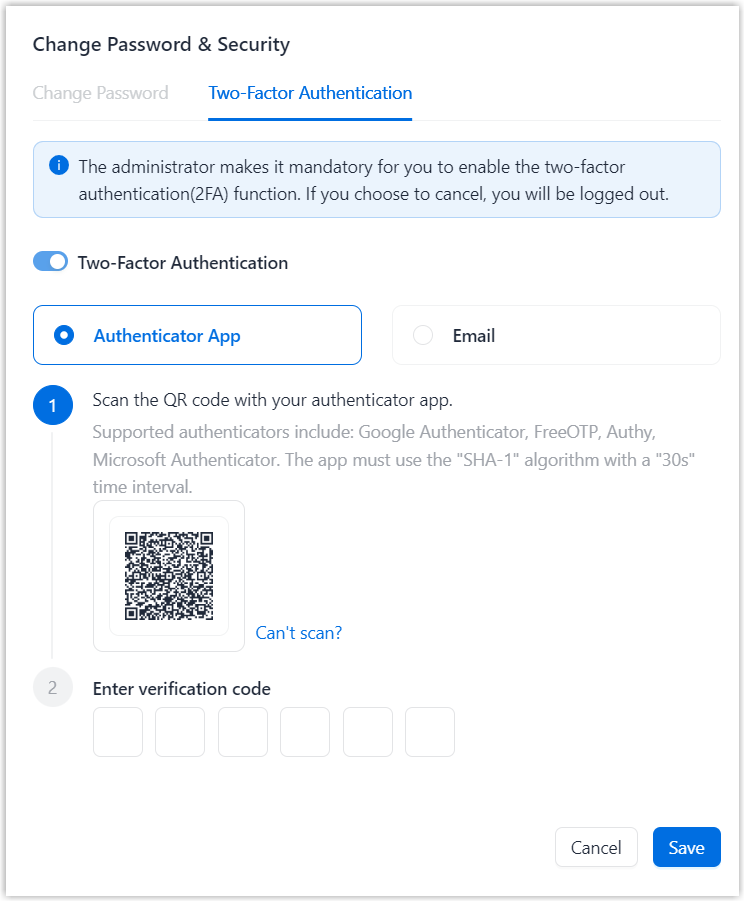
You can enforce Two-Factor Authentication (2FA) for all users to enhance account security. When enabled, users must complete 2FA verification before they can continue using NovoOne Web Client.
Note: To minimize disruption to users, we recommend enforcing 2FA
outside business hours.
Procedure
- Log in to NovoOne Tenant portal, go to .
- Select the checkbox of Make Two-Factor Authentication Mandatory
for All Accounts.

- Click Save.
Result
All users are prompted to complete the 2FA setup for their accounts before they can continue using NovoOne Web Client, as shown below.