Enable and Configure Global AI Voicemail Transcription
NovoOne Tenant supports AI voicemail transcription powered by built-in AI engine, allowing users to quickly review voicemail messages. This topic describes how to enable and configure the AI voicemail transcription in the tenant.
Procedure
- Log in to NovoOne Tenant portal, go to .
- In the Transcription Setting tab, complete the
following settings.
- Turn on the switch of Voicemail Transcription.
- Configure the voicemail transcription settings.
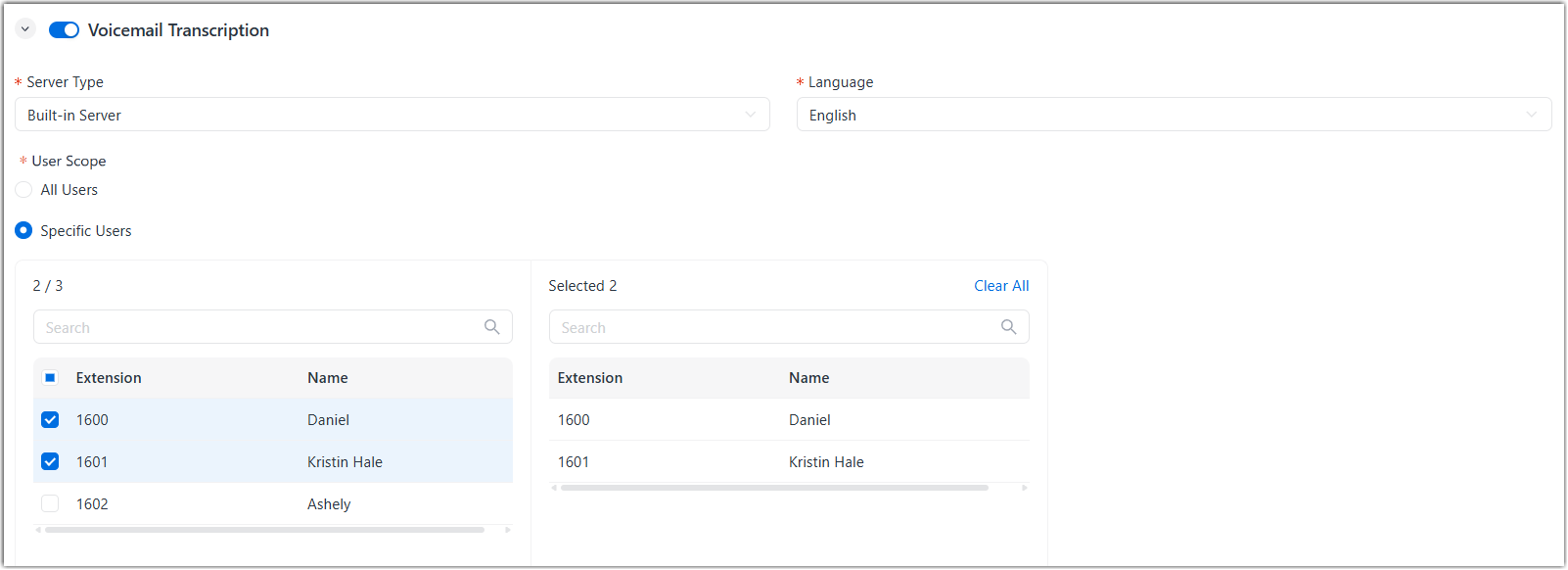
Setting Description Server Type Select Built-in Server. Language Select the desired language to be detected and transcribed for voicemail messages. User Scope Specify which users are allowed to use voicemail transcription feature. - All Users: All users can use this feature.
- Specific Users: Only selected users can use this feature.
- Click Save.
Result
- The AI voicemail transcription feature is enabled globally. The system can transcribe the authorized users' voicemail messages into readable texts in the specified language.
- You can override the voicemail transcription settings for users individually as needed (Path: ). For more information, see Override AI Voicemail Transcription for a User.