Add an Emergency Number for Basic Emergency Calling
Basic Emergency Calling allows callers to reach the local Public Safety Answering Point (PSAP), but does not automatically provide location information. You can add an emergency number for basic emergency calling, so that users can make emergency calls when needed.
Prerequisites
Service provider has assigned trunk(s) to your tenant.
Procedure
- Log in to NovoOne Tenant portal, go to .
- In the Emergency Number tab, click Add.
- Configure the emergency number.
- In the General section, configure the general
settings.
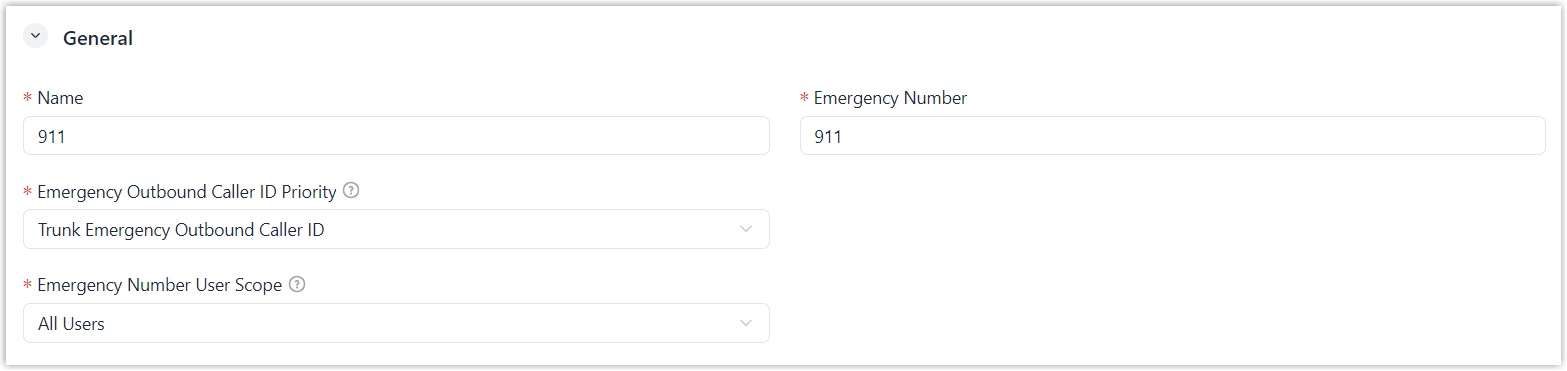
Setting Description Name Enter a name to help identify the emergency number. Emergency Number Enter the emergency number. Emergency Outbound Caller ID Priority Keep the default setting. Note: This setting is typically used for enhanced emergency calling and does not affect basic emergency calls.Emergency Number User Scope Specify the users who are allowed to make emergency calls using the emergency number. - All Users: Allow all users to make emergency calls using this number through all trunks configured in Outbound Rules.
- Specific Users: Allow
only the specified users to make emergency calls
using this number, and only through the
corresponding trunk configured in Outbound Rules.
If selected, you need to select user extensions in the subsequent settings.
- In the Outbound Rules
section, configure the outbound rules.
 Note: Emergency calls have the highest priority. If the selected trunk is in use, the system will terminate the ongoing call, and place the emergency call.
Setting Description Trunk Select the trunk used for emergency calls. Trunk Emergency Outbound Caller ID Keep the default setting. Warning: This setting is typically used for enhanced emergency calling. Do not configure it for basic emergency calling; Otherwise, emergency calls may fail.Strip Enter the number of digits to remove from the beginning of the dialed emergency number.
For example, if you set the field to 1, when a user dials 8911, the system removes the first digit (8) and places the call to 911.
Emergency Number Prefix Enter the digits to add to the beginning of the dialed emergency number.
For example, if you set the field to 1234, when a user dials 911, the system adds 1234 to the emergency number and places the call to 1234911.Users If only specific users are allowed to use the emergency number, select the users authorized to use the emergency trunk. - Click Save.
- In the General section, configure the general
settings.
Result
Authorized users can dial the emergency number to reach the PSAP and must provide their location during the call.