Set Max Number of Phone Firmware Files
This topic describes how to set maximum number of phone firmware files that can be retained on Yeastar Central Management.
Requirements
The firmware version of Yeastar Central Management is 87.19.0.76 or later.
Procedure
- Log in to Yeastar Central Management, go to .
- At the top-right corner, click Max Number of Phone Firmware
Files.
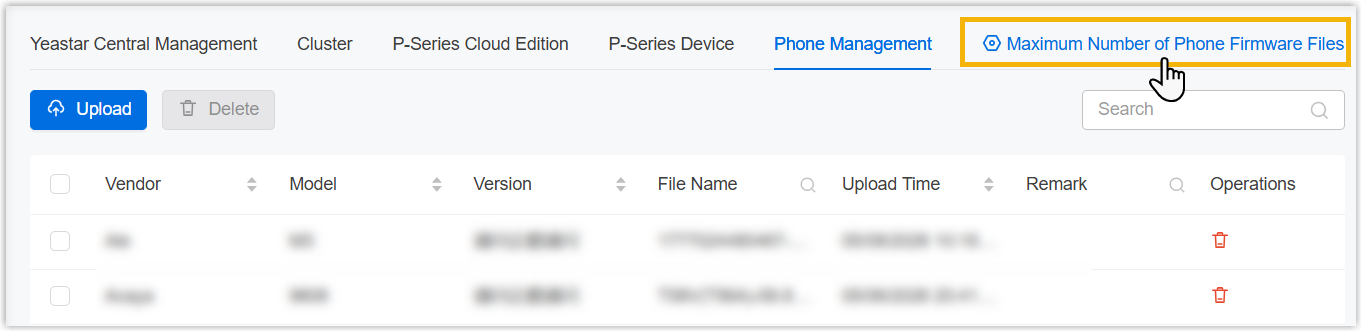
- In the pop-up window, complete the following settings.
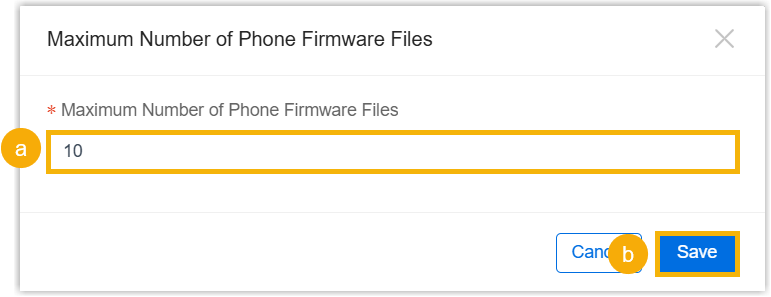
- In the Maximum Number of Phone Firmware Files
field, specify the maximum number of phone firmware files that can be
retained.Note: If the value is less than the number of currently retained phone firmware files, the system will automatically delete the oldest ones and the deletions cannot be undone.
- Click Save.
- In the Maximum Number of Phone Firmware Files
field, specify the maximum number of phone firmware files that can be
retained.
- In the pop-up window, click Confirm.