Upload Avatar for Extension
Upload an image to the PBX, which can be used as the extension avatar.
Note:
- The avatar file must be in
.jpgand.pngformat, and the file size can not exceed 1 MB. - The system will automatically clean up the uploaded avatar files that have been stored for over 1 hour at 1:00 AM daily.
Request URL
POST {base_url}/{api_path}/extension/uploadtempavatarfile?access_token={access_token}Request parameters
| Parameter | Required | Type | Description |
|---|---|---|---|
| file | Yes | File | The desired avatar file, uploaded via form-data. |
Response parameters
| Parameter | Type | Description |
|---|---|---|
| errcode | Integer | Returned error code.
Note: You can check the error code and
error message in Error Code and Error Message.
|
| errmsg | String | Returned message.
|
| file | String | The file ID of the uploaded avatar. Note: This file ID can be passed as the
value of avatar parameter when adding an extension
or editing an
extension to set an extension
avatar. |
Examples
Request example
POST /openapi/v1.0/extension/uploadtempavatarfile?access_token=0tFkq4WxebvAU6z5UWzU2XTQJhoRefIh HTTP/1.1

Host: yeastardocs.example.yeastarcloud.com
Content-Type: multipart/form-data; boundary=----WebKitFormBoundary7MA4YWxkTrZu0gW

------WebKitFormBoundary7MA4YWxkTrZu0gW
Content-Disposition: form-data; name="file"; filename="/D:/project/avatars/demo.jpg"
Content-Type: image/jpeg

(data)
------WebKitFormBoundary7MA4YWxkTrZu0gW--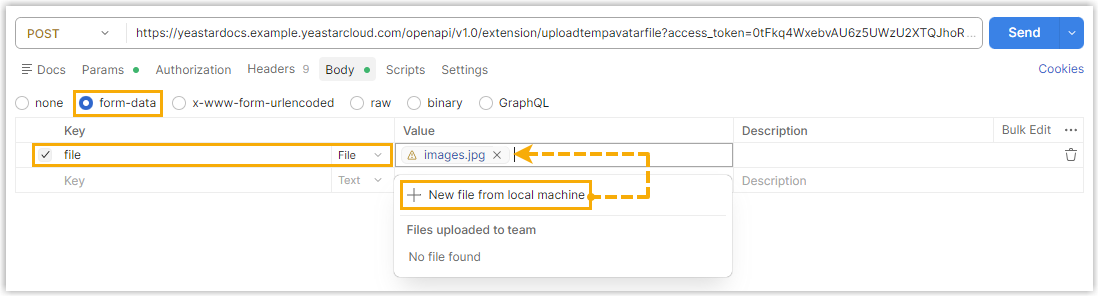
Response example
HTTP/1.1 200 OK
{
    "errcode": 0,
    "errmsg": "SUCCESS",
    "file": "FMwAglNeey743Vcq63fd393d-847f-4b2e-af9d-7eadc23557d2"
}