IP Phone Overview
You can centrally auto provision IP phones and manage auto provisioning resources on NovoOne Platform, simplifying device deployment. This topic describes auto provisioning scenarios, methods and resources.
Background Information
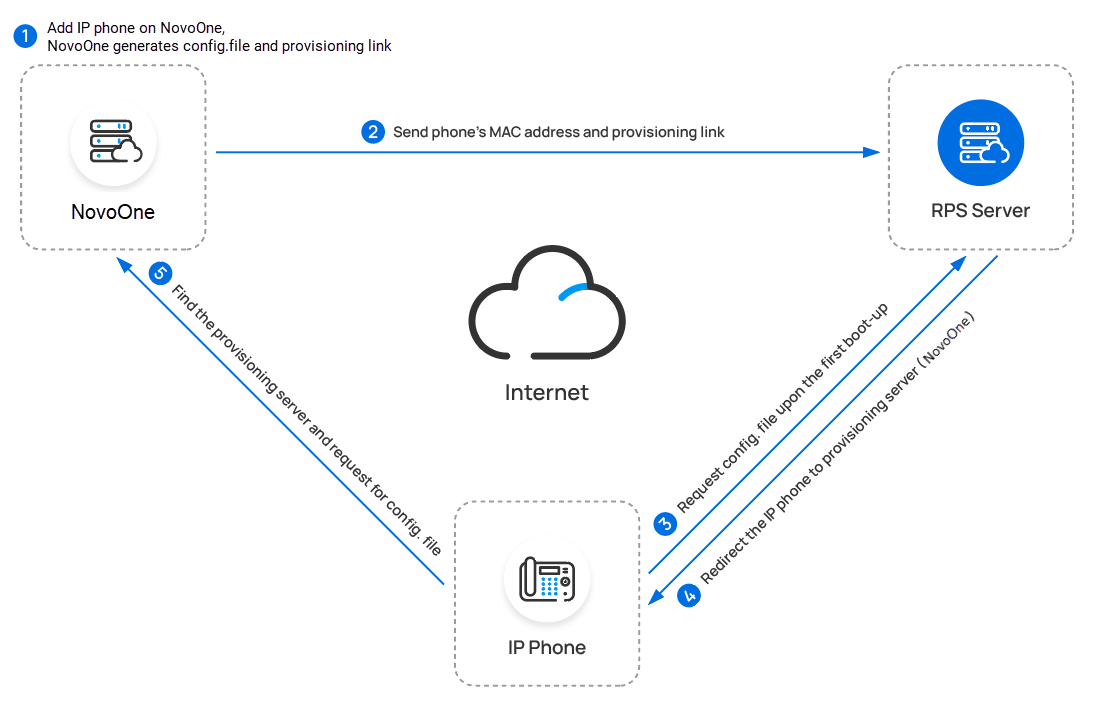
When a enterprise needs to add batches of office IP phones, you can directly add these phones and pre-configure their provisioning options on NovoOne Platform, and then allocate the phones to the enterprise tenant. Once the IP phones are connected to network, they will automatically download configuration files from provisioning server and apply the corresponding settings.
When IP phones are successfully auto-provisioned to the tenant users, you can centrally manage these phones in bulk, such as upgrading the phone firmwares, updating custom templates and images to associated phones.
In addition, if necessary, you can pre-configure provisioning options for IP phones and allocate the phones to your resellers or resellers' tenants. The resellers can manage these IP phones on their own NovoOne Platform.
Auto provisioning supported devices
NovoOne Platform supports various models for Auto Provisioning.
For more information, see Auto Provisioning - Supported Devices.
Auto provisioning methods
You can auto provision IP phones via Redirection and Provisioning Service (RPS). For more information, see Auto Provision an IP Phone.
Auto provisioning resources
| Resource | Description |
|---|---|
| Auto provisioning templates |
|
| Device firmwares | You can upload device firmwares and use them to upgrade the
version of applicable device firmwares. For more information,
see the following topics: |
| Image files | You can upload an image file and use it to update
screensaver, wallpaper, or bootlogo of associated IP
phones. For more information, see the following topics: |