Upload an Image File for Auto Provisioning
Image files can be applied to provisioned IP phones as a screensaver, wallpaper, or bootlogo. This topic describes how to upload an image file to NovoOne Platform.
Requirements
Make sure that the image file meets the following requirements:
- Format:
.jpg,.jpeg,.bmp,.png, and.dob - File size: 5 MB (Max.)
- Specifications: The image must meet the specific resolution and format requirements for your phone model. Refer to the Image Specification Reference or confirm the exact specifications with your phone vendor.
Procedure
Note: Up to 20 image files can be uploaded.
- Log in to NovoOne Platform portal, go to .
- Click Add.
- In the File section, complete the following
settings.
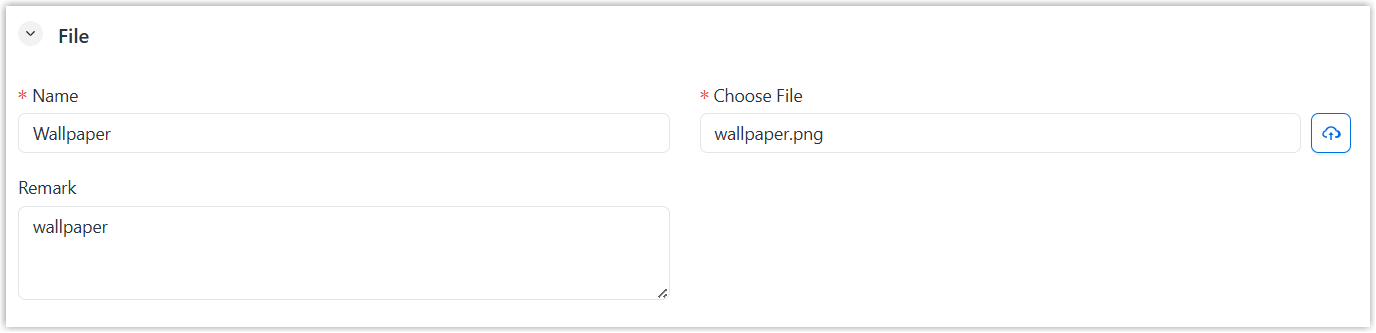
- Name: Enter a name to help you identify the image file.
- Choose File: Click
 to upload the desired image file from your computer.
 - Remark: Optional. Enter a short description about the image file.
- Optional: In the Assign section, assign
the resource to your tenants and your resellers.
- Assign the resource to your tenants
to
enable their tenant administrators to use
it.
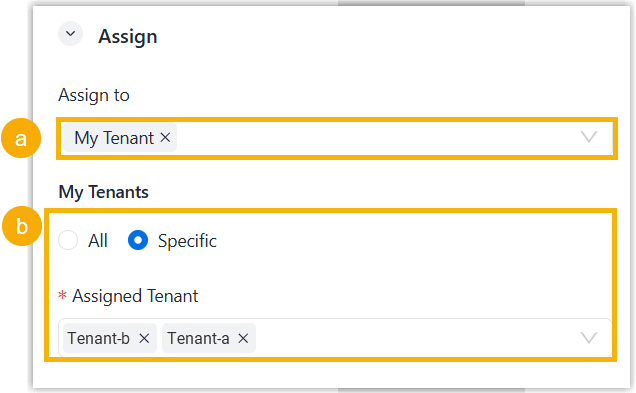
- In the Assign to drop-down list, select My Tenant.
- Specify the tenants as needed.
- To assign to all tenants, select All.
- To assign to specified tenants, select Specific and select desired tenants in the Assigned Tenant drop-down list.
- Assign the resource to your resellers to enable the resellers to use
it and assign it to their tenants.
- In the Assign to drop-down list, select Reseller.
- Specify the resellers using one of the following
methods.
Method Instruction Assign to all resellers except selected 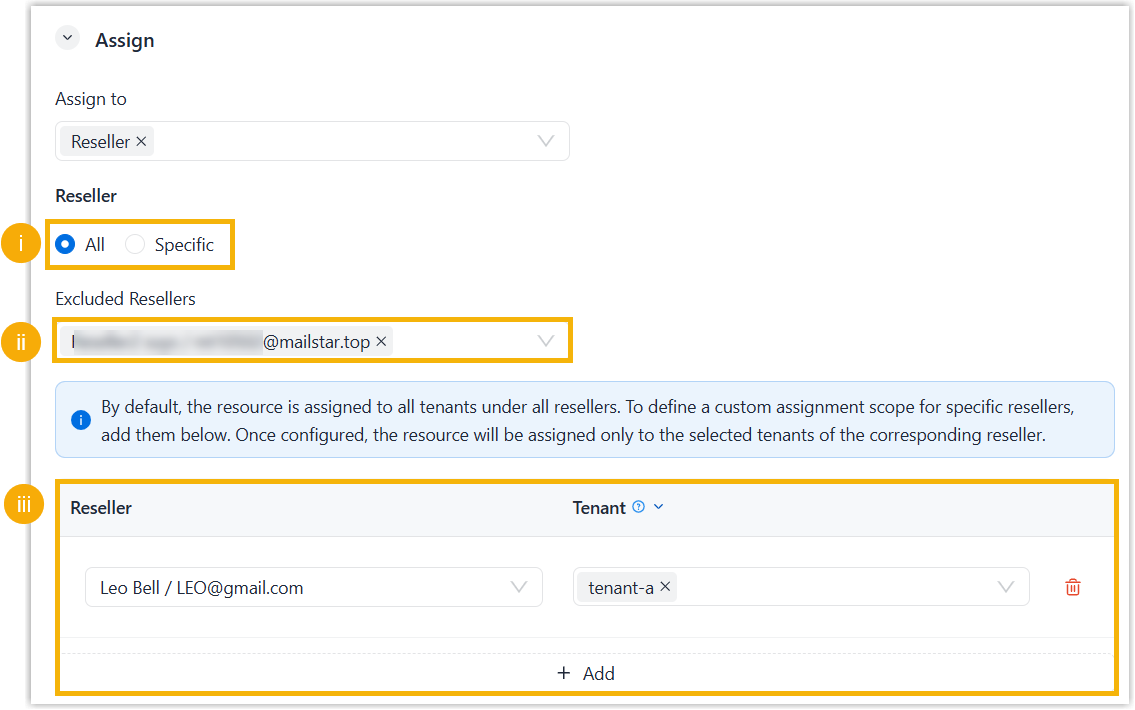
- Select All.
- Optional: To prevent specific resellers from using the resource, select the resellers in the Excluded Resellers drop-down list.
- Optional: To specify tenants whose
tenant administrators can use this resource, click
Add, select a reseller in
the Reseller drop-down list
and select the reseller's tenants in the
Tenant list.
To add more, repeat this step.
Assign to selected resellers only 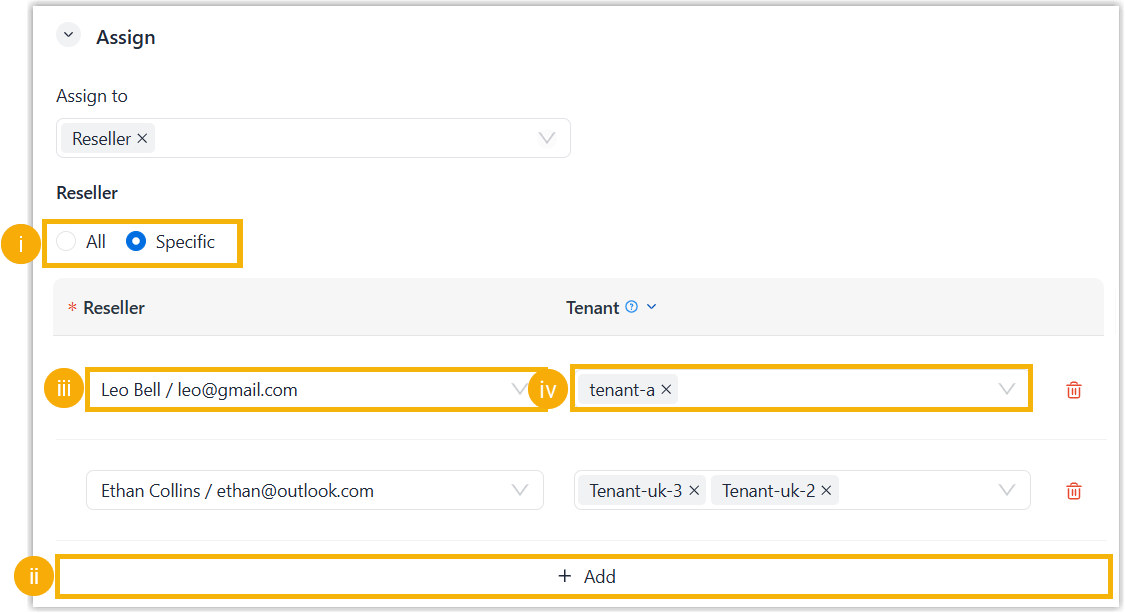
- Assign the resource to your tenants
to
enable their tenant administrators to use
it.
- Click Save.
Result
- The uploaded image file is displayed on the Image
File list.
You can set the image as phone screensaver, wallpaper, or bootlogo when creating a custom template, and centrally update the image to IP phones auto provisioned via the custom template and assigned to your tenant.
- If you assigned the image file to your tenants, the administrators for these tenants can set the image as screensaver, wallpaper, or bootlogo of provisioned phones.
- If you assigned the image file to your resellers' tenants, the image file is displayed on the Image File list on the resellers' NovoOne Platform portal. They can reassign and use the image file as needed.
Image Specification Reference
Refer to the tables below for the image specifications of wallpapers, boot logos, and screensavers on Yealink, Snom, and Fanvil IP phones.
- Yealink phones
-
Note: Ensure at least 2 MB of free space is available on the Yealink phone before setting an image.
- Snom phones
-
Phone Model Resolution Format D385 / D785 / D812 480 * 272 px PNG D713 / D735 / D765 320 * 240 px PNG D717 426 * 240 px PNG D862 / D865 1280 * 720 px PNG - Fanvil phones
-
Phone Model Resolution Boot Logo Wallpaper ScreenSaver A32 1280 * 800 px - Static Logo (U-Boot):
- Format: BMP (24-bit, vertically flipped)
- Size: 654 * 258 px
- Max Resolution: ≤ 1024 * 600 px
- Animated Logo:
- Format: PNG (Black background)
- Max Resolution: ≤ 1024 * 600 px
/ / A32i / A320 / A320i 1280 * 800 px - Static Logo (U-Boot):
- Format: BMP (24-bit, vertically flipped and rotated 90° clockwise)
- Size: 654 * 258 px
- Max Resolution: ≤ 1024 * 600 px
- Animated Logo:
- Format: PNG (Black background)
- Max Resolution: ≤ 1024 * 600 px
/ / H6W 320 * 480 px JPG (24-bit, converted from 24-bit BMP) BMP (24-bit) PNG (32-bit) H5 480 * 320 px JPG (16-bit, converted from 16-bit BMP) BMP (16-bit) / H5W 480 * 320 px JPG (16-bit, converted from 16-bit BMP) BMP (16-bit) / i504W 1024 * 600 px JPG (24-bit, converted from 24-bit BMP) BMP (24-bit) PNG (32-bit) i506W 1280 * 800 px JPG (24-bit, converted from 24-bit BMP and pre-rotated 90° clockwise) BMP (24-bit) PNG (32-bit) i67 600 * 1024 px JPG (24-bit, converted from 24-bit BMP) BMP (24-bit) PNG (32-bit) i68 800 * 1280 px JPG (24-bit, converted from 24-bit BMP) BMP (24-bit) PNG (32-bit) V62 192 * 64 px BMP (1-bit) / / V61G / V61W 320 * 240 px JPG (24-bit, pre-rotated 90° clockwise from a 320*240 source) BMP (24-bit) PNG (32-bit) V62G / V62W / V62 Pro 320 * 240 px BMP (24-bit, pre-rotated 90° clockwise from a 320*240 source) BMP (24-bit) PNG (32-bit) V63 320 * 240 px JPG (24-bit, pre-rotated 90° clockwise from a 320*240 source) BMP (24-bit) PNG (32-bit) V64 480 * 320 px JPG (24-bit, pre-rotated 90° clockwise from a 320*240 source) BMP (24-bit) PNG (32-bit) V65 480 * 272 px JPG (24-bit) BMP (24-bit) PNG (32-bit) V66 / V66 Pro 1024 * 600 px / BMP (24-bit) / V67 1024 * 600 px - Static Logo (U-Boot):
- Format: BMP (24-bit, vertically flipped)
- Size: 654 * 258 px
- Max Resolution: ≤ 1024 * 600 px
- Animated Logo:
- Format: PNG (Black background)
- Max Resolution: ≤ 1024 * 600 px
PNG or JPG PNG (210 * 56 px or 1024 * 600 px) X1SP 128 * 48 px BMP (1-bit) / / X301 / X301G / X301W 128*48 px / 132*64 (for V2) BMP (1-bit) / / X3SP / X3S 132*64 px BMP (1-bit) / / X3SG Pro / X3SW / X303 / X303W / X305 320 * 240 px JPG (24-bit, pre-rotated 90° clockwise from a 320*240 source) BMP (16-bit R5G6B5) PNG (32-bit) X3U 320 * 240 px JPG (24-bit) BMP (16-bit R5G6B5) / X3U Pro / X4U / X4U-V2 320 * 240 px JPG (24-bit, pre-rotated 90° clockwise from a 320*240 source) BMP (24-bit) PNG (32-bit) X5U-V2 480 * 320 px JPG (24-bit, pre-rotated 90° clockwise from a 480*320 source) BMP (24-bit) PNG (32-bit) X6U-V2 / X210-V2 480 * 272 px JPG (24-bit) BMP (24-bit) / X7 800*480 px / BMP (24-bit) / X7-V2 1024*600 px / BMP (24-bit) / X7A 1024*600 px - Static Logo (U-Boot):
- Format: BMP (24-bit, vertically flipped)
- Size: 654 * 258 px
- Max Resolution: ≤ 1024 * 600 px
- Animated Logo:
- Format: PNG (Black background)
- Max Resolution: ≤ 1024 * 600 px
PNG or JPG PNG (210 * 56 px or 1024 * 600 px) - Static Logo (U-Boot):