Switch Agent Status in Queue
If you are an agent in a queue, you can easily switch your agent status in queues on NovoOne Web Client.
Procedure
- Log in to NovoOne Web Client.
- At the top-right corner, click Agent Status.
- To switch agent status in a specific queue, do as follows:
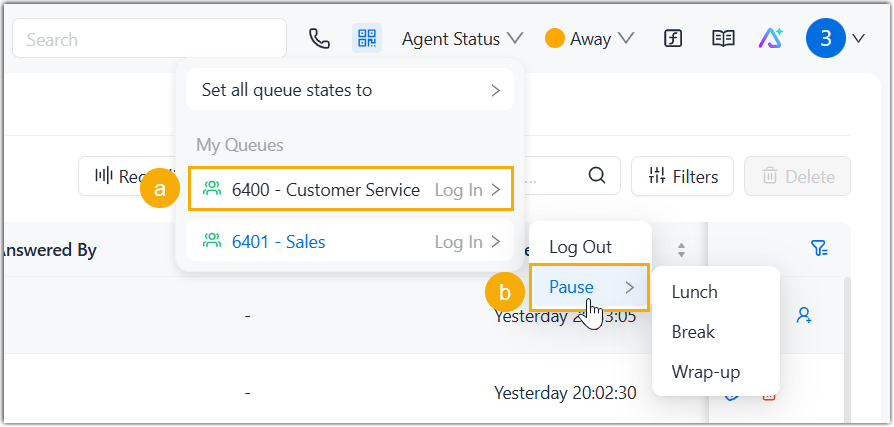
- In My Queues list, click the desired queue.
- Select the desired agent status.
- To switch agent status in all queues you belong to, do as follows:
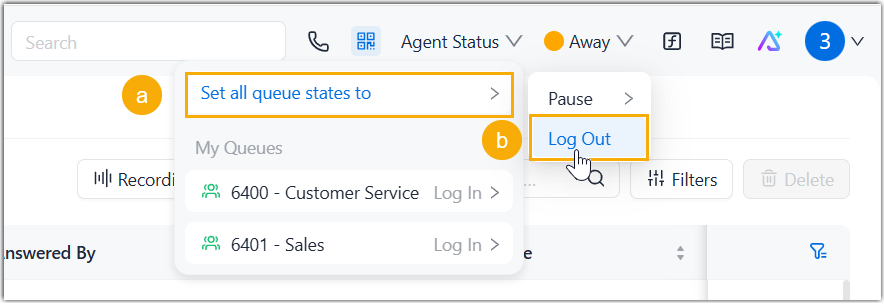
- Click Set all queue states to.
- Select the desired agent status.Note: If you are a static agent in a queue, Log In means you will receive calls from that queue; while Log Out means you will stop receiving calls from it.