Enable Inbound Call Filtering for a Trunk
This topic describes how to enable call filtering for a trunk. Once enabled, the system will use the verification results provided by the ITSP and reject calls based on the rejection criteria.
Requirements
Introduction
Before delivering an incoming call to your trunk, the ITSP verifies the call and
includes the signature verification result in the
P-Asserted-Identity (PAI) header and the SHAKEN attestation
level in a specific SIP header.
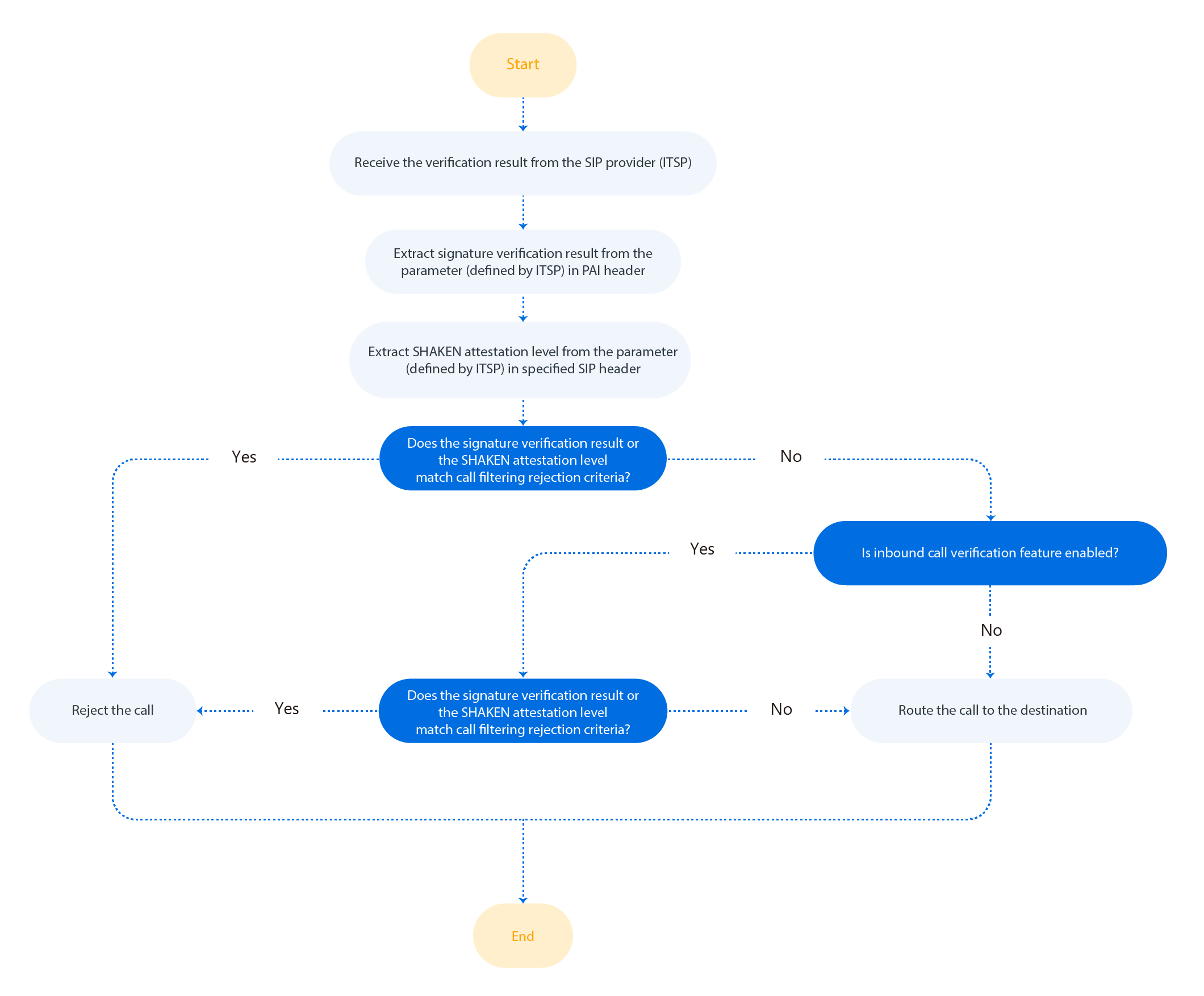
When the verification result is sent, the system extracts the signature verification result and the SHAKEN attestation level from the result. If either of them matches the pre-defined rejection criteria, the system will reject the call.
The following diagram (for reference only) illustrates the key steps of how the system processes the verification result provided by ITSP.
Prerequisites
- The parameter name in the P-Asserted-Identity (PAI) header where the ITSP includes the signature verification result.
- The parameter name defined by the ITSP to convey the SHAKEN attestation level.
TN-Validation-Failed) is conveyed by the
verstat parameter, and the SHAKEN attestation level
(C) is conveyed by the
P-Attestation-Indicator
parameter.P-Asserted-Identity: <sip:+1234567890;verstat=TN-Validation-Passed@203.0.113.45:50560>
P-Attestation-Indicator: CProcedure
- Log in to NovoOne Platform portal, go to .
- Click
 besides the desired shared trunk.
 - In the Advanced tab, scroll down to the STIR/SHAKEN section.
- Turn on the switch of Upstream Verification Result
Handling, and configure the following settings.

- In the Verification Status Parameter in PAI
Header field, enter the parameter name defined by the
ITSP to convey the signature verification result.
In this example, enter
verstat.Note: Both uppercase and lowercase letters are supported (case-sensitive). - In the Header Field for SHAKEN Attestation Level
field, enter the parameter name defined by ITSP to convey the SHAKEN
attestation level.
In this example, enter
P-Attestation-Indicator.Note: Only hyphens (-) and letters (both uppercase and lowercase) are supported. - Select the checkbox of Enable Call Filtering.
- In the Drop Calls by
Verification Status drop-down list, select one or more
verification statuses that will trigger call rejection.
In this example, select No-TN-Validation, TN-Validation-Failed and C. If either the signature verification result or the SHAKEN attestation level matches the selected status, the inbound call will be rejected.
Note:- If your ITSP has defined custom verification statuses, you can set the statuses and add them to the options as needed.
- A maximum of 10 custom statuses are supported.
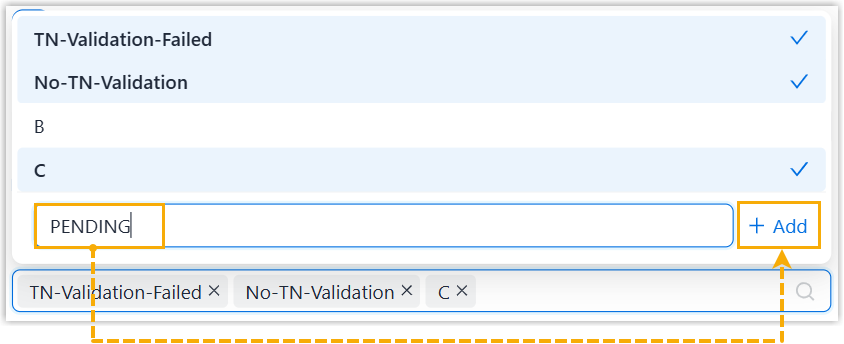
Status Description B The call comes from a legitimate user, but it cannot be confirmed whether the caller has the right to use the number (e.g., a call with a custom caller ID). C The call comes from a legitimate gateway, but it cannot be confirmed whether the number belongs to a legitimate user and the number is authentic (e.g., a call routed through legacy PSTN or from international transfer). TN-Validation-Failed Signature verification failed (e.g., a call with invalid signature or revoked certificate). No-TN-Validation No verification result available (e.g., a call without the Identityheader).
- In the Verification Status Parameter in PAI
Header field, enter the parameter name defined by the
ITSP to convey the signature verification result.
- Click Save.
Result
- The system uses the verification result provided by the ITSP, and reject calls
based on the rejection criteria.
In this example, the system extracts the signature verification result
TN-Validation-Failedfrom theverstatparameter and the SHAKEN attestation levelCfrom theP-Attestation-Indicatorparameter. Since either of them matches the rejection criteria configured in the Drop Calls by Verification Status, the inbound call is rejected. - The inbound call filtering results can be checked within the associated tenant
portal.
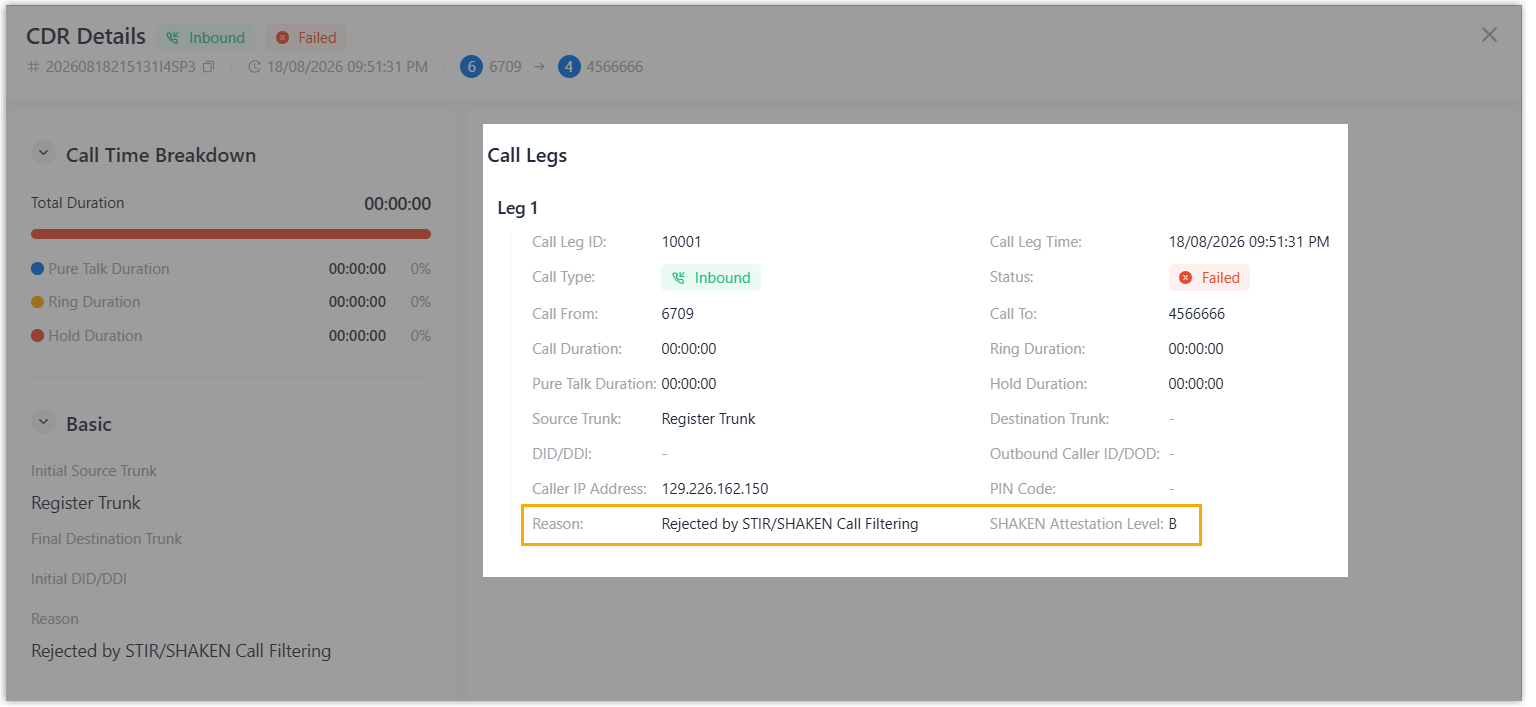
- The SHAKEN attestation level and reject reason of each inbound call are
recorded in the Call Detailed Records (CDR) of the tenant (Path: CDR & Recordings > CDR >
 ).
).
- When an inbound call is rejected, an Inbound Call Rejected due to STIR/SHAKEN Verification Failure event notification is triggered in the tenant.
- The SHAKEN attestation level and reject reason of each inbound call are
recorded in the Call Detailed Records (CDR) of the tenant (Path: CDR & Recordings > CDR >