Configure Fail2Ban
You can configure Fail2Ban to automatically detect and block attack activities for system security. This topic describes how to configure allowed and blocked IP addresses.
Defense strategy
You can add IP addresses to the following types of lists to implement different
defense strategies.
- Whitelist: The list of allowed IP addresses. All requests from IP addresses on this list are prioritized and permitted.
- Blacklist: The list of blocked IP addresses. All requests from IP addresses on this list are rejected directly.
Configure IP addresses to allow access
- Log in to NovoOne Platform portal, go to .
- Add IP addresses to allow access.
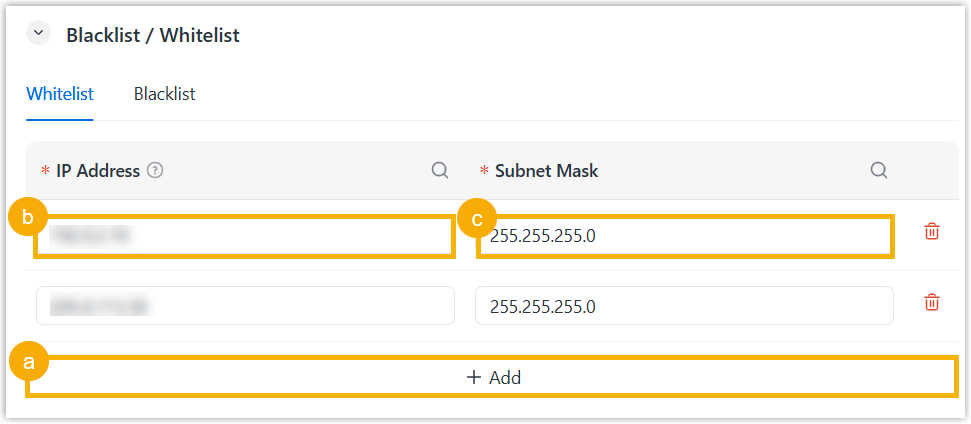
- Click Add to add an entry.
- In the IP Address column of the entry, enter an IP address.
- In the Subnet Mask column of the entry, enter the corresponding subnet mask.
To add more, repeat this step.
- Click Save.
All requests from IP addresses on this list are prioritized and permitted.
Configure IP addresses to block access
- Log in to NovoOne Platform portal, go to .
- Add IP addresses to block access.
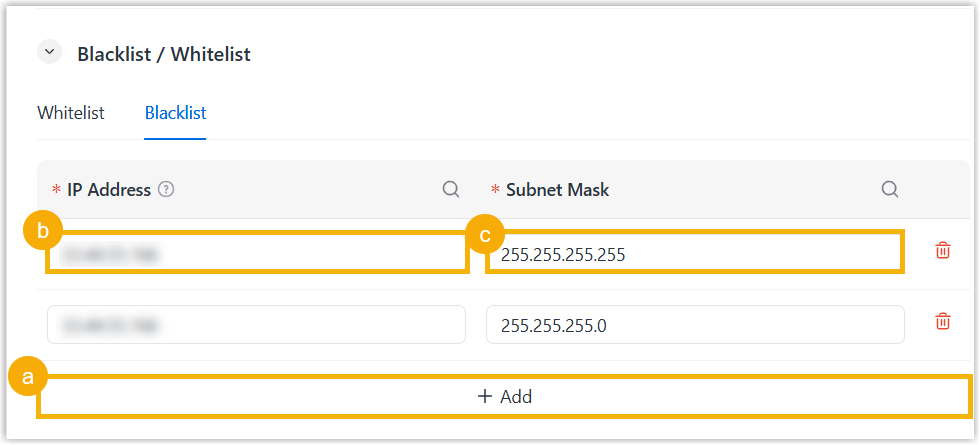
- Click Add to add an entry.
- In the IP Address column of the entry, enter an IP address.
- In the Subnet Mask column of the entry, enter the corresponding subnet mask.
To add more, repeat this step.
- Click Save.
All requests from IP addresses on this list are rejected directly.