Yeastar Central Management 87.17.0.80

Release Date: January 29, 2026

New features

Trunk Access Control
Added support for Trunk Access Control feature (Path: Cloud PBX > Trunk Sharing > Trunk Access Control). This feature allows you to grant assignment permissions for your shared trunks and DID numbers to subordinate users while retaining full configuration and management control over the trunks.
The authorized users can not view or modify the trunk resources, and are only permitted to perform the following allocation operations:
  • Assign the shared trunks and DID numbers to which they have access to the Cloud PBXs they manage.
  • Further grant the assignment permissions for these trunk resources to their own subordinate users.
For more information, see Assign Trunk Access Permission to Users.
Trunk Configuration Access
Added support for Trunk Configuration Access feature, which allows you to configure whether PBX users are permitted to add or import trunks on their Cloud PBXs. You can configure this setting when creating a PBX or editing an existing PBX's settings.
Note: This setting is only available for P-Series Cloud PBX with firmware version 84.21.0.66 or later.
For more information, see the following topics:
Terminal Registration Monitoring
Added support for monitoring the peak registration numbers of different terminal types on P-Series Cloud PBXs, and visually displaying the registration peak values and their historical trends over the last 24 weeks or 12 months by terminal type, including Linkus clients and SIP endpoints.
Note: This feature collects data only from P-Series Cloud PBXs with firmware version 84.21.0.66 or later.
You can access the monitoring data based on the desired scope:
Data Scope Description
Multiple/All Cloud PBXs You can view the peak registration data and trends for all Cloud PBXs or multiple Cloud PBXs (filtered by region, PBXHub server, or creator) on Dashboard.

For more information, see Dashboard Overview.
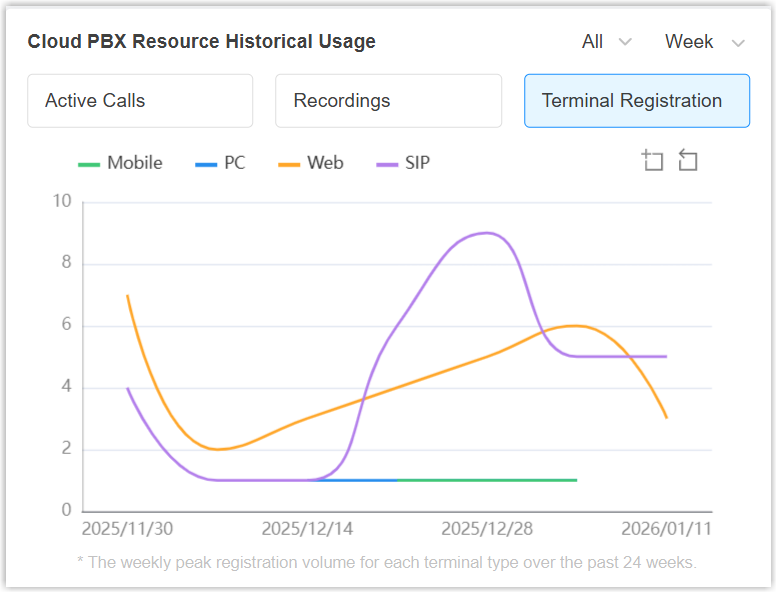
Single Cloud PBX You can view the peak registration data and trends for a specific Cloud PBX on its resource monitoring window (accessible from the Cloud PBX list).
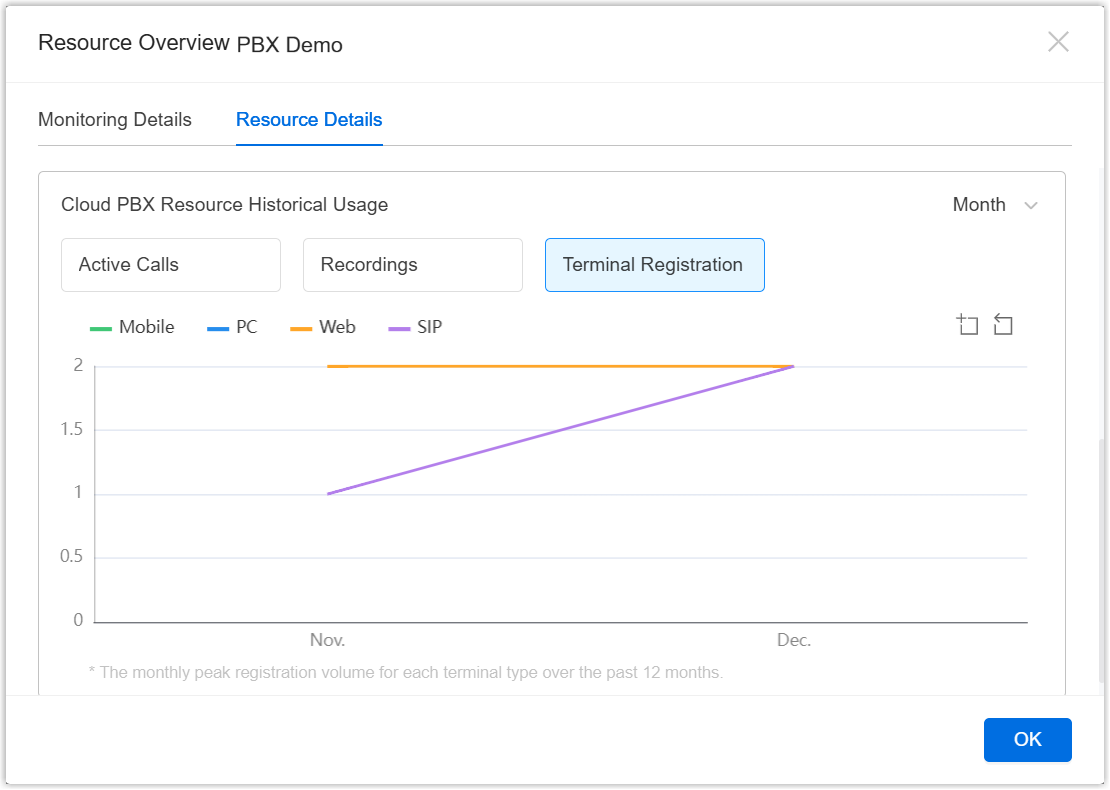
For more information, see Check System Resources of a P-Series Cloud PBX.

Theme Settings for Cloud PBX
Added support for customizing theme settings for P-Series Cloud PBXs within PCE white-label template (Path: Cloud PBX > White Label > Other Information).
You can decide the supported theme mode (light mode and/or dark mode) of white-labeled Cloud PBXs, and configure the specific theme colors for different theme mode independently.
Note: This setting will take effect on P-Series Cloud PBXs with firmware version 84.21.0.117 or later.

For more information, see Customize Your Own Brand of Cloud PBXs.
Auto Activation for Cloud PBX
Added support for activating Cloud PBXs automatically via API. When creating a Cloud PBX through the API, you can configure the following parameters to trigger automatic activation and initial configuration upon PBX creation.
Note: This setting takes effect only for P-Seires Cloud PBXs with firmware version 84.21.0.66 or later.
  • autoActivated: Determines whether to activate the Cloud PBX automatically.
  • cloudPbxInitialConfigRequest: Provides a set of initial configuraiton parameters for the Cloud PBX.
For more information, see Developer Guide - Create a Cloud PBX.
Call Encryption Tunnel
Added a global configuration option Enable Call Encryption Tunnel for Cloud PBX (Path: Cloud PBX > PBX > Options). Once enabled, this setting applies to all your P-Series Cloud PBXs.
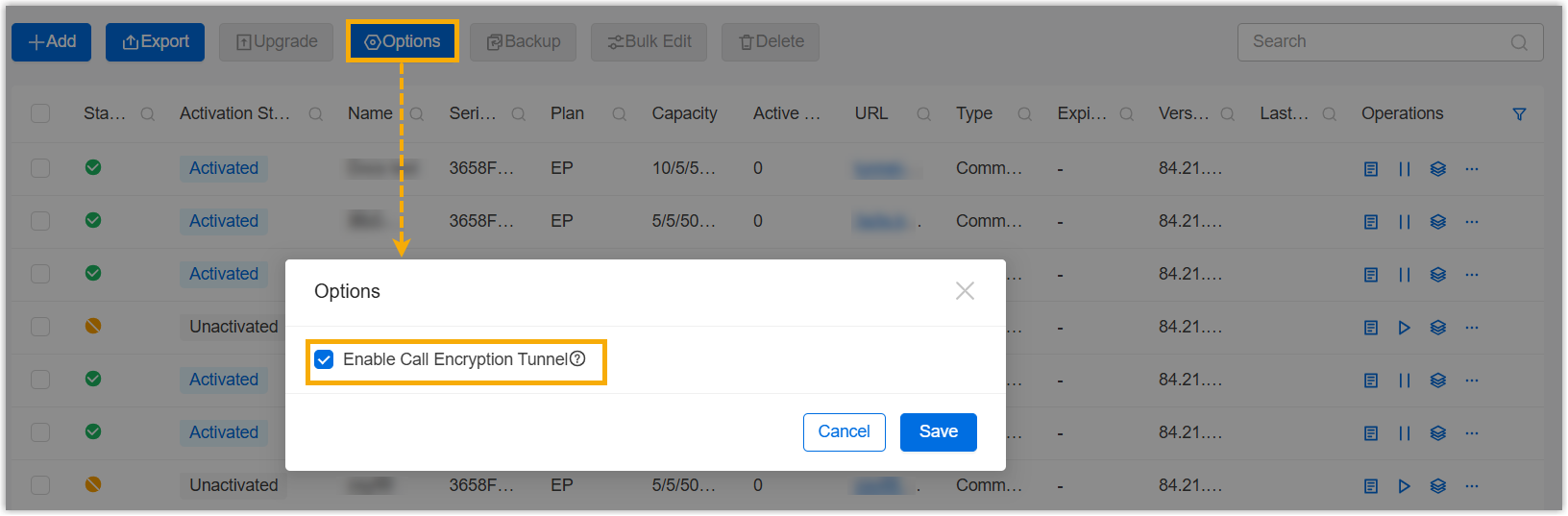
This feature establishes an encrypted tunnel between the P-Series Cloud PBX and their Linkus Mobile Client, enabling the clients to transmit all SIP signalling and RTP media streams through it. This enhances communication security and effectively prevents carrier SIP blocking, and ensures stable extension registrations and calls for Linkus Mobile Client even in restricted network environments.
Note: To use the encrypted tunnel for Linkus Mobile calls, ensure the following requirements are met:
  • Network: Manually open the tunnel service port 1090 (TDP&TCP) for the SBC Server.
  • Cloud PBX: Firmware version 84.21.0.117 or later.
  • Linkus Mobile Client: Version 5.22.19 (iOS) / 5.22.12 (Android) or later.
For more information, see Enable Encryption Tunnel for Linkus Mobile Calls.

Improvements

Cloud PBX
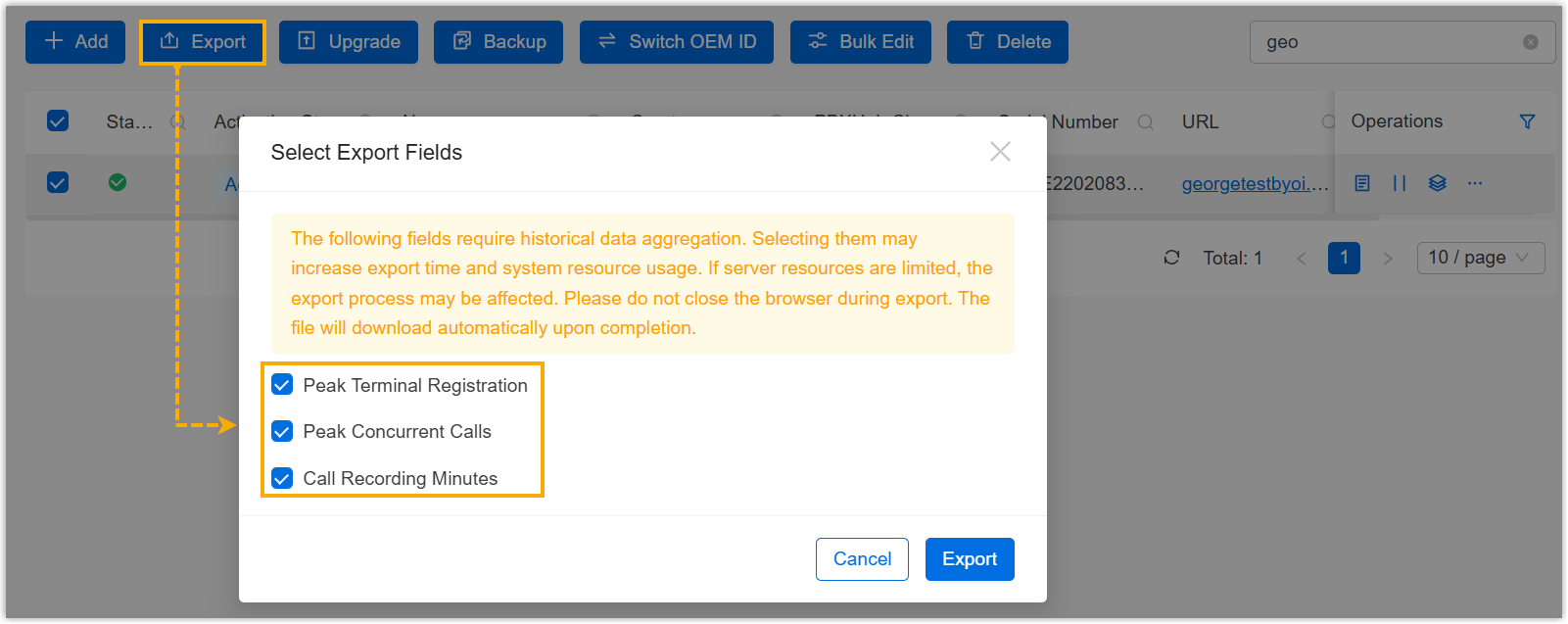
Optimized the PBX exporting: When exporting Cloud PBXs, you can select the specific resource utilization data fields as needed to include the specified data with the downloaded PBX information.
User
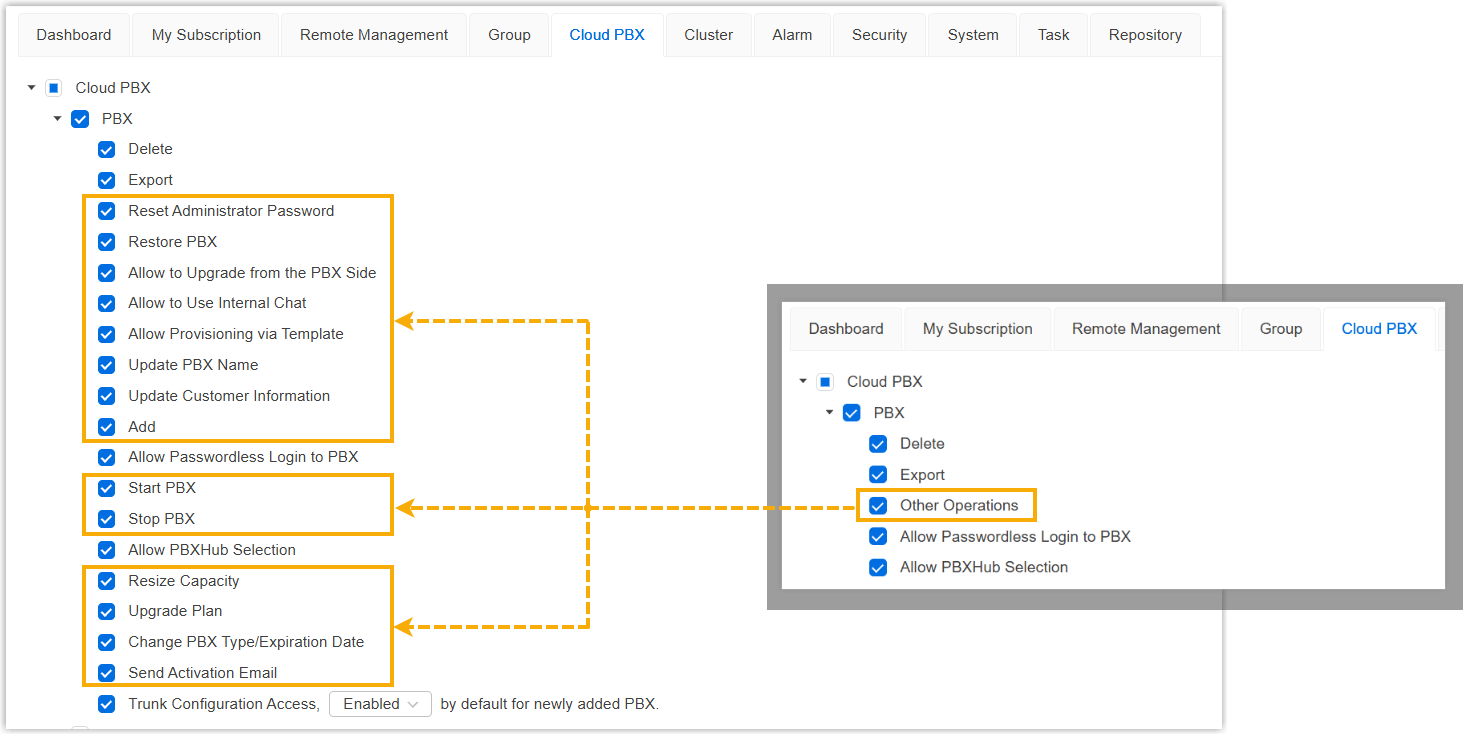
Optimized the user permission control for Cloud PBX (Path: System > User > My Colleague/Hosting User > User Permission > Cloud PBX):
  • Replaced the original Other Operations permission for Cloud PBX feature with more granular control permissions, as shown below:
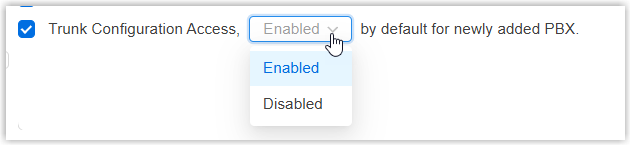
  • Added a permission option Trunk Configuration Access for Cloud PBX feature, which allows you to assign the permission to your colleagues or subordinate users and set its default enablement status. Users who are granted this permission can then configure their Cloud PBXs to control whether the PBX users are permitted to add or import trunks.
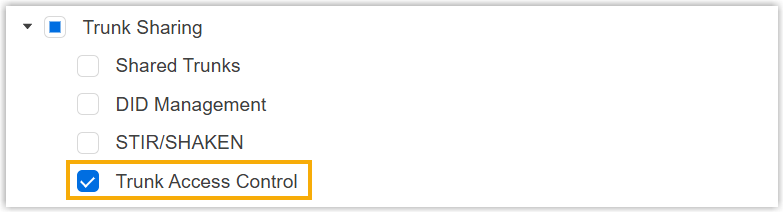
  • Added a permission option Trunk Access Control for Trunk Sharing feature, which allows you to assign the permission to your colleagues or subordinate users. Users who granted this permission can them assign their own shared trunks and DIDs to their subordinate users for allocation and use.
API
Optimized the API interface for the following features:
Feature Description
Trunk Access Control Added Added API interfaces for trunk access control. With the API interfaces, the followings can be implemented:
  • Query the list of all trunk access permissions.
  • Query all the trunk access permissions assigned to a specific user.
  • Query the access permission for a specific trunk assigned to a user.
  • Create, modify, or delete trunk access permission assignments.

For more information, see Developer Guide - Trunk Access.

Shared Trunk Added Added an API interface /dm/open_api/v1/shared_trunk/name/acl, which can be used to query all the available shared trunks.

For more information, see Developer Guide - Query Available Shared Trunks.

DID Management Added Added an API interface /dm/open_api/v1/did_management/usable, which can be used to query the available DID numbers of a specific shared trunk.

For more information, see Developer Guide - Query Available DID Numbers of Specific Trunk.

Cloud PBX Optimized Added the following response parameters for interfaces to query the information of all the Cloud PBXs or a specific Cloud PBX:
  • autoActivated: Indicates whether the PBX was automatically activated and provisioned via API.
  • trunkConfigurationAccess: Indicates whether the PBX users are allowed to add or import trunks on the PBX.
  • cloudPbxPeakInfoDTO: Returns the historical utilization of PBX resources over the last 2 months.
For more information, see the following topics:
Optimized Added the a request parameter trunkConfigurationAccess for interfaces to create or update the information of a Cloud PBX, which can be used to set whether PBX users are allowed to add or import trunks on their Cloud PBX.
YCM User Added Added an API interface /dm/open_api/v1/user_info/subordinates, which can be used to query the information of all your subordinate users.

For more information, see Developer Guide - Query All Subordinate Users.