Phones Mapping
This topic introduces the mapping of auto-provisioned phones between Yeastar and 3CX Phone System.
On Yeastar PBX web portal, go to to check whether phones are provisioned correctly, as detailed in the following information for your reference.
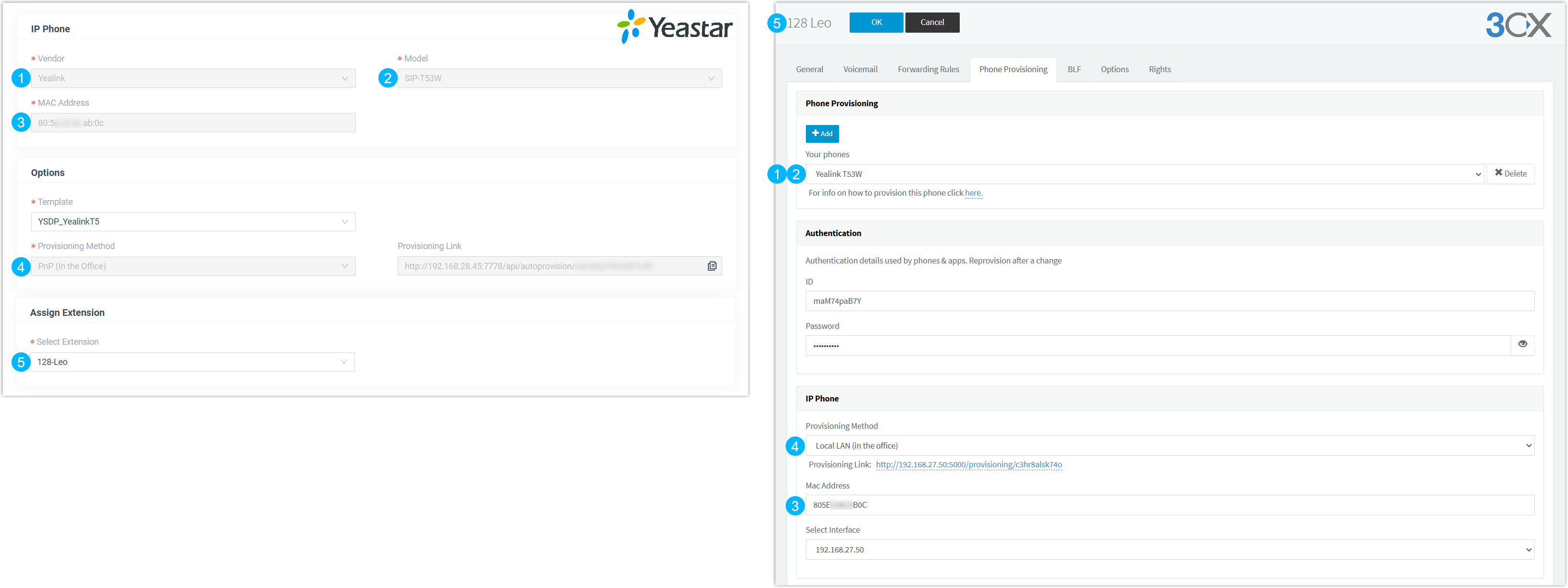
| Yeastar | 3CX |
|---|---|
| IP Phone | |
| Vendor | Your phones |
| Model | Your phones |
| MAC Address | Mac Address |
| Options | |
| Template |  |
Provisioning Method
Note:
|
Provisioning Method
|
| Provisioning Link | |
| Assign Extension | |
| Select Extension Note: Yeastar Phone System
supports 1 extension to be registered on a maximum of 5 IP
phones. If it reaches the limit, the other phones will not be
migrated. |
Extension |