Add an IVR
Add an IVR.
MCP tool
create_ivrTool parameters
You need to specify the following parameters in your request.
Note: The supported parameters are not limited to those listed
below. You can ask your MCP client what other settings are supported using a
prompt such as "What settings can I configure when adding an IVR?".
| Parameter | Required | Description |
|---|---|---|
| name | Yes | The IVR name. |
| number | Yes | The IVR number. |
| prompt | No | The
name of the IVR prompt. Valid values are default or
the name of an existing custom prompt file on the PBX. Up to five
prompts are supported; separate multiple prompt names with commas,
for example, default,IVR.wav.The IVR prompt that
plays greeting and explains the IVR menu options to
callers.Note: If you
are unsure which values are supported, you can ask your MCP
client using a prompt such as "How can I get the available
prompt?" |
| prompt_repeat | No | The number of times to repeat the prompt. |
| digit_timeout | No | The number of seconds to wait between key presses. |
| resp_timeout | No | The number of seconds to wait for the caller to operate. |
| press_key_option_list | No | The complete list of key routes. Providing this list replaces all
existing key routes. Configure what happens when a caller presses a key or does not respond. Each key route includes:
|
Example
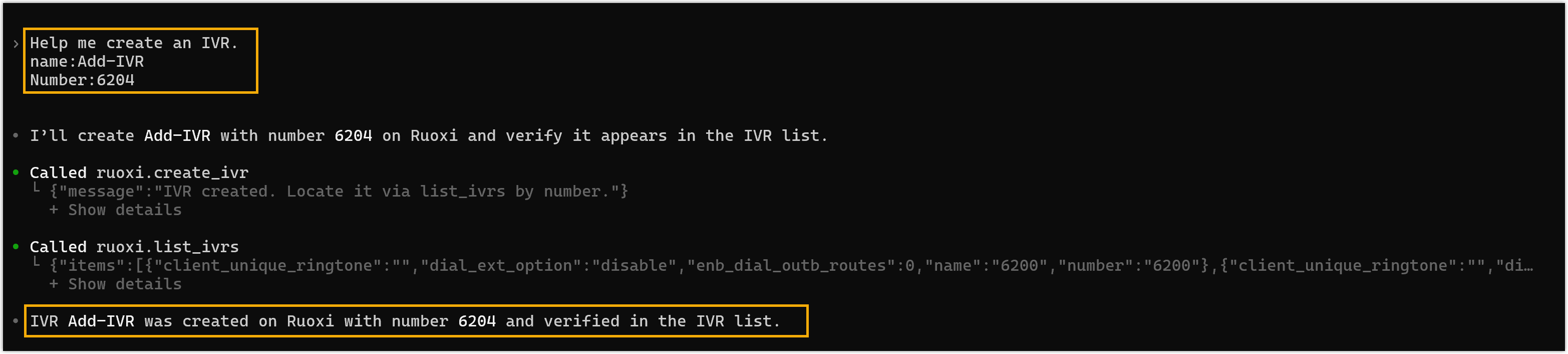
The following example demonstrates how to use a natural language request in Codex to call this tool and add an IVR.
- Prompt example
-
Help me create an IVR. name:Add-IVR Number:6204 - Response example
-