Download Fax Data
When faxes are sent or received through your Linkus Web Client, the activities are logged and the associated fax files are saved. You can download both fax logs and their associated fax files, or download individual fax file as needed.
Download fax logs and the associated fax files
- Log in to Linkus Web Client, go to .
- Optional: At the top of the list, set filters to locate
the fax logs that you want to download.
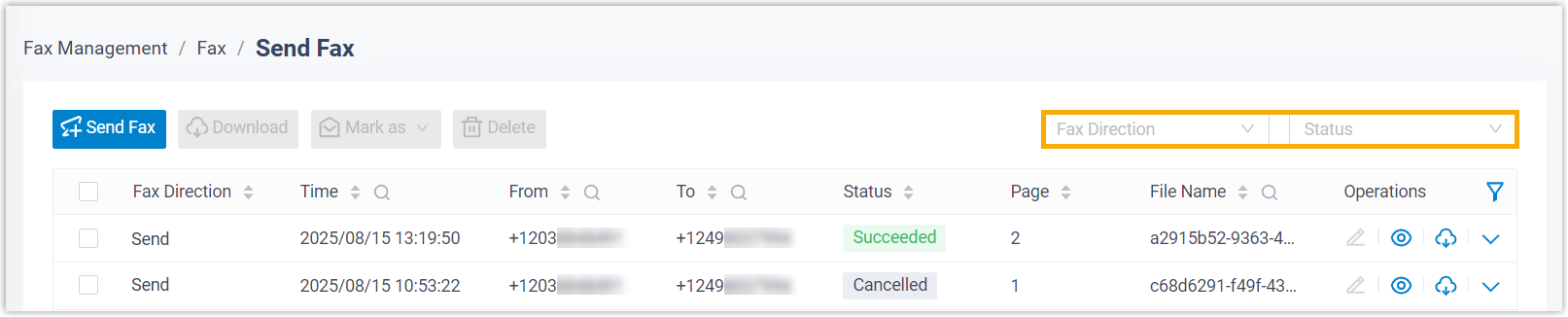
Item Description Fax Direction Select Send or Receive to filter sent or received faxes. Status Select a status to filter faxes. Note: To narrow down the search result, you can use the column filters in the list. - Select the checkboxes of the fax logs that you want to download, then click
Download.

The fax data is downloaded as a
.zipfile, which includes a.csvfile with log details and one or more.pdffiles for the fax documents.
Download individual fax files
- Log in to Linkus Web Client, go to .
- Optional: At the top of the list, set filters to locate the fax log
associated with the fax file that you want to download.
Item Description Fax Direction Select Send or Receive to filter sent or received faxes. Status Select a status to filter faxes. Note: To narrow down the search result, you can use the column filters in the list. - Click
 beside a desired fax log.
The fax file is downloaded as a
.pdffile.