Yeastar P-Series Cloud Edition 84.25.0.76 V26.2-Beta
This topic outlines the release history of firmware version 84.25.0.76, from the beta stages to the final release.
- To try out the new updates, check for firmware updates from PBX admin portal and upgrade your phone system.
- For details on the new features and improvements in Linkus UC Clients and 'Yeastar Linkus for Google' Chrome extension, see Linkus Release Notes.
- If you found something that doesn't work as expected, you can submit feedback directly from here .
Firmware 84.25.0.76-beta1
Release date:November 26, 2026
Release version:V26.2-Beta
Base version:84.25.0.27
New features
- AI MCP Service
- Added the MCP Service (Path: ), which enables MCP-compatible AI agents and clients to connect to the PBX's built-in MCP Server.
- PBX-native Instant Messaging
-
Added support for PBX-native Instant Messaging (IM), allowing internal chat data to be stored on the PBX to help customers meet data storage and compliance requirements.Note:
- For existing PBXs, you can switch between PBX-native IM and NetEase-based IM
as needed (Path: ). Note that switching IM modes permanently delete all existing
chat history.
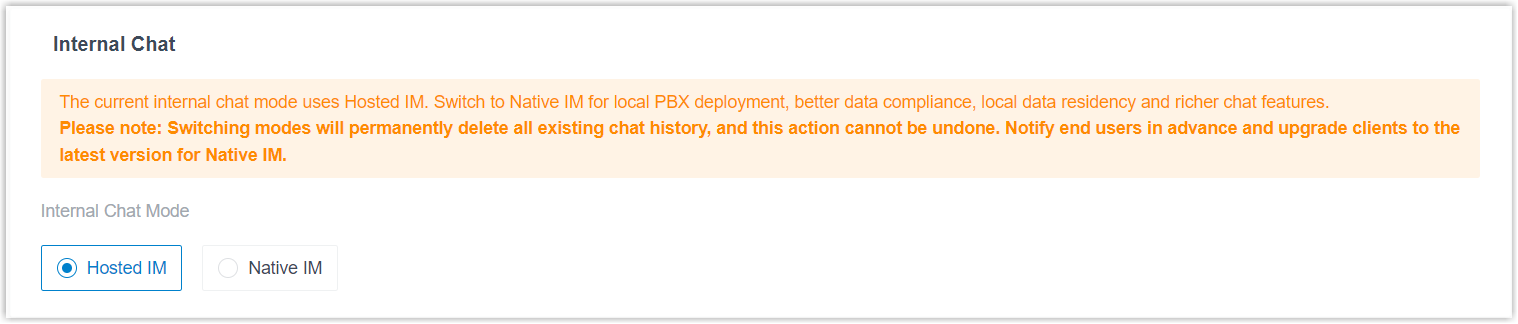
- For newly deployed PBXs running this version, PBX-native IM is enabled by default, and the IM mode selection is hidden.
- For existing PBXs, you can switch between PBX-native IM and NetEase-based IM
as needed (Path: ). Note that switching IM modes permanently delete all existing
chat history.
- In addition, the following updates are introduced for PBX-native IM:
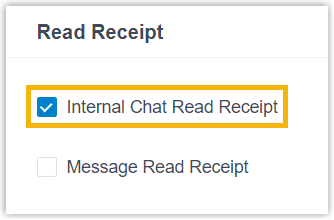
- Added support for read receipts for internal chat messages (Path: ), allowing users to see whether their internal chat messages have
been read.
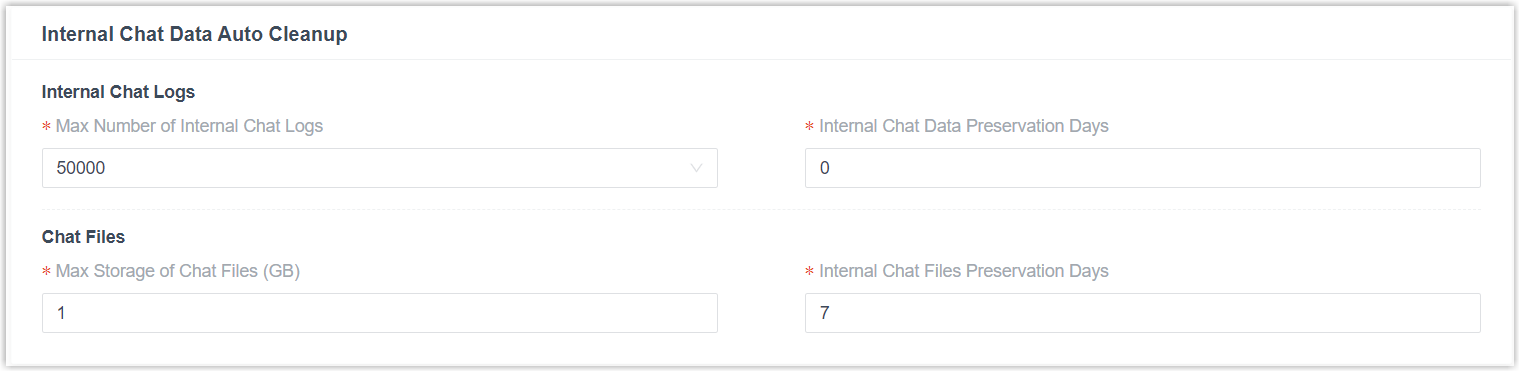
- Added support for automatically cleaning up internal chat logs and files when
the configured storage threshold is reached (Path: ).
- Added support for read receipts for internal chat messages (Path: ), allowing users to see whether their internal chat messages have
been read.
- Call Analytics
-
Call Analytics is now available in Linkus Desktop and Web Client, providing a dashboard for monitoring and analyzing inbound and outbound call activities. It brings together key call metrics, performance indicators, and real-time call information, helping managers track call trends, assess team performance, and identify areas for improvement.
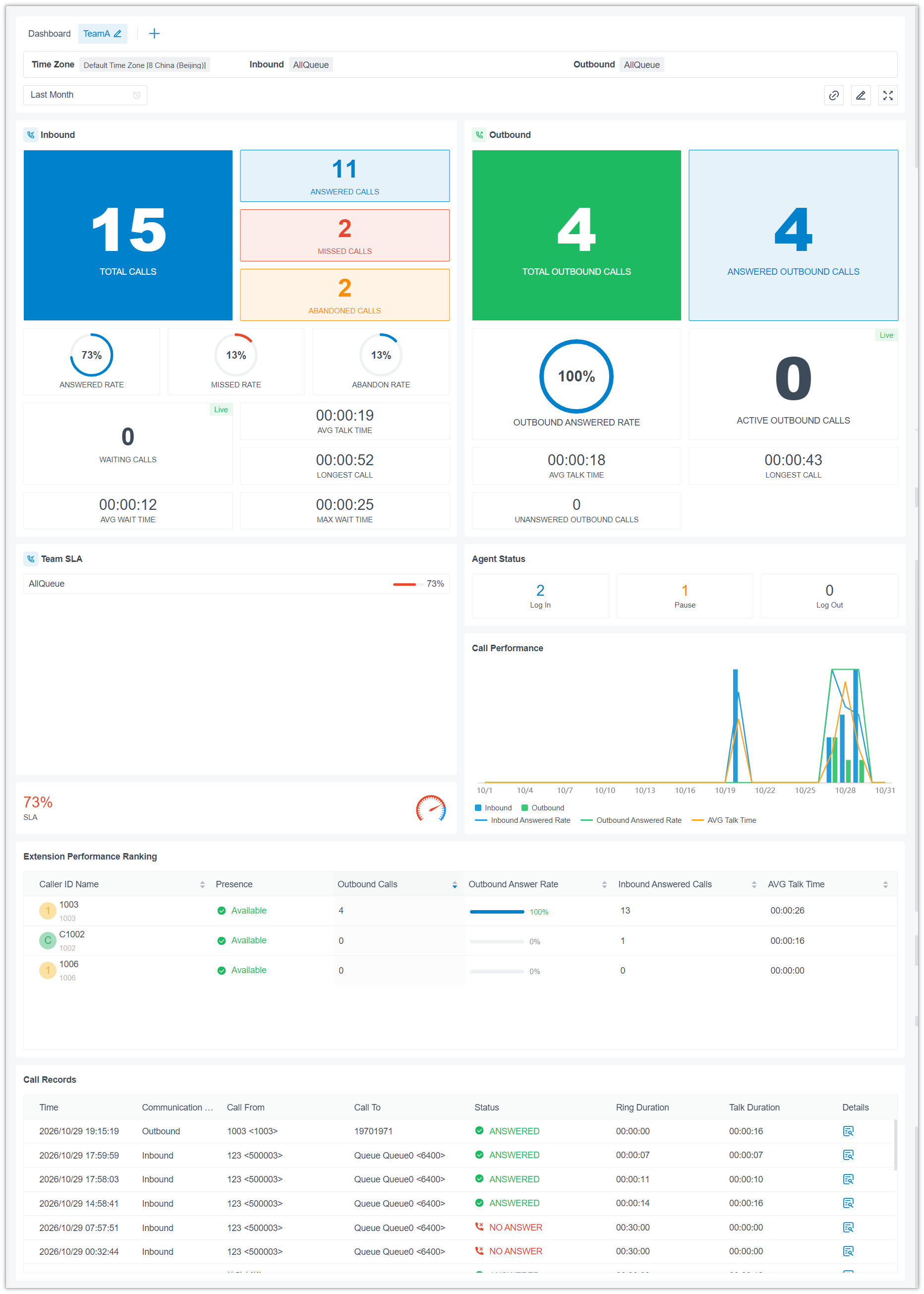
To use Call Analytics, complete the following steps:
- Upgrade PBX to the new version.
- Subscribe PBX to Ultimate Plan.
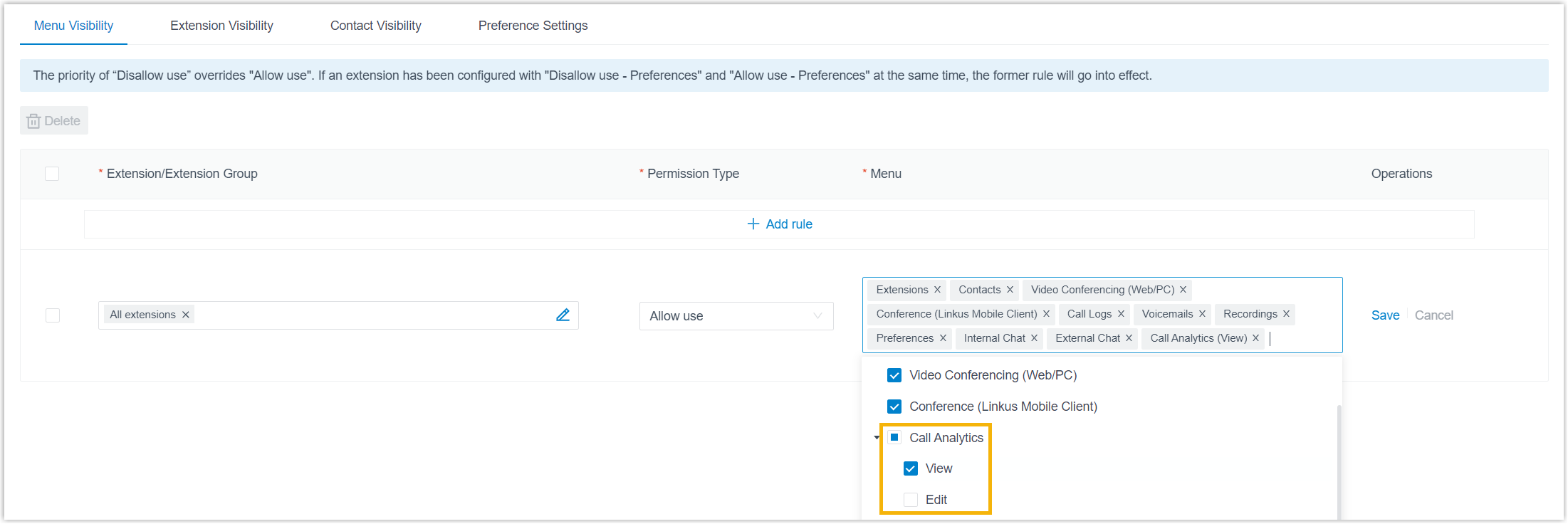
- Grant extensions the permission to view or edit Call Analytics settings (Path: ).
- Set up the Call Analytics dashboard by following the guides below.
Improvements and bug fixes
- Extension
- Added the Voice Activity Detection (VAD) setting for Linkus
Mobile Client (Path: ).When enabled, Linkus Mobile Client automatically detects voice activity and reduces audio transmission when no voice activity is detected, helping reduce bandwidth usage.Note:
- VAD only works with
u-lawanda-lawcodecs. - Extension users can also enable or disable VAD on their Linkus Mobile Client (Path: ).
- VAD only works with
- Client Permission
- Added the Call Analytics permission setting (Path: ), allowing you to control whether extensions can view or edit Call Analytics settings.
- Trunk
- Added support for parentheses
()in trunk names.Note: Unpaired parentheses are replaced with periods.when the settings are saved. - Auto Provisioning
-
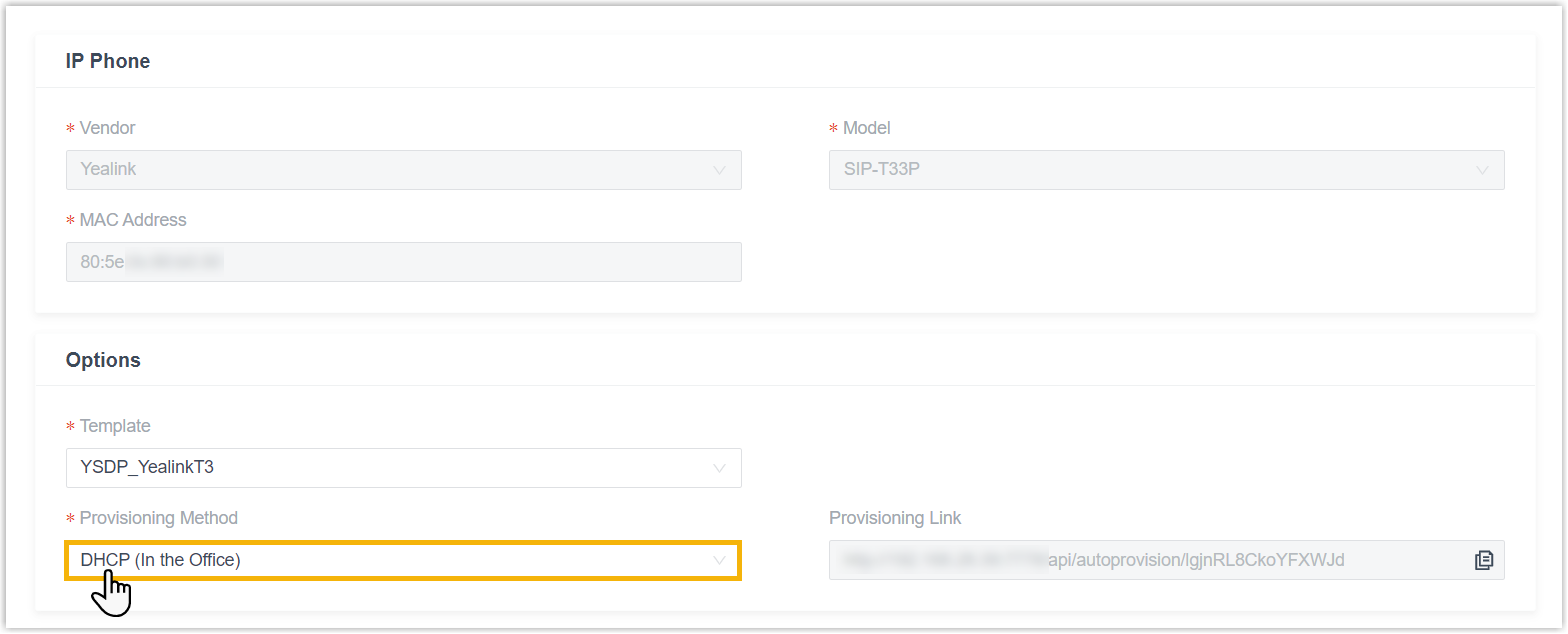
- Added
support for changing the provisioning method of provisioned phones (Path: Auto Provisioning > Phones >
 > Options > Provisioning Method), eliminating the need to delete and re-add a phone when switching
provisioning methods.
- Fixed the auto provisioning issue: After Yealink phone configuration file encryption was disabled, the configuration file downloaded for an existing phone was outdated, resulting in function key settings not taking effect.
- Fixed the hot desking issue: After the voicemail password was changed using feature code, the new password was not applied to hot desking phone login.
- Added
support for changing the provisioning method of provisioned phones (Path: Auto Provisioning > Phones >
- Inbound Route
- Added support for parentheses
()in inbound route names.Note: Unpaired parentheses are replaced with periods.when the settings are saved.
- Voicemail
- Fixed the voicemail issue: Deleting a voicemail record caused the audio files associated with other records to become unavailable.
- Call Transfer
- Fixed the call transfer issue: When an analog phone registered on a gateway transferred a call to another extension and the extension was busy, the call was not successfully transferred back to the original extension.
- Call Pickup
- Fixed the call pickup issue: After a call was picked up using the group call pickup feature code and transferred to another extension, it could not be picked up again.
- Ring Group
- Fixed the ring group issue: When a caller hung up before any ring group member answered, the call was not recorded as a missed call on the member's phone.
- Call Queue
-
- Fixed the queue issue: When a queue was configured to end waiting if no agents were available, incoming calls were still placed in the queue instead of being routed to the no-agent-available destination.
- Fixed the wallboard issue: When a queue's failover destination was set to itself, calls looped back into the queue, causing the missed call count to increase abnormally.
- Fixed the ring strategy issue: When agents were signed in to a queue through the API, the Rrmemory ring strategy did not work correctly, causing incoming calls to repeatedly ring the same agent.
- Fixed the satisfaction survey issue: The caller's satisfaction rating was not recorded if the caller hung up before the End Prompt finished playing.
- Call Recording
- Fixed the recording issue: CDR records showed that call recording had started, but the corresponding recording files were missing.
- Call Disposition
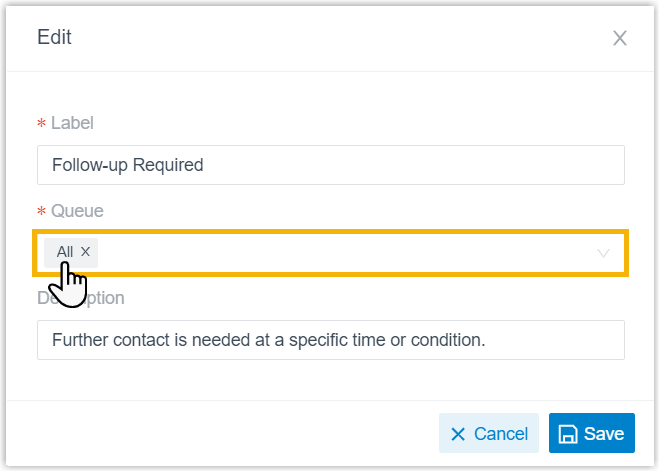
- Added the Queue setting (Path: Call Features > Call Disposition > ), allowing you to specify the queues whose agents can use the disposition
codes.
- AI Transcription
-
- Added Bulgarian (Bulgaria) as a supported transcription language when AWS is selected as the transcription provider (Path: ).
- Added Play Transcription Prompt
setting (Path: ).
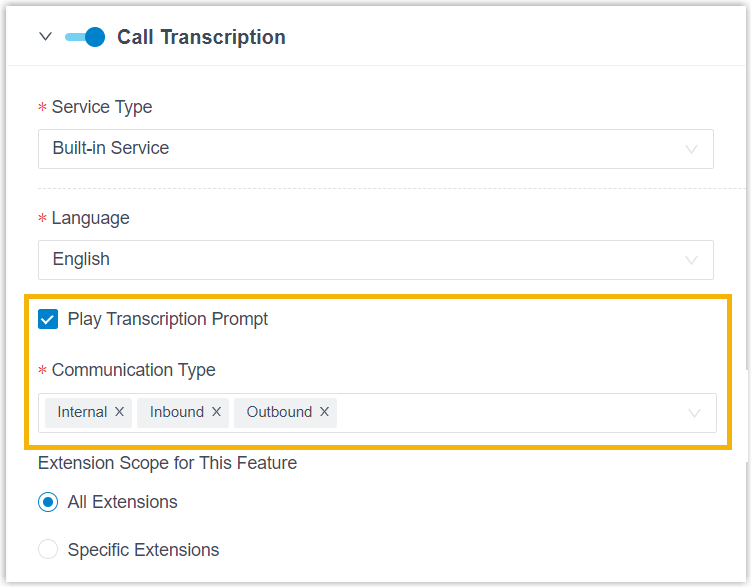
When enabled, the system plays a prompt tone when transcription starts for the specified call types, notifying both parties that the call is being transcribed.
- Improved the security of custom AI service credentials: API key, Access ID, and Access Key can no longer be viewed after being saved.
- Archive
- Fixed the following archive issues:
-
When retention policy was enabled, newly archived folders on SharePoint were incorrectly deleted.
-
Creating or executing a recording archive task via FTP could fail.
-
Archived recordings could not be played or downloaded from the PBX web portal.
-
- Backup and Restore
-
Added support for restoring backup files across P-Series Appliance Edition, P-Series Software Edition, and P-Series Cloud Edition (Path: ).
- CDR
- Fixed the following CDR issues:
- Call records involving the AI receptionist could not be filtered correctly.
- Some call records were missing from the CDR list.
-
Clearing all personal call records failed for records involving forwarded numbers, causing extension users to lose access to their call records and resulting in high CPU usage.
- API
-
- Optimized the following API events:
Event Description All Events
Added timeparameter to all events monitored via Webhook to indicate when the event was triggered.(30028) Call Note Status Updated Added the following parameters to provide information about the call source. -
call_flow -
call_flow_id -
call_flow_number
For more information, see (30028) Call Note Status Updated.
-
- Optimized
API interfaces for the following features:
Feature Description GDPR Added the following interfaces to query and configure GDPR. gdpr/getgdpr/update
Extension Added enb_vadparameter to the following interfaces, allowing you to enable or disable Voice Activity Detection (VAD) for extensions' Linkus Mobile Client.extension/getextension/queryextension/createextension/update
Linkus Server Added the following interfaces to query and configure Linkus server. Linkus Server Setting:extension_linkusserver/getextension_linkusserver/update
Welcome Email Template:email_template/getemail_template/update
Trunk Added the nameparameter to support querying trunks by name, and updated thepasswordparameter to return the Base64-encoded password instead of the plaintext password for the following interfaces:trunk/gettrunk/query
LDAP Server Added the following interfaces to query and configure LDAP server. LDAP Nodes:ldap_nodes/listldap_nodes/searchldap_nodes/getldap_nodes/queryldap_nodes/update
LDAP Server Settings:ldap_server/getldap_server/update
LDAP Credentials:
ldap_credentials/listldap_credentials/search
Emergency Number Added the following interfaces to query and configure emergency number. emergency_number/listemergency_number/createemergency_number/updateemergency_number/deleteemergency_number/importemergency_number/export
Voicemail Added the
transcribe_duration,transcription_text, andtranscription_typeparameters to the following interface to query voicemail transcription information.Added the following interfaces to query and configure group voicemail.vm/get
group_voicemail/searchgroup_voicemail/getgroup_voicemail/querygroup_voicemail/creategroup_voicemail/updategroup_voicemail/delete
Added the following interfaces to query and configure global voicemail settings.vm_settings/getvm_settings/update
IVR Added the enable_custom_key,enable_end_key,enable_language,end_key,language,press_key_type, andpin_list_idparameters to the following interfaces, allowing you to query and configure advanced IVR settings, including prompt language and custom key.ivr/listivr/searchivr/getivr/queryivr/createivr/update
Speed Dial Added the following interfaces to query and configure speed dial. speed_dial/listspeed_dial/searchspeed_dial/getspeed_dial/queryspeed_dial/createspeed_dial/updatespeed_dial/deletespeed_dial/importspeed_dial/exportspeed_dial_prefix/getspeed_dial_prefix/update
Call Note Added filter_queue_id,filter_queue_type,queue, andqueue_scopeparameters to the following interface, allowing you to query the queues applicable to the call disposition selected for the call note.callnotes/get
Added
filter_queue_idandfilter_queue_typeparameters to the following interface, allowing you to validate whether the call disposition selected for the call note is applicable to the specified queue.callnotes/update
Call Disposition Added the following interfaces to query and configure call disposition. call_disposition/listcall_disposition/searchcall_disposition/getcall_disposition/querycall_disposition/createcall_disposition/updatecall_disposition/delete
AI Added the following interfaces to query and configure AI transcription. ai_toolbox/getai_toolbox/update
SIP Settings Added the following interfaces to query and configure SIP settings. sip_settings/getsip_settings/update
CDR Added filter_queue_idandfilter_queue_typeparameters to the following interfaces, allowing you to query CDR by the queues associated with call disposition.cdr/listcdr/search
External Chat Logs Added the following interfaces to query and download external chat logs. external_chat_logs/listexternal_chat_logs/getexternal_chat_logs/download
For more information, see API Interfaces & Events Summary.
- Optimized the following API events:
- Microsoft SQL Integration
- Added support for underscores
_in database username (Path: ). - Active Directory (AD) Integration
- Fixed the integration issue: A backslash in an AD account username was lost when the username was saved, causing the AD integration to fail after the PBX restarted.