Yeastar P-Series Cloud Edition 84.20.0.74
Release date: September 15, 2025
New features
- Virtual Fax Integration
- Yeastar P-Series Cloud Edition supports integration with online fax service providers, enabling your team to securely send and receive faxes over the Internet via Linkus Desktop or Web Client, without relying on physical fax machines.
- AI Call Transcription
- Yeastar P-Series Cloud Edition provides Call Transcription feature using
its built-in artificial intelligence (AI), which transcribes
conversations in 1:1 audio/video calls into readable text. With the
feature enabled, extension users can view real-time transcriptions
during call and review AI-generated summaries after calls on their
Linkus UC Clients.
For more information, see AI Transcription Overview.
- WebSocket Audio Streaming
- Yeastar P-Series Cloud Edition provides WebSocket Audio Streaming feature,
enabling the real-time transmission of audio streams from active calls
to third-party platforms via WebSocket for further analysis or
processing.
For more information, see WebSocket Audio Streaming Overview.
Improvements and bug fixes
- Extension
-
- Optimized function key for Extension (Path: ): Added a function key type Set
Presence, which allows extension users to
quickly switch their extension to a specified presence
status.
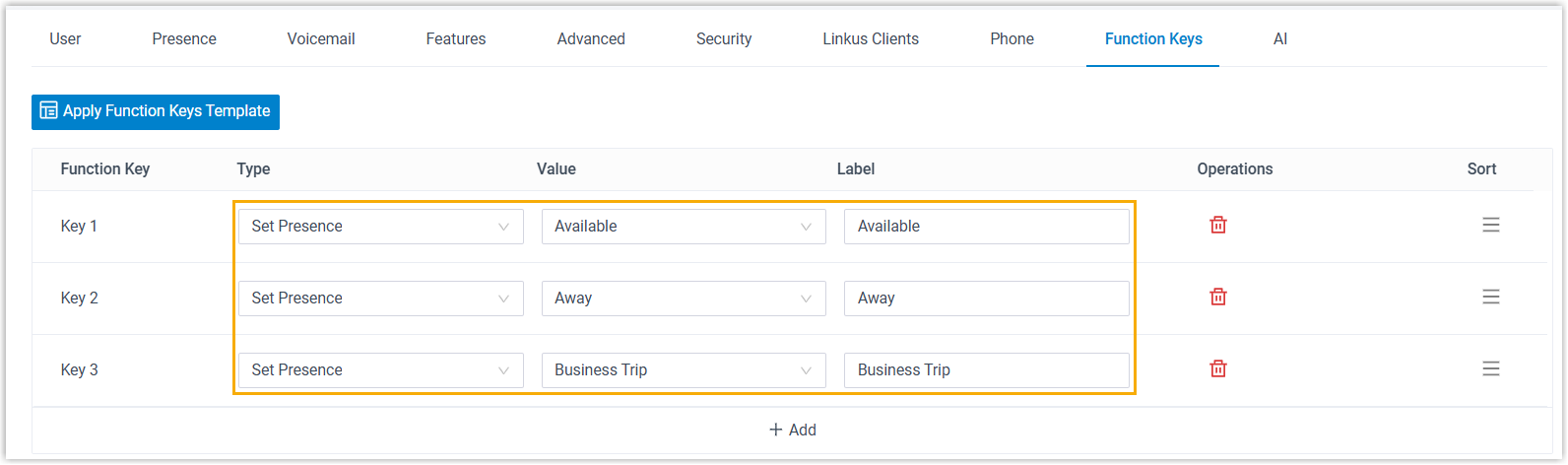
For more information, see Switch Extension Presence by Function Key.
- Fixed the extension presence issue: Failed to select a call flow as a call forwarding destination when bulk editing extensions' presence settings.
- Fixed the function key template issue: Failed to save a function key template if more than 5 function keys were added in the template.
- Optimized function key for Extension (Path: ): Added a function key type Set
Presence, which allows extension users to
quickly switch their extension to a specified presence
status.
- User Role
- Optimized the user role settings (Path: ):
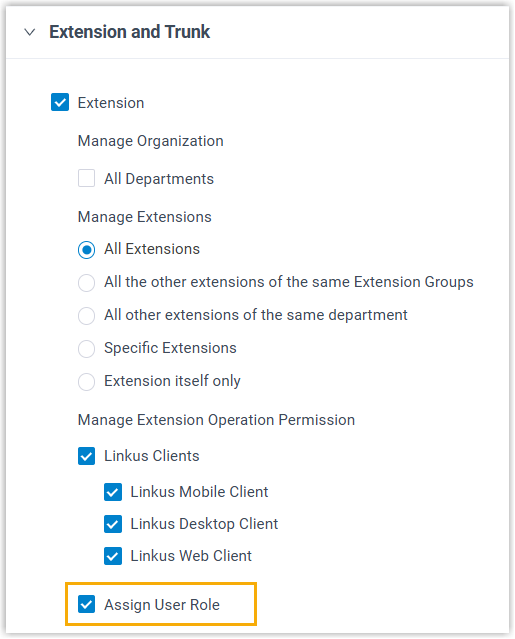
- Added a permission option Assign User
Role, which allows users with this role to
assign or change extension's user role.
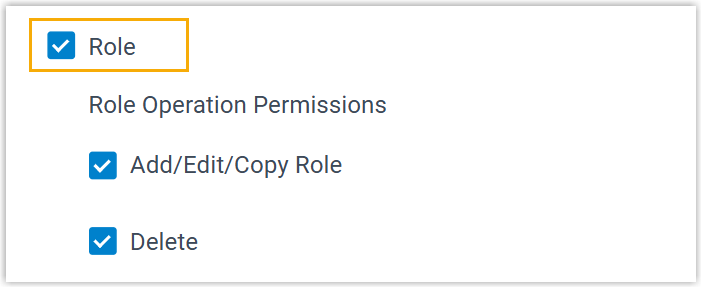
- Added a permission option Role, which
allows users with this role to view and manage the Role
feature.
- Added a permission option Assign User
Role, which allows users with this role to
assign or change extension's user role.
- LDAP Server
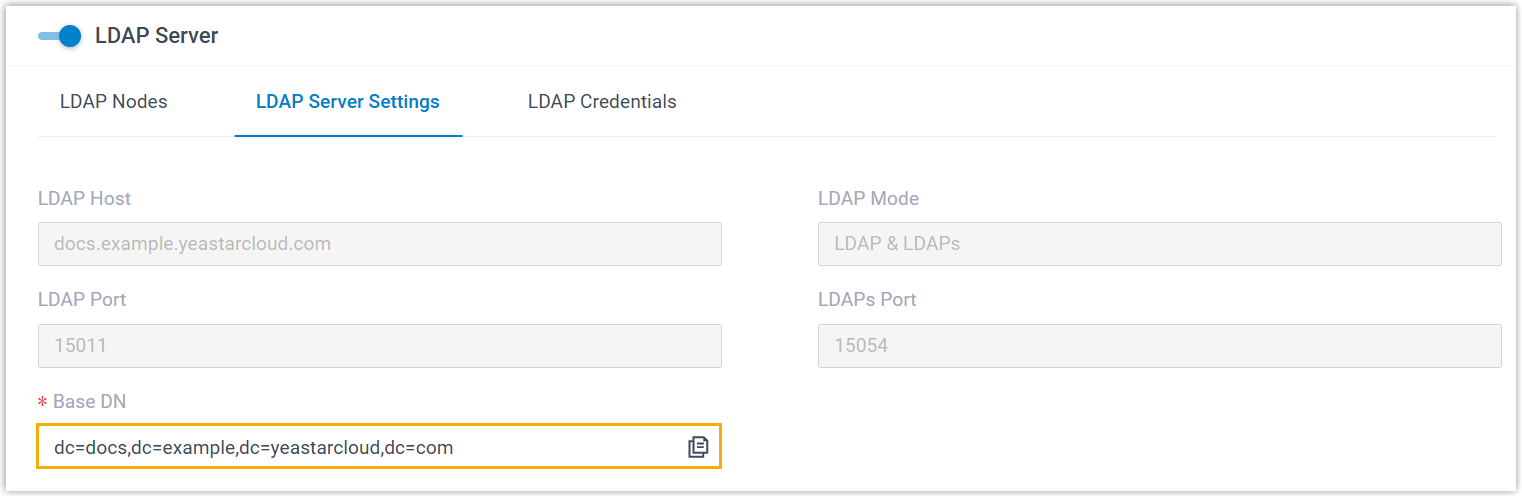
- Optimized the LDAP Server settings (Path: ), which allows you to edit the Base DN for LDAP.
- Auto Provisioning
-
- Added support for auto provisioning the following Gigaset phones:
- C530 IP
- COMFORT 5xx IP
- Added support for synchronizing contact data to the following
Snom IP phones via XML Phonebook, allowing users to query and
place calls to PBX contacts directly from their devices. Note: The firmware of the phones should be 10.1.178.0 or later.
- D712
- D713
- D715
- D717
- D735
- D785
- Updated the auto provisioning method for the following Yealink
IP phones: Auto Provisioning is
no longer supported on the following devices as Yealink has discontinued RPS
service for these models. Note: You can still provision the phones by either utilizing a DHCP server to deliver the PBX-provided provisioning link, or manually entering the provisioning link into the phones. This allows the phones to obtain configuration files through this link to complete the provisioning process.
- SIP-T20P, SIP-T22P, SIP-T26P, SIP-T28P
- SIP-T32G, SIP-T38G
- SIP-T41P, SIP-T42G, SIP-T46G, SIP-T48G
- SIP-T52S, SIP-T54S
- Fixed the auto provisioning issue: NEC IP phones would unexpectedly reboot when receiving voicemail status updates via MWI subscription.
- Added support for auto provisioning the following Gigaset phones:
- Emergency Number
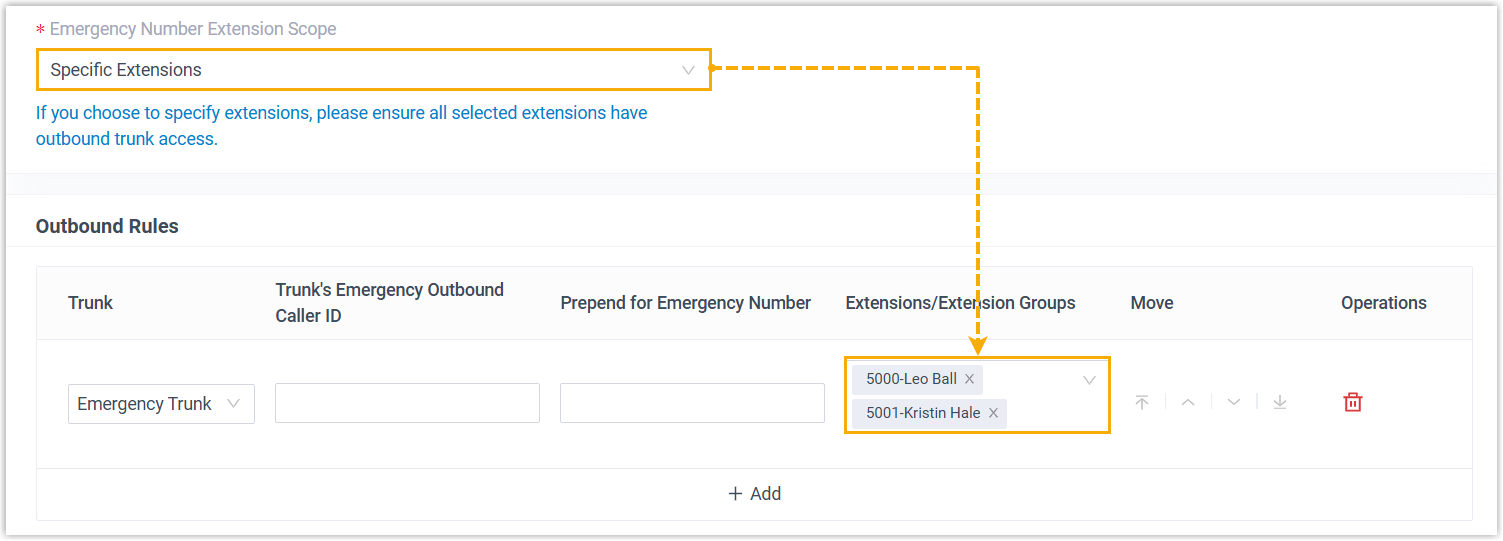
- Added support for specifying extensions that are allowed to make
emergency calls using specific emergency numbers (Path: ). Note: Ensure all selected extensions have permission to use the trunk specified in the Outbound Rules.
- Recording
- Added support for generating stereo recording files from one-on-one calls by assigning the RX audio track and TX audio track to the left and right channels. This allows clear voice differentiation between the two parties, improving the efficiency of post-processing for recordings.
- Email Server
- Fixed the email server issue: Failed to connect to Microsoft email service when configuring Outlook as the email server.
- CRM/Helpdesk Integration Template
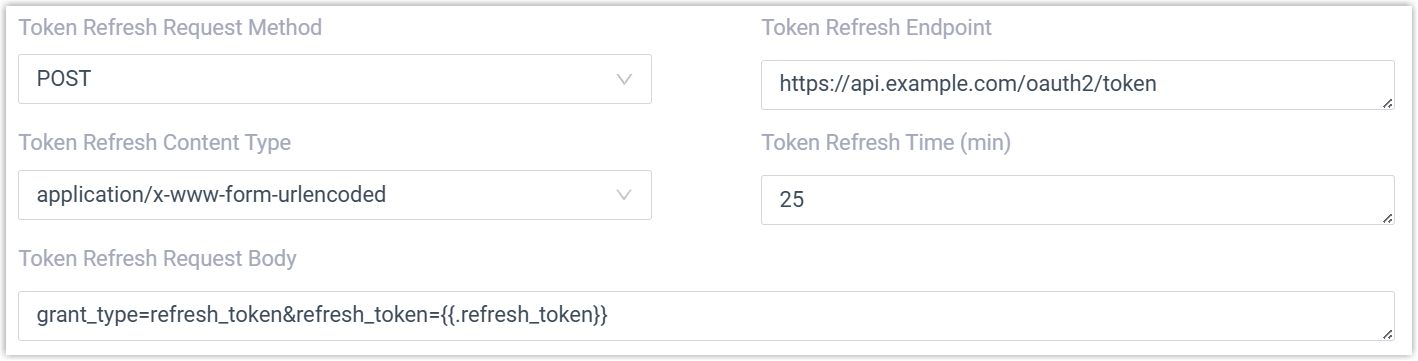
- Added support for configuring token refreshing settings when using
OAuth2 and Bearer Token authentication methods in
integration templates.
- API
-
- Optimized the API interfaces for the following features.
Feature Description Added WebSocket Audio Streaming With the new API interfaces of WebSocket Audio Streaming feature, the followings can be achieved: - Get WebSocket Audio Streaming settings
- Edit WebSocket Audio Streaming settings
Added Recording Added an interface recording/search, which can be used to search specific recording files. Optimized System Optimized the interface system/information: Added response parameters system_date_format,system_time_format, andtimestamp, which return the display format of the system's date and time, as well as the timestamp of the current system time.Optimized Extension Optimized the interfaces extension/get, extension/query, extension/create, and extension/update: Added a parameter max_outb_call_duration, which can be used to query or specify the maximum call duration of an outbound call made from the extension.Optimized Backup - Added the following interfaces:
- backup/status: This interface can be used to query the backup status of a specific backup file.
- backup/download: This interface can be used to retrieve a download URL for a specific backup file.
- Optimized the interfaces backup/list, backup/search, backup/get, and backup/query: Added a response parameter
backup_status, which returns the backup status of the backup file. - Optimized the interface backup/create: Added a request parameter
fax_backup, which can be used to decide whether to back up fax logs.
Optimized CDR Optimized the interfaces cdr/search and cdr/download: Added support for using timestamps in the start_timeandend_timeparameters for CDR filtering. - Added an API event (30033) Recording download completed,
which indicates that a recording file is successfully downloaded
via API.
For more information, see API Event - Recording Downloaded Completed.
- Optimized the API interfaces for the following features.
- Linkus Web Client
-
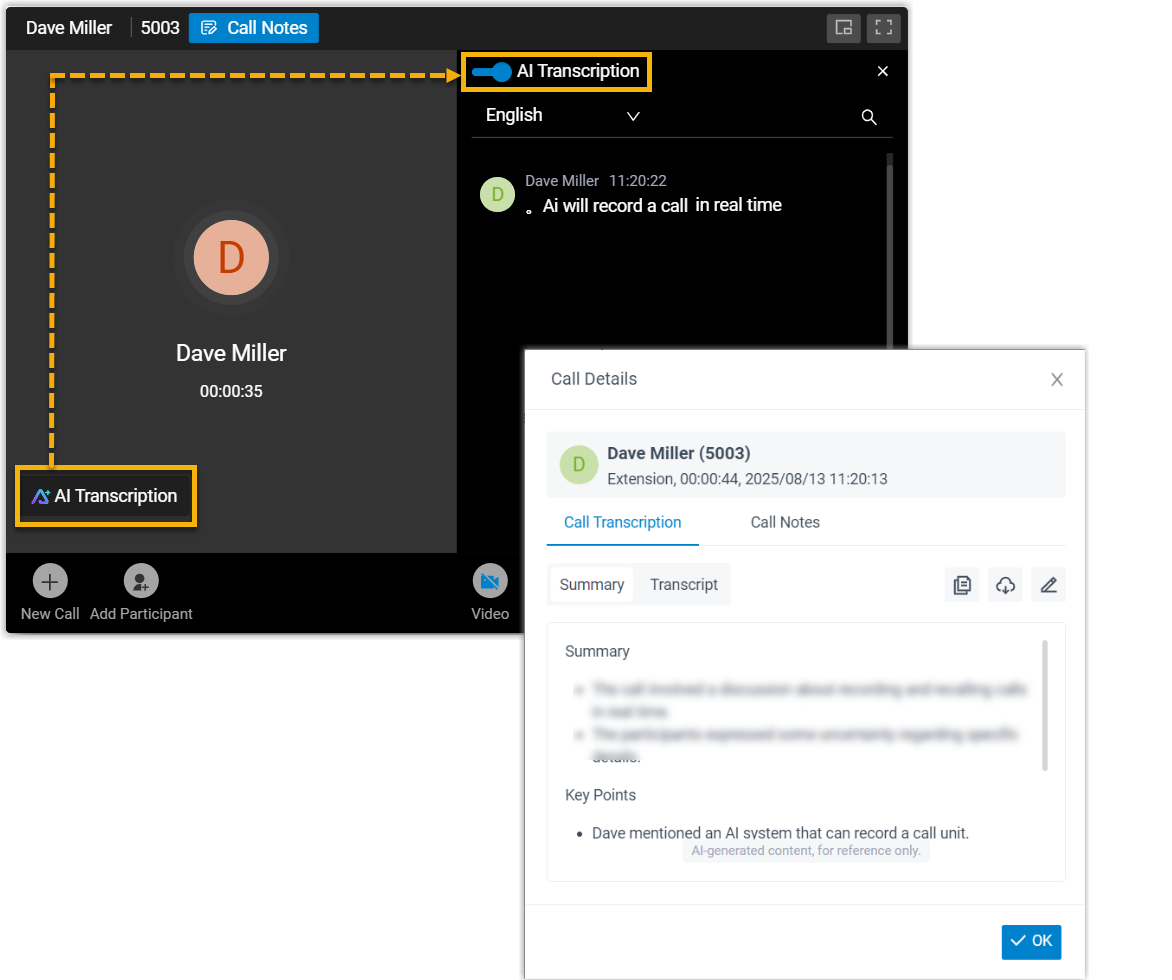
- Added support for AI-powered Call Transcription, which allows
extension users to transcribe their 1:1 audio/video calls into
readable text in real time, and review an AI-generated summary
after the call ends. Note: To achieve this, you need to enable the Call Transcription feature and grant permission to specific extensions (Path: ).For more information, see Linkus Web Client - Transcribe a Call.
- Fixed the Video Conferencing issue: When inviting a contact to a video conference, the system prompted that invitation email was sent successfully, but the contact did not receive the email.
- Added support for AI-powered Call Transcription, which allows
extension users to transcribe their 1:1 audio/video calls into
readable text in real time, and review an AI-generated summary
after the call ends.