Upload a Custom Ringtone
Upload a custom ringtone.
Request URL
POST {base_url}/{api_path}/custom_ringtone/upload?access_token={access_token}Request parameters
| Parameter | Required | Type | Description |
|---|---|---|---|
| file | Yes | File | The custom ringtone file. Note: Only a file in ".wav" or
".mp3" format is allowed, and the file size must not exceed 4MB. |
| is_check | No | String | The operation mode. Note: This parameter is required and
available only when the parameters old_file and
new_file
are
not included in the request.Valid value:
|
| type | No | String | The file type. Note: This parameter is required when a
file is created rather than replaced. Valid value:
|
| old_file | No | String | The filename of the custom ringtone to be replaced, including the file
extension (e.g., "demo_ringtone.wav"). Note:
|
| new_file | No | String | The new filename used to update the filename of the replaced ringtone,
including the file extension (e.g., "demo_ringtone.wav"). Note: The file extension must be the same as the old file. |
Response parameters
| Parameter | Type | Description |
|---|---|---|
| errcode | Integer | Returned error code.
Note: You can check the error code and
error message in Error Code and Error Message.
|
| errmsg | String | Returned message.
|
| upper_limited | Integer | The limit for custom ringtone files. Note: This parameter
is returned only when the number of custom ringtone files reaches the
limit. |
Example
Request example
POST /openapi/v1.0/custom_ringtone/upload?access_token=gwakjgu9ZBUfz36wql4ndsVKkryI0kdj HTTP/1.1

Host: yeastardocs.example.yeastarcloud.com
Content-Type: multipart/form-data; boundary=----WebKitFormBoundary7MA4YWxkTrZu0gW
------WebKitFormBoundary7MA4YWxkTrZu0gW
Content-Disposition: form-data; name="file"; filename="demo_ringtone.wav"
Content-Type: audio/wav

<binary audio content>
------WebKitFormBoundary7MA4YWxkTrZu0gW
Content-Disposition: form-data; name="is_check"

force
------WebKitFormBoundary7MA4YWxkTrZu0gW
Content-Disposition: form-data; name="type"

backend
------WebKitFormBoundary7MA4YWxkTrZu0gW--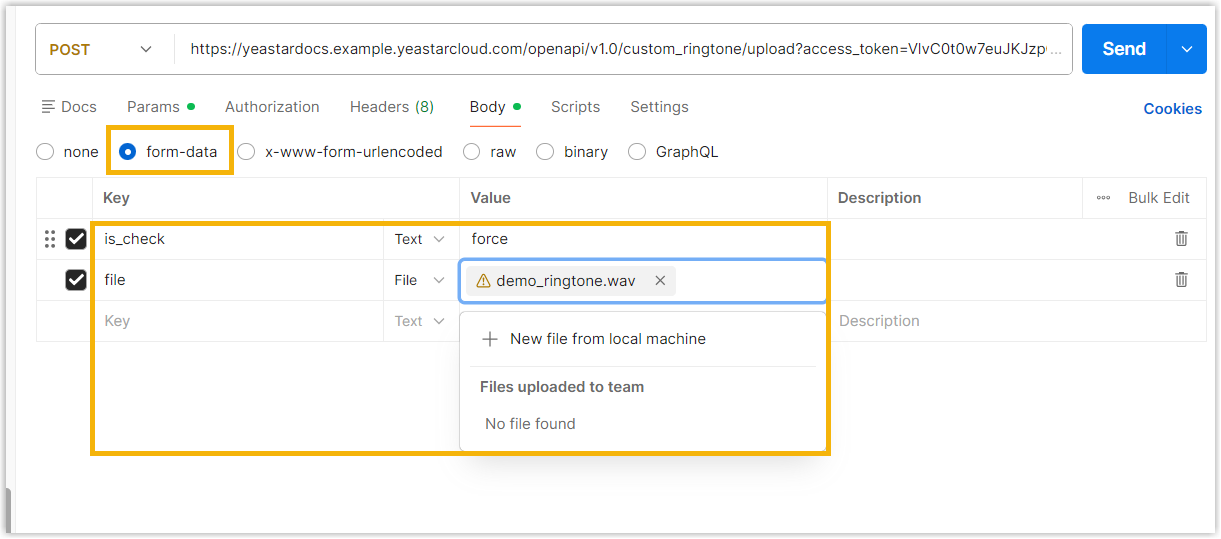
Response example
HTTP/1.1 200 OK
{
  "errcode": 0,
  "errmsg": "SUCCESS"
}